
How Do I Change the Exit Delay Time on the IQ5 Hub System?
To change the exit delay time on the IQ5 Hub, swipe down and touch Settings, then Advanced Settings, and enter your Installer Code. Next, touch Installation, then Security and Arming, and set the Normal Exit Delay to the time that you want. The default exit delay on the panel is 60 seconds.
About the Exit Delay
The exit delay is the countdown the IQ5 Hub (available in AT&T LTE and Verizon LTE) gives you to leave after arming to Away before the system is fully armed. During this window you can open the door and step outside without setting off the alarm. You can change how long that countdown lasts, and you can silence the beeps it plays, both covered below for your security system.
How Long Is the Default Exit Delay?
The default exit delay on the IQ5 Hub is 60 seconds. You can adjust the Normal Exit Delay anywhere from 30 to 254 seconds, or as low as 5 seconds if SIA limits are disabled. There is also a separate Long Exit Delay, set to 120 seconds by default, that applies to sensors assigned to the long-delay group when they need extra time. Most homes are fine with the standard 60-second exit delay.
Change the Exit Delay Time
-
Swipe down and touch Settings. Swipe down from the top of the screen to open the Settings Tray, then touch SETTINGS.
 Swipe down from the top of the screen to open the Settings Tray.
 Touch Settings in the Settings Tray.
-
Touch Advanced Settings and enter your Installer Code. Touch ADVANCED SETTINGS, then enter your Installer Code (1111 by default). The Dealer Code (2222) works here too. The panel advances automatically after a valid code.
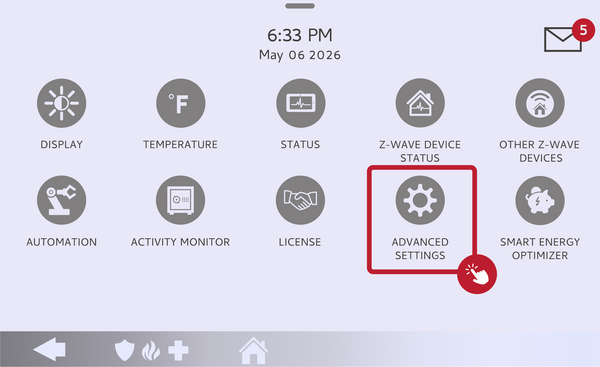 Touch Advanced Settings.
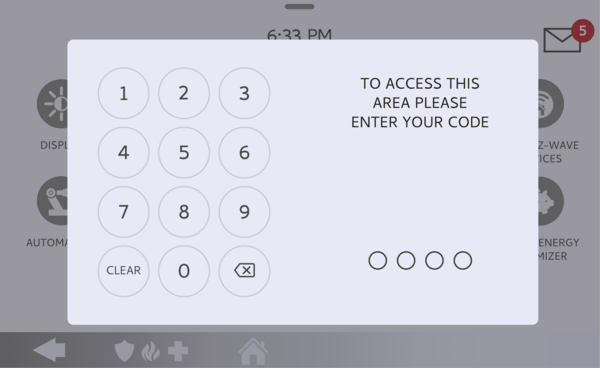 Enter your Installer Code (1111 by default).
-
Touch Installation, then Security and Arming. Touch INSTALLATION, then touch SECURITY AND ARMING to open the arming and delay settings.
Touch Installation, then Security and Arming. -
Set the Normal Exit Delay. Find Normal Exit Delay and set it to the number of seconds you want, within the allowed range. The new exit delay applies the next time you arm the system to Away.
Set the Normal Exit Delay to the time you want.




Turn Off the Exit Delay Beeps
If the countdown beeps are what you want to quiet rather than the timing, you do not need the Installer Code at all. When you arm the system to Away from the home screen, the arming screen shows an Exit Sounds toggle. Turn Exit Sounds off before the countdown finishes, and the panel arms silently without the beeps for that arming. This is the quickest way to silence a noisy exit without changing any programming.
Tips
Give yourself a realistic exit delay; long enough to get out comfortably, but not so long that the system sits unarmed after you have already left. If certain doors need more time, the Long Exit Delay is designed for that, so you do not have to stretch the normal delay for the whole system. Keep in mind that shortening the exit delay too much can make it hard to leave before the system arms, which may trip the alarm on your way out.
Changing the exit delay on the IQ5 Hub lets you set a countdown that fits how you leave home, with or without the beeps. For help adjusting the exit delay or arming settings on your IQ5 Hub, contact the Alarm Grid support team. We are here Monday through Friday from 9:00 AM to 8:00 PM Eastern Time.
Did you find this answer useful?
We offer alarm monitoring as low as $10 / month
Click Here to Learn MoreRelated Products


- Answered