
VIVOTEK AM-218 - Installation Guide
Related Products
Document Transcript
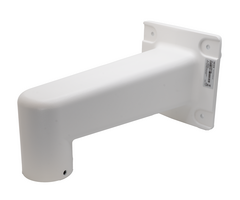
AM-218 Wall-Mount Bracket - Prism Series Mount Installation Guide
Compatible Prism Series Cameras
Additional mounting accessories required
ADC-VC8498P
AM-528 Large Pendant Cap
AM-719 Outdoor Junction Box
ADC-VC8498PA
AM-528 Large Pendant Cap
AM-719 Outdoor Junction Box
ADC-VC8295P
AM-52E Small Pendant Cap
AM-719 Outdoor Junction Box
https://answers.alarm.com/Partner/Installation_and_Troubleshooting/Video_Devices/Alarm.com_Prism_Series_PoE_Camera...
Updated: Wed, 30 Sep 2026 21:05:08 GMT
1 AM-218 Wall-Mount Bracket
Important
: The AM-218 must be installed with the AM-719. You should also purchase the corresponding AM-528 or
AM-52E pendant cap for your Prism Series Camera.
The AM-218 Wall-Mount Bracket and other listed mounting accessories can be ordered through the Partner Portal's
Order Equipment page
.
In the box
•
AM-218 Wall-Mount Bracket
•
M5X14 hex screws (x4)
https://answers.alarm.com/Partner/Installation_and_Troubleshooting/Video_Devices/Alarm.com_Prism_Series_PoE_Camera...
Updated: Wed, 30 Sep 2026 21:05:08 GMT
2 Refer to the table below for the description of the included screws:
Screw description
Number of screws
Material characteristics
M5X14
4
Stainless steel, hex and cross head
AM-719 Mounting Hole dimensions and definitions
Pre-installation
The camera's cowl must be removed in order to install the video device. Retain the camera screws and cover for re-
installation after cable routing and mounting is complete.
https://answers.alarm.com/Partner/Installation_and_Troubleshooting/Video_Devices/Alarm.com_Prism_Series_PoE_Camera...
Updated: Wed, 30 Sep 2026 21:05:08 GMT
3 Installation instructions
Note
:
•
It is presumed that this wall-mount bracket is installed with a hole drilled on the wall for routing power lines, DI/DO,
and Ethernet cables.
•
Route cables before you secure the wall-mount bracket to a wall.
•
For details on the cable connections with each camera model, see
Prism Series Cameras - Installation Guide
.
AM-719 Wall mount installation
Important
: The screws and mounting surface must be able to support a weight of 5 kg (~11 lbs).
1.
Place the included alignment sticker on the desired installation location.
2.
Drill holes on the wall and install the AM-719.
3.
If space behind the wall allows, you may also pass cables through the wall.
https://answers.alarm.com/Partner/Installation_and_Troubleshooting/Video_Devices/Alarm.com_Prism_Series_PoE_Camera...
Updated: Wed, 30 Sep 2026 21:05:08 GMT
4 Note
: It is recommended to use an NPT (National Pipe Thread) pipe if the connection goes through a wall.
4.
Verify the drilled holes are
waterproof. You can use silicon, or caulk the drilled holes, to prevent water leakage.
5.
Determine whether the installation will use the bottom hole of the junction box (i.e., the hole oriented towards the
ground when the junction box is installed) or the center hole (i.e., the hole that is flush with the wall/mounting
surface). Install the cable gland accordingly and pass cables through it.
Note
: A 3/4" conduit is required for routing the cables with waterproof connections.
◦
If using the bottom hole, make sure to seal the center hole that is flush with the wall/mounting surface.
If using the bottom hole,
seal the center hole.
6.
Install the cable gland and pass cables through it. Form a drip loop when routing with the conduits.
https://answers.alarm.com/Partner/Installation_and_Troubleshooting/Video_Devices/Alarm.com_Prism_Series_PoE_Camera...
Updated: Wed, 30 Sep 2026 21:05:08 GMT
5 OR
3/4”
Bracket and Adapter installation
Note
: The illustrations below use a generic dome camera for referencing. Specific Alarm.com camera models may differ
from this representation.
1.
Route cables through the AM-218 and the corresponding pendant cap (i.e., AM-528 or AM-52E).
2.
Secure the bracket to the conduit box using the included hex screws.
3.
Secure the adapter plate to the bracket by turning the threaded parts clockwise together until tight.
4.
Use the adapter's included hex socket screw to securely fasten the connection.
AM-719
AM-218
AM-528
-
OR -
AM-52E
5.
Follow the instructions in the Installation Guide that came with the adapter to install the camera.
https://answers.alarm.com/Partner/Installation_and_Troubleshooting/Video_Devices/Alarm.com_Prism_Series_PoE_Camera...
Updated: Wed, 30 Sep 2026 21:05:08 GMT
6 6.
Open the camera's live view to assist with adjusting the camera's field of view as desired.
7.
Re-install the dome cowl once the live view has been adjusted.
Additional installation methods
Pole mounts and corner mounts are also supported. For installation steps and information regarding those mounting
solutions, see:
•
AM-312 V04 Pole Mount - Prism Series Mount Installation Guide
•
AM-412
Corner Mount - Prism Series Mount Installation Guide
https://answers.alarm.com/Partner/Installation_and_Troubleshooting/Video_Devices/Alarm.com_Prism_Series_PoE_Camera...
Updated: Wed, 30 Sep 2026 21:05:08 GMT
7 Additional resources
•
For assistance with choosing the correct mounting accessories for your installation, see
Prism Series Camera
Mounting Accessories
.
•
For steps and information about installing Prism Series Cameras, see
Prism Series Cameras - Installation Guide
.
https://answers.alarm.com/Partner/Installation_and_Troubleshooting/Video_Devices/Alarm.com_Prism_Series_PoE_Camera...
Updated: Wed, 30 Sep 2026 21:05:08 GMT
8
- Uploaded