
VIVOTEK AM-71K - Installation Guide
Related Products

Document Transcript
AM-71K Outdoor Junction Box - Prism Series Mount Installation Guide
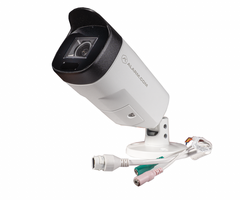
Compatible Alarm.com cameras
•
ADC-VC7398PA
Note
: The AM-71K can be mounted directly to the mounting surface or to the AM-312_V04 Pole Mount. For installation
instructions regarding the pole mount, see
AM-312 V04 Pole Mount - Prism Series Mount Installation Guide
.
AM-71K Outdoor Junction Box
The AM-71K Outdoor Junction Box and other listed mounting accessories can be ordered through the Partner Portal's
Order Equipment page
.
https://answers.alarm.com/Partner/Installation_and_Troubleshooting/Video_Devices/Alarm.com_Prism_Series_PoE_Camera...
Updated: Wed, 30 Sep 2026 20:31:16 GMT
1 In the box
T15
G
3
/
4
”
P
l
u
g
G3/4” Gland
M4 x 25 mm
x1
x
1
x1
x4
x4
M4 x 12 mm
x4
ø6-8
x1
ø8*
x1
Mechanical drawing and mounting hole definitions
110 x 48m
Hole type
Compatible cameras
Screw type
Number of screws
B
ADC-VC7398PA
M4X12
3
https://answers.alarm.com/Partner/Installation_and_Troubleshooting/Video_Devices/Alarm.com_Prism_Series_PoE_Camera...
Updated: Wed, 30 Sep 2026 20:31:16 GMT
2 Installation instructions
Note
: The images below uses a generic bullet camera for reference. Specific Alarm.com camera models may differ from
this representation.
1.
Remove the top cover from the junction box.
https://answers.alarm.com/Partner/Installation_and_Troubleshooting/Video_Devices/Alarm.com_Prism_Series_PoE_Camera...
Updated: Wed, 30 Sep 2026 20:31:16 GMT
3 2.
Determine whether the installation will use the bottom hole of the junction box (i.e., the hole oriented towards the
ground when the junction box is installed) or the center hole (i.e., the hole that is flush with the wall/mounting
surface). Install the cable gland accordingly and pass cables through it.
OR
3
/4”
if using the
bottom hole,
seal the
center hole.
Install the cable gland and
pass cable through it.
Note
: If using the bottom hole, make sure to seal the center hole that is flush with the wall/mounting surface.
3.
Place the included alignment sticker at the desired installation location. Drill holes on the wall and install the
junction box. If space behind the wall allows, pass the cables through the walls.
https://answers.alarm.com/Partner/Installation_and_Troubleshooting/Video_Devices/Alarm.com_Prism_Series_PoE_Camera...
Updated: Wed, 30 Sep 2026 20:31:16 GMT
4 4.
Pass the camera's Ethernet cable through the top cover hole of the box and the rubber seal.
5.
Install the waterproof components of the cable gland to the Ethernet cable following the camera's installation guide
instructions. The cable gland will be placed within the protection of the box.
https://answers.alarm.com/Partner/Installation_and_Troubleshooting/Video_Devices/Alarm.com_Prism_Series_PoE_Camera...
Updated: Wed, 30 Sep 2026 20:31:16 GMT
5 6.
Verify the rubber seal is properly installed to the center hole. The outer rim of the seal must be through and cover
the edge of the hole.
Note
: Choose the appropriate rubber seal (i.e.,
ø6-8 or
ø8) based on the diameter of the cable.
7.
Secure the top cover to the junction box using 3 hex socket screws.
https://answers.alarm.com/Partner/Installation_and_Troubleshooting/Video_Devices/Alarm.com_Prism_Series_PoE_Camera...
Updated: Wed, 30 Sep 2026 20:31:16 GMT
6 8.
Mount the camera to the top cover using the
B
holes for screw placement.
9.
Install the camera using the corresponding mounting holes with the included hex socket screws.
◦
For steps and additional information about completing camera setup, see
Prism Series Cameras - Installation
Guide
.
10.
Open the camera's live view to assist with adjusting the camera's field of view as desired.
https://answers.alarm.com/Partner/Installation_and_Troubleshooting/Video_Devices/Alarm.com_Prism_Series_PoE_Camera...
Updated: Wed, 30 Sep 2026 20:31:16 GMT
7 Additional resources
•
For assistance with choosing the correct mounting accessories for your installation, see
Prism Series Camera
Mounting Accessories
.
•
For steps and information about installing Prism Series Cameras, see
Prism Series Cameras - Installation Guide
.
https://answers.alarm.com/Partner/Installation_and_Troubleshooting/Video_Devices/Alarm.com_Prism_Series_PoE_Camera...
Updated: Wed, 30 Sep 2026 20:31:16 GMT
8
- Uploaded