
How Do I Add a Z-Wave Thermostat to a 2GIG GC Touch Panel?
To add a Z-Wave thermostat to the 2GIG GC Touch, disarm the panel and tap Settings (gear icon). Enter the Installer Code (1561 by default), tap Automation Device, and select Add Device. Trigger the pairing mode on your thermostat, and the panel will then detect and enroll the device.
Understanding Thermostat Compatibility
The 2GIG GC Touch (available in AT&T LTE and Verizon LTE versions) functions as a Z-Wave smart home gateway. To integrate a thermostat with the panel, you need a Z-Wave compatible model rather than a WIFI-only thermostat. Popular Z-Wave thermostats include the Honeywell T6 Pro Z-Wave, and the Alarm.com ADC-T25 models. These communicate directly with the panel through the Z-Wave protocol.
Steps to Add a Z-Wave Thermostat
- Disarm the system. The panel restricts access to the Settings menu when armed in either Away or Stay mode. Ensure the system shows Disarmed status before proceeding.
- Tap Settings. Locate the gear icon (⚙) in the top-right corner of the home screen. Tapping this opens the code entry screen.
- Enter the Installer Code. The default Installer Code is 1561. After entering the correct code, the Settings menu will appear with options for Equipment Management, Screen Management, WIFI, and more.
-
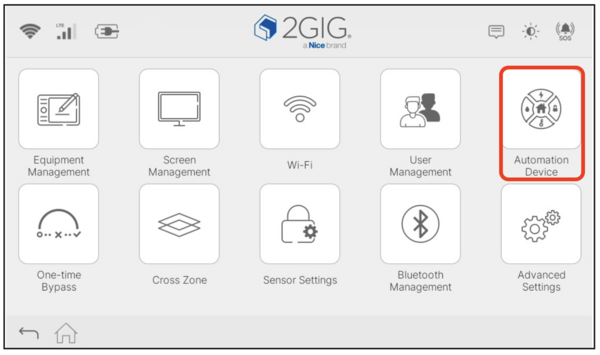
Tap Automation Device. This icon shows a circular symbol with smart home elements. Tapping it opens the Z-Wave device management screen with options for Device List, Add Device, and Remove Device.
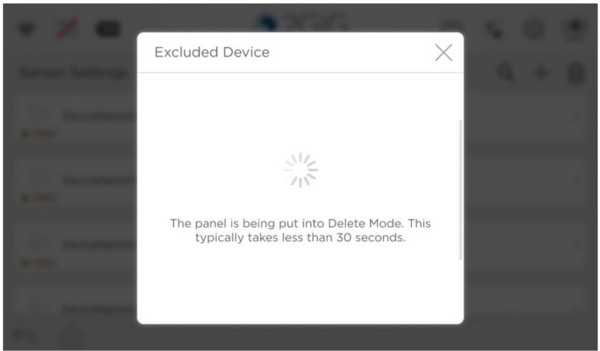
- Tap Remove Device. The panel will enter the removal (Delete) Mode within 30 seconds and begin scanning for Z-Wave devices. A message confirms the panel is actively searching for devices to exclude.
-
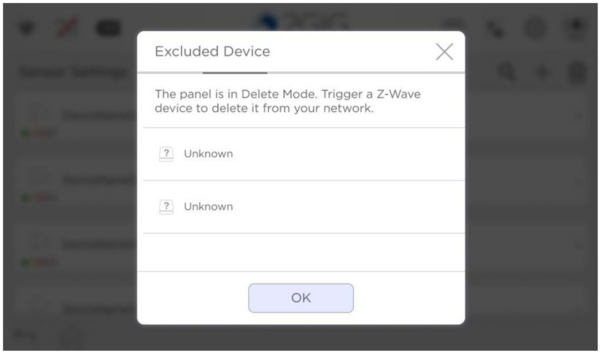
Trigger exclusion mode on your thermostat. Refer to your thermostat's manual for specific exclusion instructions. Most Z-Wave thermostats have a menu option or button sequence to enter exclusion mode. Often the process for inclusion and exclusion are exactly the same. The thermostat will broadcast a signal that the panel detects. Once all devices to be excluded are listed, press OK to delete the displayed devices. When you're finished tap the X in the upper right corner to exit Exclusion Mode.
-
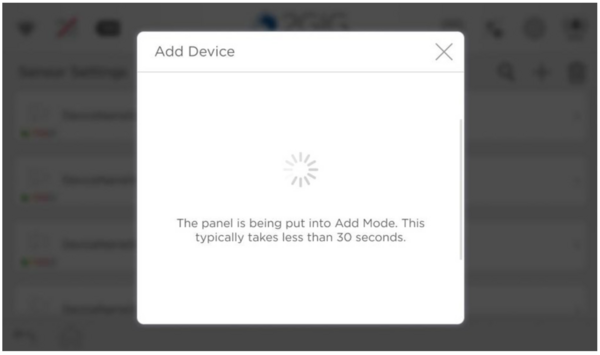
Tap Add Device. Once the thermostat has been successfully excluded, you can add it to the system. Tapping Add Device will enter inclusion mode. At this point, the panel is now listening for the thermostat pairing request. Activate the inclusion/add function on the thermostat. The panel will let you know once it detects the device.
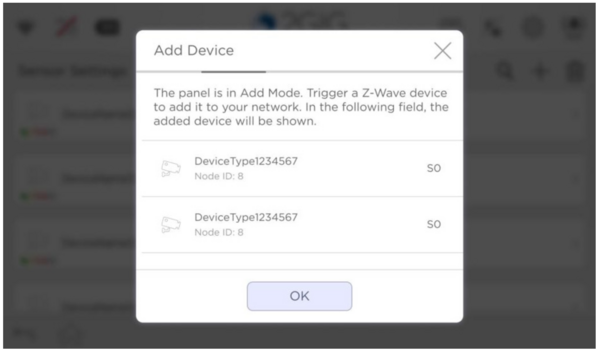
- Confirm the thermostat was added. Once detected, the thermostat will appear in the list of devices to be added, along with its Z-Wave security level. Tap OK to enroll all displayed devices. For devices that use S2 security, the enrollment process may take a few minutes.
Controlling Your Thermostat
After pairing, your thermostat appears in the Devices section under Thermostat. From this screen, you can view the current temperature, switch between Auto, Cool, and Heat modes, and adjust the cooling and heating set points. The home automation features extend to remote control through the Alarm.com app, allowing you to manage climate settings from anywhere.
Using the Remove Device option on the GC Touch to exclude the thermostat first clears any previous network data that could prevent successful enrollment. Often times, when a new device won't enroll it's because the thermostat has gone through QA during manufacturing and the network information for that process hasn't been deleted from the device.
Adding a Z-Wave thermostat to the 2GIG GC Touch provides convenient touchscreen and remote climate control integrated with your security system. For help with thermostat pairing or other configurations on your GC Touch panel, contact the Alarm Grid support team at support@alarmgrid.com, Monday - Friday from 9:00 AM - 8:00 PM Eastern Time.
Did you find this answer useful?
We offer alarm monitoring as low as $10 / month
Click Here to Learn MoreRelated Products


- Answered