
How Do I Change to 6-Digit User Codes on a 2GIG GC Touch?
The 2GIG GC Touch lets you use either 4-digit or 6-digit user codes to arm and disarm your security system. The panel uses 4-digit codes by default. You can switch to 6-digit codes at any time by accessing User Management using the Installer Code. The change applies to all users at once.
The 2GIG GC Touch (available in AT&T LTE and Verizon LTE) let you set user codes to either 4 digits or 6 digits. All codes are 4 digits by default the panel is first powered up. Switching to 6-digit codes is a good option if you want stronger security with user codes that are more difficult to guess or otherwise brute force attack. In some cases, your insurance company may require a 6-digit code for improved security.
What Happens to Existing Codes
When you change the PIN Code Length, the panel updates all existing user codes automatically. If you switch from 4 digits to 6 digits, the panel adds "00" to the end of each existing code. You can then edit each existing code to include 6 custom digits and any new PIN codes can be configured accordingly. For example, the code "1234" becomes "123400" when you switch to 6-digit codes. If you switch back to 4 digits later, the panel removes the last two digits of all existing codes, so "123400" goes back to "1234."
When changing the user code length, let all users know about the change before you make it. Anyone who tries to use their old 4-digit code after the switch will need to add "00" to the end until the code has been edited.
This setting is only available when you enter the Settings menu with the Installer Code (default: 1561). If you use the Master Code (default: 1111) instead, you will go directly to the Standard Users screen and will not see the PIN Code Length option.
How to Switch to 6-Digit PIN Codes
-
Tap the Settings icon (⚙) in the top-right corner of the home screen.
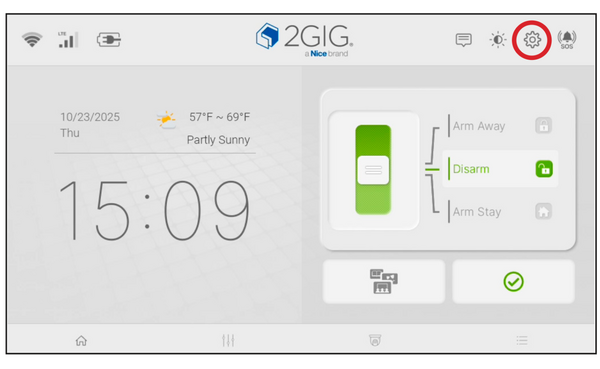
- Enter the Installer Code (default: 1561) when prompted.
-
Tap User Management from the Installer Settings menu.
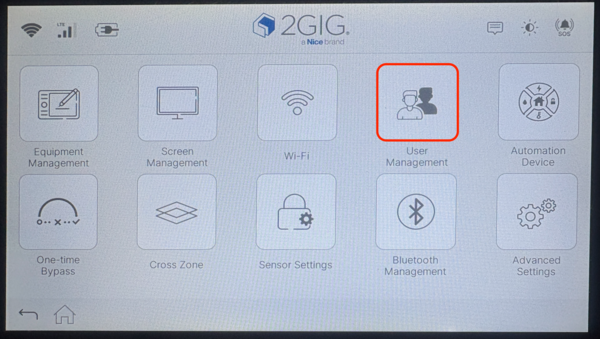
-
Tap PIN Code Length.
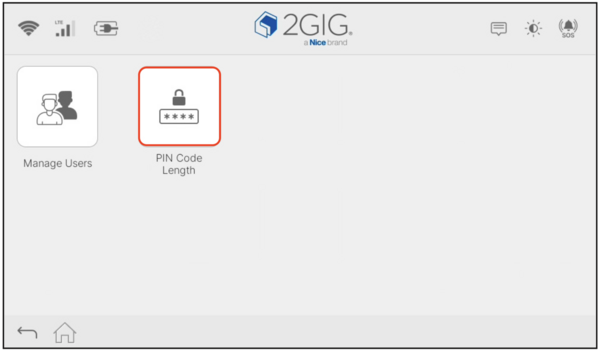
-
Select 6 digits to apply the change to all user codes.
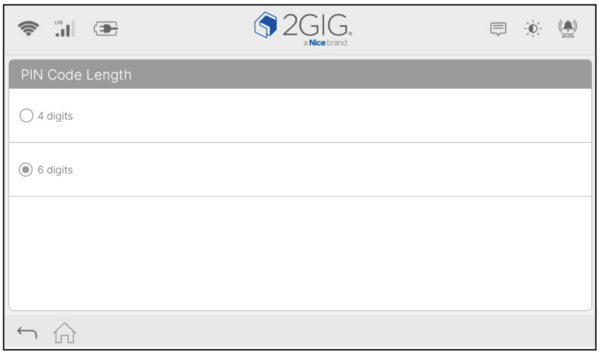
All user PINs will update right away. Make sure every household member knows their updated code before the next time they need to arm or disarm the system.
Switching to 6-digit codes on the 2GIG GC Touch is a simple way to improve the security of your system. The change takes effect immediately and only takes a minute to complete. For help with PIN Code Length or other user management settings on your GC Touch panel, contact the Alarm Grid support team at support@alarmgrid.com, Monday - Friday from 9:00 AM - 8:00 PM Eastern Time.Did you find this answer useful?
We offer alarm monitoring as low as $10 / month
Click Here to Learn MoreRelated Products


- Answered