
How Do I Find the IMEI Number for a 2GIG GC Touch Panel?
To find the IMEI number on a 2GIG GC Touch, make sure the panel is disarmed, then tap Settings (gear icon) and enter the Installer Code (1561 by default) or Master Code (1111 by default). Navigate to Equipment Management, then select Panel Information to view the panel IMEI and Serial Number.
The IMEI (International Mobile Equipment Identity) is a unique 15-digit identifier assigned to the cellular communicator inside your 2GIG GC Touch (available in AT&T LTE and Verizon LTE versions). You may need this number when registering your security system for monitoring service or troubleshooting cellular connectivity. The Panel Information screen also displays other useful identifiers including the Serial Number, IMSI, and MAC Address.
Steps to Find the IMEI Number
-
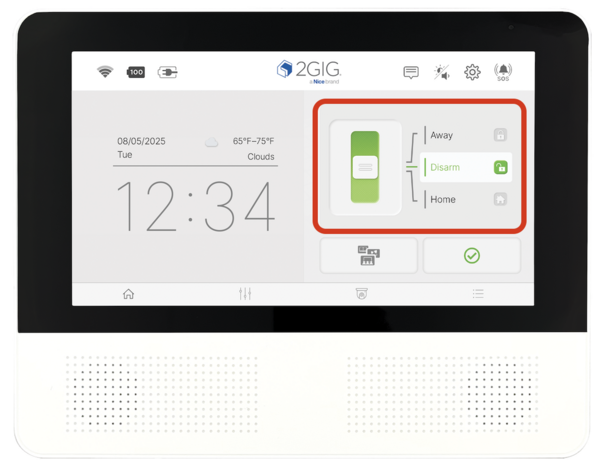
Disarm the system. Be sure the system is disarmed. The panel restricts access to Settings when armed in either Away or Stay mode.
-
Tap the Settings icon. Look for the gear icon (⚙) in the top-right corner of the home screen.
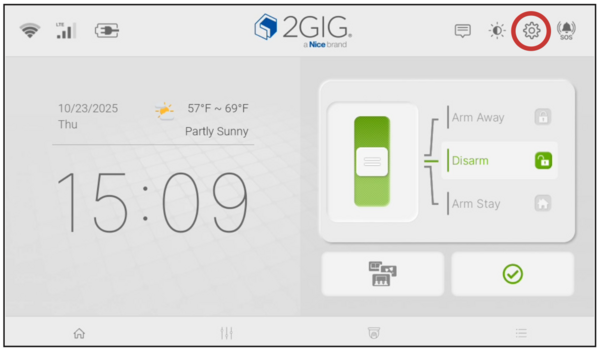
- Enter a valid code. Type the Installer Code (1561 by default) or the Master Code (1111 by default). Either code grants access to the Panel Information screen.
-
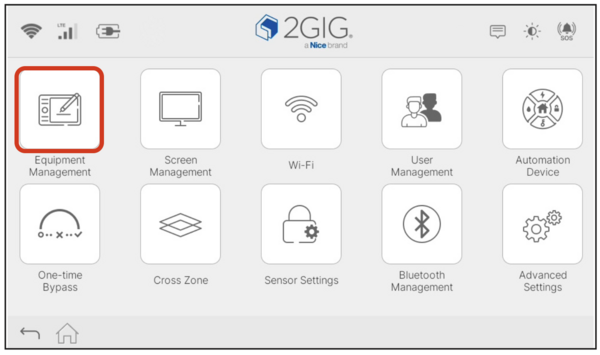
Tap Equipment Management. This option appears in the Settings menu after entering your code.
-
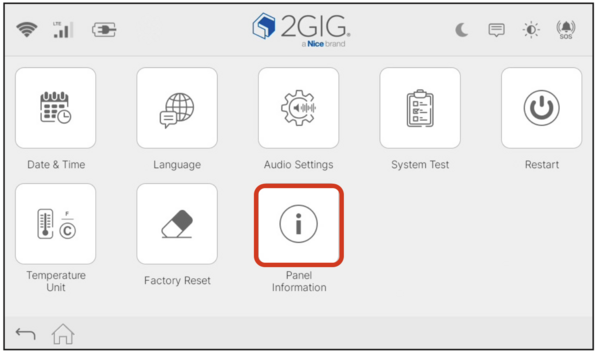
Tap Panel Information. Within Equipment Management, locate the Panel Information icon and tap it.
-
View the IMEI number. The Panel Information screen displays your IMEI along with the Serial Number, IMSI, and MAC Address.
The numbers shown below are for illustrative purposes only. Identifying information has been obscured:

About the IMEI Number
The IMEI uniquely identifies your panel's cellular module on mobile networks. This number is typically required when setting up both self and full monitoring or when working with technical support to diagnose cellular communication issues. Both versions of the 2GIG GC Touch, AT&T and Verizon, use 4G/LTE cellular communication as a backup path when WIFI is unavailable.
The Panel Information screen provides all the key identifiers you might need in one convenient location. Besides the IMEI, you can find your panel's Serial Number (useful for warranty and support inquiries), IMSI (International Mobile Subscriber Identity, which identifies the SIM card), and MAC Address (required for network troubleshooting and whole-home automation with a third-party controller ). Having these numbers readily available can speed up support calls and service activation.
Finding the IMEI on the 2GIG GC Touch takes just a few taps through the Settings menu. Keep this number handy when activating monitoring service or troubleshooting cellular connectivity. For help with panel information or other features on your GC Touch panel, contact the Alarm Grid support team at support@alarmgrid.com. We're available Monday - Friday from 9:00 AM - 8:00 PM Eastern Time.
Did you find this answer useful?
We offer alarm monitoring as low as $10 / month
Click Here to Learn MoreRelated Products


Related Categories
- Answered