
Can I Download the Firmware for a 2GIG GC Touch Alarm System?
Yes. Firmware updates for the 2GIG GC Touch can be downloaded from the Alarm Grid website. The firmware file must be saved to a USB flash drive in .zip format, then connected to the panel's rear USB Type-C port. The system detects the update automatically and prompts for code entry.
Where to Download Firmware
Alarm Grid provides firmware files for the 2GIG GC Touch (available in AT&T LTE and Verizon LTE versions) on our firmware update page. Visit the 2GIG GC Touch documents page to find available firmware versions. The firmware downloads as a .zip file that must remain in its .zip format when transferred to your USB flash drive. You must also leave the file name unchanged when downloading it.
Before downloading, check your panel's current firmware version by navigating to Settings, entering your Installer Code (1561 by default) or Master Code (1111 by default), then selecting Equipment Management followed by Panel Information. Compare the ROM version number to available downloads to confirm an update exists for your 2GIG GC Touch system.
Update Requirements
The 2GIG GC Touch must meet specific conditions before accepting a firmware update. The system must be disarmed, as the panel will not process updates while armed in Away or Stay mode. AC power must be available and connected to the panel, and the backup battery level must be above 20 percent. These requirements prevent the update from being interrupted by a power loss, which could damage the system software.
Use a standard USB flash drive in the FAT32 file format. The firmware .zip file should be placed in the root directory of the drive, not inside any folders. The root directory must not have any other contents. If using a USB Type A flash drive, you will need a USB Type A to USB Type C adapter since the GC Touch panel features a Type-C port on its rear panel.
It's been reported that plugging a usb drive directly into the rear port on the GC Touch can be a tight fit. If you find this to be the case you can either replace your USB drive with one that has a smaller form factor, or you can use a dongle or extender to make the connection. An extender with a short cable, as shown below, is ideal.

Shown is a USB C male to USB C female dongle. These also come in USB A female to USB C male variations.
How the Update Process Works
When you connect the USB drive containing newer firmware, the panel automatically detects it and displays a prompt showing the new version number and your current version. A 60-second countdown timer appears, during which you must enter either your Master Code or Installer Code to authorize the update. If you enter a valid code and press the enter button, the system proceeds with the installation automatically.
If you miss the 60-second window or need to perform the update later, the code entry screen will disappear and a firmware update icon appears in the status bar at the top of the display. This icon indicates a pending update is available. Tapping this icon or reinserting the USB drive will bring back the update prompt. Removing the flash drive causes the update icon to disappear.

Requesting Firmware Through the Panel
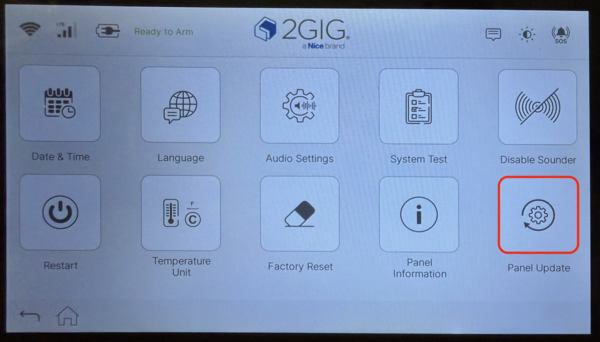
In firmware version 1.1, 2GIG added the ability to request Over the Air (OTA) updates directly from the panel. In order to receive an OTA update, the panel must be registered with Alarm.com and have a connection to WIFI in addition to the other requirements mentioned above. To request the firmware update Tap Settings (⚙) > Enter Installer Code (default: 1561) > Equipment Management > Panel Update.
After the Update
Once authorized, the panel installs the firmware and restarts automatically. The update process typically takes several minutes to complete. Do not remove the USB drive or disconnect power during installation. After restarting, your sensors, user codes, and system settings remain intact. You can verify the new version by returning to Panel Information in the Equipment Management menu.
Downloading and installing firmware updates keeps your 2GIG GC Touch running with the latest features and security improvements. For Alarm Grid customers who need help with firmware updates or other features on a GC Touch panel, contact the Alarm Grid support team by calling 888-818-7728, or emailing support@alarmgrid.com, Monday - Friday from 9:00 AM - 8:00 PM Eastern Time. You can also visit our website and chat with a live agent Monday - Friday from 9:00 AM - 6:00 PM Eastern Time.
Did you find this answer useful?
We offer alarm monitoring as low as $10 / month
Click Here to Learn MoreRelated Products


- Answered