
How Do I Change the Siren Timeout on the IQ Panel 5 System?
To change the siren timeout on the IQ Panel 5, swipe down and touch Settings, then Advanced Settings, and enter your Installer Code. Next, touch Installation, then Sirens and Alarms, and scroll down to Siren Timeout to set how long the siren keeps sounding during an alarm event on the panel.
About the Siren Timeout
The siren timeout on the IQ Panel 5 (available in AT&T LTE and Verizon LTE) is how long the siren keeps sounding during an alarm event before it automatically stops. By default the siren shuts off after 4 minutes, and you can adjust that up or down to fit your needs. Setting an appropriate timeout helps your security system get attention during an alarm without the siren running longer than necessary.
The available options are 3, 4, 5, 6, 7, 8, and 15 minutes. Many local ordinances limit how long an alarm siren may sound, so a shorter timeout can help you stay within those rules, while a longer one keeps the siren going if you want maximum audibility. The setting lives in the Sirens and Alarms menu alongside the panel's other siren options.
Before You Begin
This setting is in the Sirens and Alarms menu, which requires the Installer Code (1111 by default) or Dealer Code (2222 by default). The steps below use the Installer Code. Check whether your area has a local ordinance on siren duration before setting a longer timeout, since some municipalities cap how long an alarm may sound.
Change the Siren Timeout
-
Swipe down and touch Settings. Swipe down from the top of the screen to open the Settings Tray, then touch SETTINGS.
 Swipe down from the top of the screen to open the Settings Tray.
 Touch Settings in the Settings Tray.
-
Touch Advanced Settings and enter your Installer Code. Touch ADVANCED SETTINGS, then enter your Installer Code (1111 by default). The Dealer Code (2222) works here too. The panel advances automatically after a valid code.
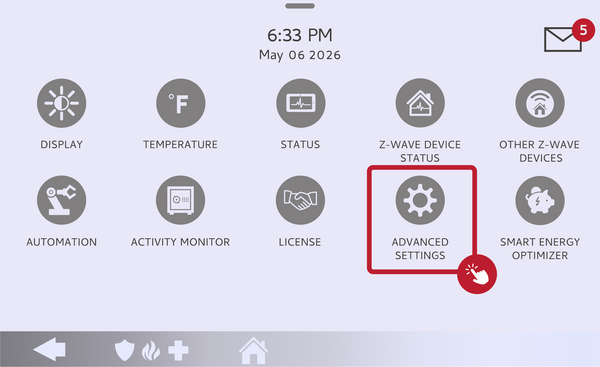 Touch Advanced Settings.
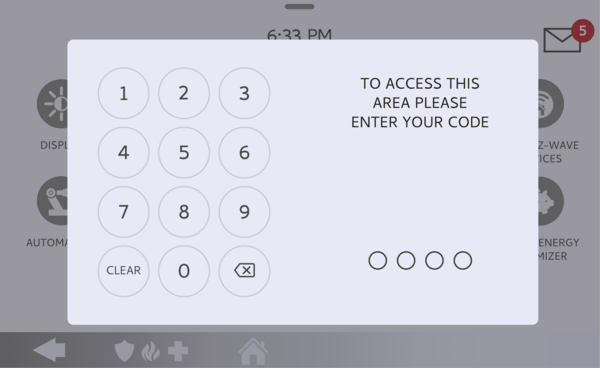 Enter your Installer Code (1111 by default).
-
Touch Installation, then Sirens and Alarms. Touch INSTALLATION, then touch SIRENS AND ALARMS and scroll down to Siren Timeout.
Touch Sirens and Alarms, then scroll to Siren Timeout. -
Set the Siren Timeout. Touch Siren Timeout and choose the length you want: 3, 4, 5, 6, 7, 8, or 15 minutes. The siren will stop sounding after that amount of time during an alarm event.
Choose 3, 4, 5, 6, 7, 8, or 15 minutes.
Tips
The siren timeout only limits how long the siren sounds; it does not affect the alarm signal sent to your monitoring station, which goes out regardless of the siren duration. If false alarms are a concern, a shorter timeout reduces how long a mistaken alarm disturbs the neighborhood while you disarm. Keep in mind the default of 4 minutes is a sensible middle ground that works well for most homes.
Changing the siren timeout on the IQ Panel 5 lets you control how long the siren sounds during an alarm. For help with the siren timeout or other alarm settings on your IQ Panel 5, contact the Alarm Grid support team. We are here Monday through Friday from 9:00 AM to 8:00 PM Eastern Time. Email us at support@alarmgrid.com, call us at 888-818-7728, or visit our website and chat with a live support agent.
Did you find this answer useful?
We offer alarm monitoring as low as $10 / month
Click Here to Learn MoreRelated Products


- Answered