
How Do I Check the Battery Status on the IQ Panel 5 System?
To check the battery status on the IQ Panel 5, swipe down to open the Settings Tray, where the battery status appears at a glance. For more detail, go to Settings, then Advanced Settings, enter your code, and touch About to see the Battery Status and the Battery Level shown as a percentage.
About the Panel Battery
The IQ Panel 5 (available in AT&T LTE and Verizon LTE) has a rechargeable backup battery that keeps the panel running during a power outage. Checking it now and then confirms the battery is holding a charge and ready to take over if the power goes out. You can get a quick read from the Settings Tray, or open the About page for the full Battery Status and Battery Level percentage.
The Battery Status reads Disconnected, Charging, or Full. Disconnected means the panel is not seeing the battery at all, Charging means it is topping up, and Full means it is charged and ready. Paired with the level percentage, this tells you whether the backup power on your security system is in good shape or needs attention.
Quick Check From the Settings Tray
The fastest way to see the battery requires no code:
-
Swipe down to open the Settings Tray. Swipe down from the top of the screen to pull down the Settings Tray. The battery status appears here alongside the system, WIFI, Bluetooth, and cellular status icons, giving you an at-a-glance read without going any further.
 Swipe down to see the battery status in the Settings Tray.
Full Battery Details on the About Page
For the exact status and charge percentage, use the About page:
-
Swipe down and touch Settings. Swipe down from the top of the screen to open the Settings Tray, then touch SETTINGS.
 Touch Settings in the Settings Tray.
-
Touch Advanced Settings and enter your code. Touch ADVANCED SETTINGS, then enter your Installer Code (1111 by default). The Master Code (1234) or Dealer Code (2222) work here too. The panel advances automatically after a valid code.
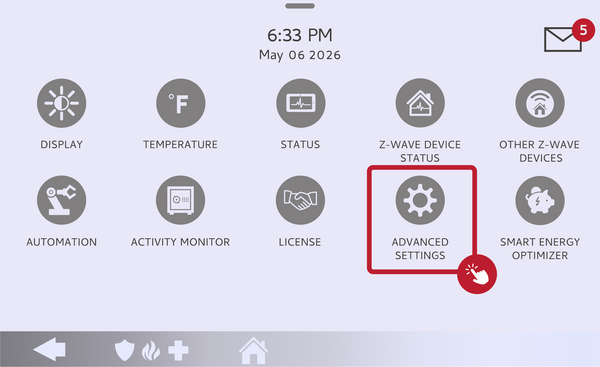 Touch Advanced Settings.
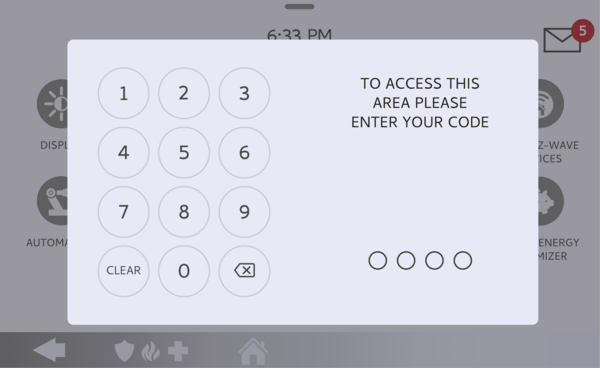 Enter your Installer Code (1111 by default).
-
Touch About. On the Advanced Settings menu, touch ABOUT to open the panel's system information.
Touch About on the Advanced Settings menu. -
Find the Battery section. Scroll to the Battery entry, which shows the Battery Status of Disconnected, Charging, or Full, and the Battery Level as a percentage. Together these give you the full picture of the backup battery.
Read the Battery Status and Battery Level.
Tips
A freshly installed or recently drained battery may read Charging with a lower percentage for a while, which is normal as it builds back up to Full. If the battery reads Disconnected, open the panel and confirm the battery lead is firmly plugged in, then recheck. A battery that will not hold a charge, stays low even after a full day on AC power, or repeatedly fails the Battery item in the Panel Test is due for replacement. When it is time, follow our guide on how to replace the battery in the IQ Panel 5, and power the panel down safely first.
Checking the battery status on the IQ Panel 5 keeps your backup power ready for the next outage. For help reading your battery status or replacing the battery on your IQ Panel 5, contact the Alarm Grid support team. We are here Monday through Friday from 9:00 AM to 8:00 PM Eastern Time. Email us at support@alarmgrid.com, call us at 888-818-7728, or visit our website and chat with a live support agent.
Did you find this answer useful?
We offer alarm monitoring as low as $10 / month
Click Here to Learn MoreRelated Products


- Answered