
How Do I Enable Force Arm on the IQ Panel 5 Alarm System?
To enable Force Arm on the IQ Panel 5, swipe down and touch Settings, then Advanced Settings, and then enter your own Installer Code. Next, touch Installation, then Installer Settings, and then enable Force Arm so an auto-bypassed sensor is re-included in the system once it closes again.
About Force Arm
Force Arm on the IQ Panel 5 (available in AT&T LTE and Verizon LTE) works together with Auto Bypass to automatically re-protect a sensor once it closes. When you arm with a door or window open, Auto Bypass skips that sensor so the system can still arm. Force Arm then watches that bypassed sensor, and if it is restored, meaning it is closed, either during the exit delay or after the system is already armed, the panel un-bypasses it and adds it back into the protected area of your security system.
The setting is disabled by default. With it off, a sensor that was bypassed at arming stays bypassed for the whole arming period, even after you close it, so that zone is unprotected until you disarm and arm again. With Force Arm on, simply closing the door brings its protection back automatically. It is a useful setting if you often arm with a door open and want it to start protecting again the moment it is shut, without having to disarm and rearm.
Before You Begin
Force Arm is in the Installer Settings, which require the Installer Code (1111 by default) or Dealer Code (2222 by default). The steps below use the Installer Code. Force Arm only matters when Auto Bypass is doing its job, so Auto Bypass should be enabled, which it is by default, for Force Arm to have anything to re-include.
Enable Force Arm
-
Swipe down and touch Settings. Swipe down from the top of the screen to open the Settings Tray, then touch SETTINGS.
 Swipe down from the top of the screen to open the Settings Tray.
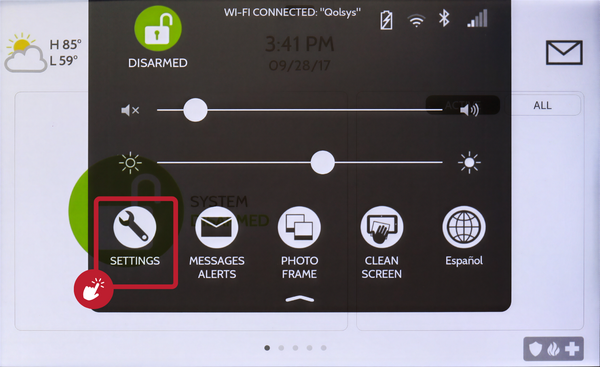 Touch Settings in the Settings Tray.
-
Touch Advanced Settings and enter your Installer Code. Touch ADVANCED SETTINGS, then enter your Installer Code (1111 by default). The Dealer Code (2222) works here too. The panel advances automatically after a valid code.
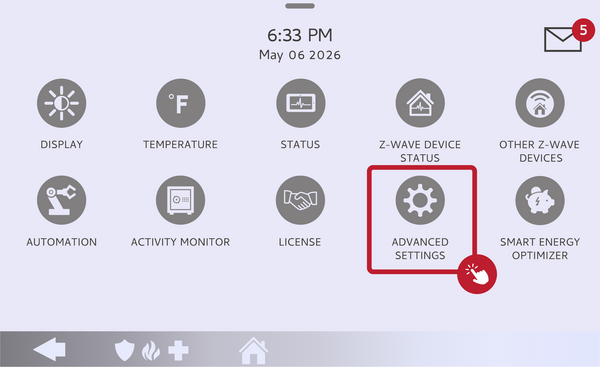 Touch Advanced Settings.
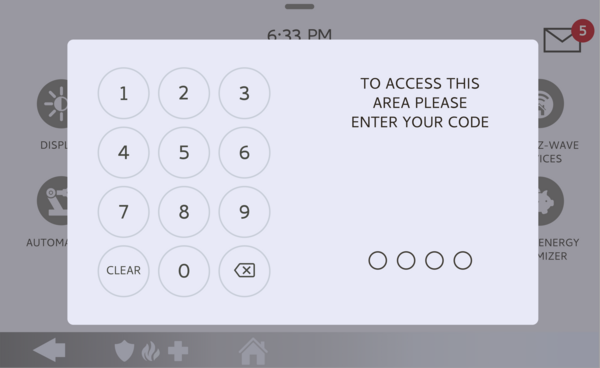 Enter your Installer Code (1111 by default).
-
Touch Installation, then Installer Settings. Touch INSTALLATION, then open INSTALLER SETTINGS and find the Force Arm setting.
Open Installer Settings and find Force Arm. -
Enable Force Arm. Toggle Force Arm on. Now, any sensor that was auto-bypassed at arming will be re-included in the protected area as soon as it closes. Toggle it off any time to leave bypassed sensors bypassed for the arming period.
Toggle Force Arm on.
Tips
Force Arm is handy for a household that often arms in a hurry with a door still open, since the door starts protecting the moment it is shut rather than staying bypassed. If you would rather a bypassed zone stay bypassed until you disarm, leave Force Arm off. Either way, it is still best to arm with all doors and windows closed so nothing is bypassed in the first place, and Force Arm simply catches the cases where one was left open.
Enabling Force Arm on the IQ Panel 5 re-protects an auto-bypassed sensor as soon as it closes. For help with Force Arm or your arming settings on your IQ Panel 5, contact the Alarm Grid support team. We are here Monday through Friday from 9:00 AM to 8:00 PM Eastern Time. Email us at support@alarmgrid.com, call us at 888-818-7728, or visit our website and chat with a live support agent.
Did you find this answer useful?
We offer alarm monitoring as low as $10 / month
Click Here to Learn MoreRelated Products


- Answered