
How Do I Enable Glass Break Detection on the IQ Panel 5?
To enable the Panel Glass Break Detector on the IQ Panel 5, swipe down and touch Settings, then Advanced Settings, and then enter your Installer Code. Next, touch Installation, then Installer Settings, and enable the Panel Glass Break Detector so the panel mics listen for breaking glass.
About the Panel Glass Break Detector
The Panel Glass Break Detector on the IQ Panel 5 (available in AT&T LTE and Verizon LTE) uses the panel's built-in microphones to listen for the sound of breaking glass. When you enable it, the panel creates its own independent glass break zone that falls into your zone order, giving you glass break coverage near the panel without buying and mounting a separate glass break sensor. That makes it a convenient added layer of protection for a room where the panel sits, like a living room or entryway with windows, on your security system.
It is disabled by default for a specific reason: the panel's microphones can only do one listening job at a time. The Panel Glass Break Detector cannot be enabled if Panel Ambient Noise Detection is turned on, since both features share the same mics, so you choose one or the other. Leaving glass break off out of the box keeps those microphones free, which is why you have to deliberately turn it on. Note that this feature is not evaluated for UK or CE and EN Grade 2 installations.
Before You Begin
The Panel Glass Break Detector is in the Installer Settings, which require the Installer Code (1111 by default) or Dealer Code (2222 by default). The steps below use the Installer Code. If Panel Ambient Noise Detection is currently on, you will need to disable it first, since the two cannot run at the same time. After enabling, you can run the Panel Glass Break Test to confirm the microphones pick up the sound properly.
Enable the Panel Glass Break Detector
-
Swipe down and touch Settings. Swipe down from the top of the screen to open the Settings Tray, then touch SETTINGS.
 Swipe down from the top of the screen to open the Settings Tray.
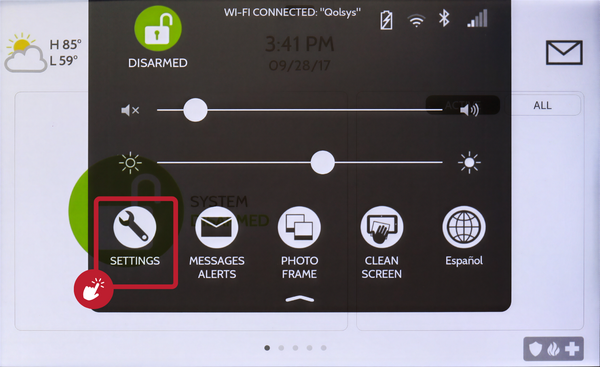 Touch Settings in the Settings Tray.
-
Touch Advanced Settings and enter your Installer Code. Touch ADVANCED SETTINGS, then enter your Installer Code (1111 by default). The Dealer Code (2222) works here too. The panel advances automatically after a valid code.
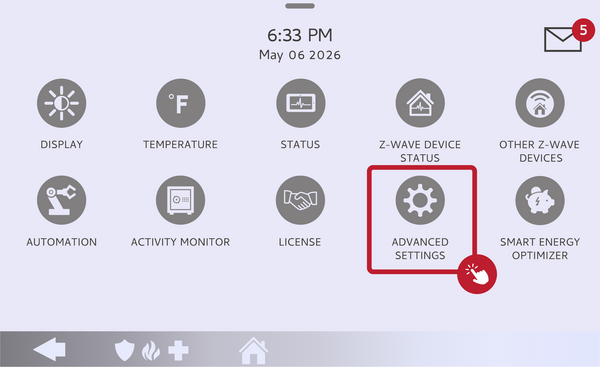 Touch Advanced Settings.
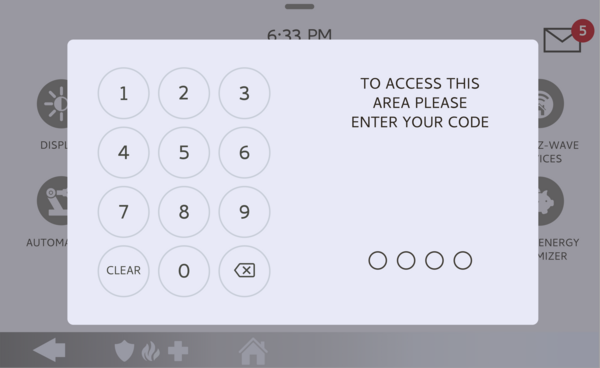 Enter your Installer Code (1111 by default).
-
Touch Installation, then Installer Settings. Touch INSTALLATION, then open INSTALLER SETTINGS and find the Panel Glass Break Detector setting.
Open Installer Settings and find Panel Glass Break Detector. -
Enable the Panel Glass Break Detector. Toggle the Panel Glass Break Detector on. The panel adds an independent glass break zone using its microphones. If it will not enable, turn off Panel Ambient Noise Detection first, then try again.
Toggle the Panel Glass Break Detector on.
Tips
Because it listens from the panel itself, the Panel Glass Break Detector protects glass that is within range of the panel, so it works best in the room where the panel is mounted rather than as whole-home coverage. For windows in other rooms, a dedicated wireless glass break sensor is still the better choice. After turning it on, run the Panel Glass Break Test from the System Tests so you know the microphones are hearing correctly, and remember you cannot use this alongside Panel Ambient Noise Detection.
Enabling the Panel Glass Break Detector on the IQ Panel 5 adds built-in glass break protection using the panel's own microphones. For help with the Panel Glass Break Detector or adding glass break coverage on your IQ Panel 5, contact the Alarm Grid support team. We are here Monday through Friday from 9:00 AM to 8:00 PM Eastern Time. Email us at support@alarmgrid.com, call us at 888-818-7728, or visit our website and chat with a live support agent.
Did you find this answer useful?
We offer alarm monitoring as low as $10 / month
Click Here to Learn MoreRelated Products


- Answered