
How Do I Enable Power Down Communication on the IQ Panel 5?
To enable Power Down Event Communication on the IQ Panel 5, swipe down and touch Settings, then Advanced Settings, and then enter your own Installer Code. Next, touch Installation, then Installer Settings, and enable Power Down Event Communication so the panel reports a power down event.
About Power Down Event Communication
Power Down Event Communication on the IQ Panel 5 (available in AT&T LTE and Verizon LTE) controls whether the panel reports when it is intentionally shut down. When it is enabled, the panel sends a unique event code to Alarm.com and the central station any time the Master Code is used to reach the Power Down icon under Advanced Settings. That gives your monitoring a clear record that someone deliberately powered the system off, rather than the panel simply going quiet, which is valuable oversight for your security system.
The setting is disabled by default, so out of the box a deliberate power down is not reported as its own event. Enabling it is useful when you want accountability around who shuts the panel down and when, such as at a business or any site where an unexpected power down should raise a flag. It only applies to a Master Code power down through the Power Down icon, not to a simple loss of AC power.
Before You Begin
Power Down Event Communication is in the Installer Settings, which require the Installer Code (1111 by default) or Dealer Code (2222 by default). The steps below use the Installer Code. For the reported event to mean anything, the system should be monitored, since the unique code is sent to Alarm.com and the central station that watches your account.
Enable Power Down Event Communication
-
Swipe down and touch Settings. Swipe down from the top of the screen to open the Settings Tray, then touch SETTINGS.
 Swipe down from the top of the screen to open the Settings Tray.
 Touch Settings in the Settings Tray.
-
Touch Advanced Settings and enter your Installer Code. Touch ADVANCED SETTINGS, then enter your Installer Code (1111 by default). The Dealer Code (2222) works here too. The panel advances automatically after a valid code.
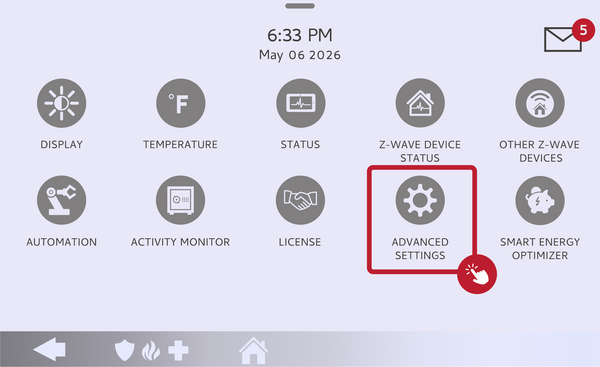 Touch Advanced Settings.
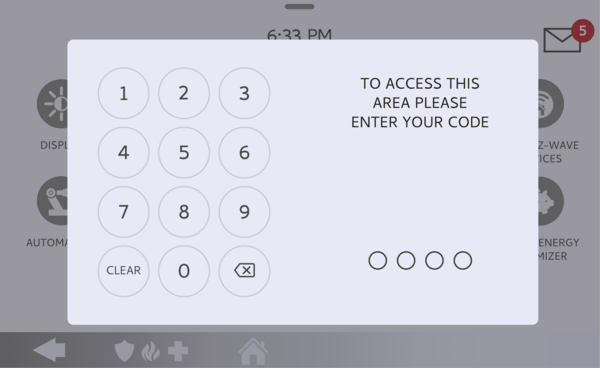 Enter your Installer Code (1111 by default).
-
Touch Installation, then Installer Settings. Touch INSTALLATION, then open INSTALLER SETTINGS and find the Power Down Event Communication setting.
Open Installer Settings and find Power Down Event Communication. -
Enable the setting. Check the Power Down Event Communication box to turn it on. The panel will now send a unique event code to Alarm.com and the central station whenever the Power Down icon is accessed with the Master Code. Uncheck it any time to return to the default.
Check the Power Down Event Communication box.
Tips
This setting reports only a deliberate power down done through the Power Down icon with the Master Code, so it does not cover a normal AC power outage, which is handled by the separate AC power trouble reporting. Enabling it is a good idea for commercial sites or any location where you want to know if the panel was intentionally shut off. Because the event goes to your central station, let your monitoring provider know you are turning it on so they recognize the signal.
Enabling Power Down Event Communication on the IQ Panel 5 gives your monitoring a record of any deliberate panel shutdown. For help with Power Down Event Communication or other reporting settings on your IQ Panel 5, contact the Alarm Grid support team. We are here Monday through Friday from 9:00 AM to 8:00 PM Eastern Time. Email us at support@alarmgrid.com, call us at 888-818-7728, or visit our website and chat with a live support agent.
Did you find this answer useful?
We offer alarm monitoring as low as $10 / month
Click Here to Learn MoreRelated Products


- Answered