
How Do I Find the IMSI Number on the IQ Panel 5 System?
To find the IMSI on the IQ Panel 5, swipe down and touch Settings, then Advanced Settings, and enter your code. Next, touch About and scroll to the Cellular section, where the IMSI is listed alongside the IMEI and ICCID. The IMSI identifies the panel's cellular SIM on the carrier network.
What the IMSI Is
The IQ Panel 5 (available in AT&T LTE and Verizon LTE) has a built-in cellular radio with a SIM, and the IMSI, or International Mobile Subscriber Identity, is the number that identifies that SIM on the carrier network. It is one of a few cellular identifiers your provider may ask for when activating or troubleshooting the cellular connection that keeps your cellular monitoring online. You will find it on the panel's About page.
The IMSI sits in the Cellular section of the About page, right next to the IMEI and the ICCID. Looking it up is a quick, view-only task that changes nothing on the panel. Most homeowners never need the IMSI day to day, but it is good to know where it is when support asks for it.
Before You Begin
The About page sits in Advanced Settings, which you can reach with any of your codes: the Master Code (1234 by default), Installer Code (1111 by default), or Dealer Code (2222 by default). The steps below use the Master Code. Viewing the IMSI makes no changes to the panel, so you can look it up whenever your provider needs it.
Find the IMSI
-
Swipe down and touch Settings. Swipe down from the top of the screen to open the Settings Tray, then touch SETTINGS.
 Swipe down from the top of the screen to open the Settings Tray.
 Touch Settings in the Settings Tray.
-
Touch Advanced Settings and enter your code. Touch ADVANCED SETTINGS, then enter your Master Code (1234 by default). The Installer Code (1111) or Dealer Code (2222) work here too. The panel advances automatically after a valid code.
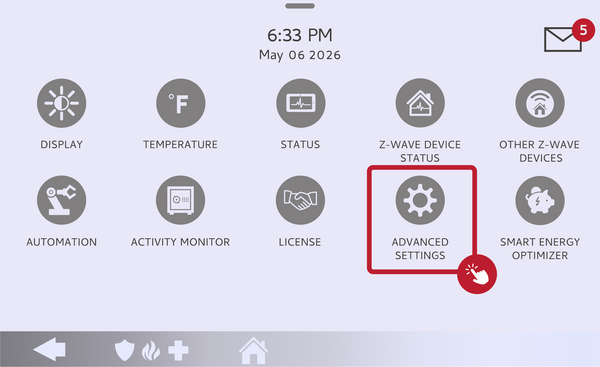 Touch Advanced Settings.
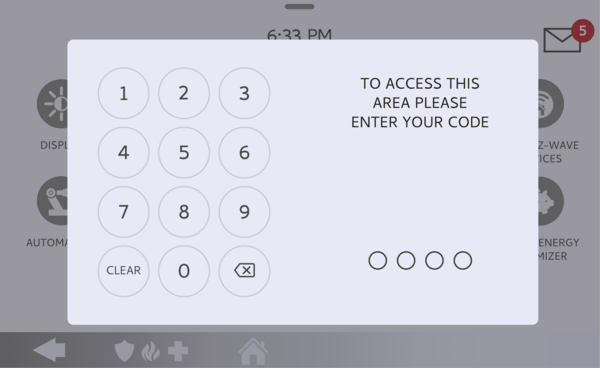 Enter your Master Code (1234 by default).
-
Touch About. On the Advanced Settings menu, touch ABOUT to open the panel's system information.
Touch About on the Advanced Settings menu. -
Scroll to the Cellular section. Scroll down the About page to the Cellular section and read the IMSI. It appears near the IMEI and ICCID as a long string of digits. Write it down or take a photo if your provider needs it.
Read the IMSI in the Cellular section.
Tips
The Cellular section groups the identifiers your provider is most likely to request together, so while you are there you can also grab the IMEI, which is the radio number tied to your account, and the ICCID, which identifies the SIM card itself. Copy the full number carefully, since these identifiers are long and a single wrong digit can send support down the wrong path. If the panel shows no cellular details at all, the cellular radio may not be activated yet, which is worth mentioning to your provider.
Finding the IMSI on the IQ Panel 5 gives your provider the cellular identifier they need to activate or troubleshoot your service. For help locating the IMSI or activating cellular on your IQ Panel 5, contact the Alarm Grid support team. We are here Monday through Friday from 9:00 AM to 8:00 PM Eastern Time. Email us at support@alarmgrid.com, call us at 888-818-7728, or visit our website and chat with a live support agent.
Did you find this answer useful?
We offer alarm monitoring as low as $10 / month
Click Here to Learn MoreRelated Products


- Answered