
How Do I Find the Serial Number on the IQ Panel 5 System?
To find the serial number on the IQ Panel 5, swipe down and touch Settings, then Advanced Settings, and enter your code. Next, touch About and scroll to the System Serial Number. This guide covers finding it through the panel interface, though it is also printed on the panel and on its box.
Where to Find the Serial Number
The IQ Panel 5 (available in AT&T LTE and Verizon LTE) has a unique serial number that identifies your exact unit, and there are three places to find it. It is printed on a sticker on the back of the panel, on the original box it shipped in, and on the panel's About page. This guide walks through the About page method, since that is the easiest way to read it once the panel is already mounted on the wall.
Before You Begin
The About page sits in Advanced Settings, which you can reach with any of your codes: the Master Code (1234 by default), Installer Code (1111 by default), or Dealer Code (2222 by default). The steps below use the Installer Code. Viewing the serial number makes no changes to the panel, so you can look it up any time support asks for it.
On the About page you will see two serial number entries. Here is what each one means:
| System Serial NumberIdentifies your panel as a whole. This is the one support and your monitoring provider use to look up your account, verify warranty, and match records. When someone asks for "the serial number," give them this one. |
| PCA Serial NumberRefers only to the internal circuit board (the printed circuit assembly). It is not tied to your account, so you will rarely need it unless support specifically asks. |
Find the Serial Number
-
Swipe down and touch Settings. Swipe down from the top of the screen to open the Settings Tray, then touch SETTINGS.
 Swipe down from the top of the screen to open the Settings Tray.
 Touch Settings in the Settings Tray.
-
Touch Advanced Settings and enter your code. Touch ADVANCED SETTINGS, then enter your Installer Code (1111 by default). The Master Code (1234) or Dealer Code (2222) work here too. The panel advances automatically after a valid code.
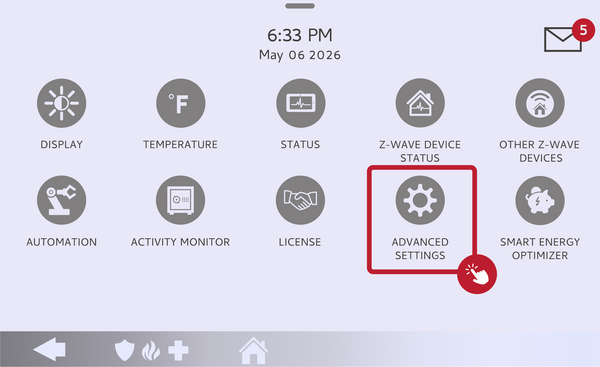 Touch Advanced Settings.
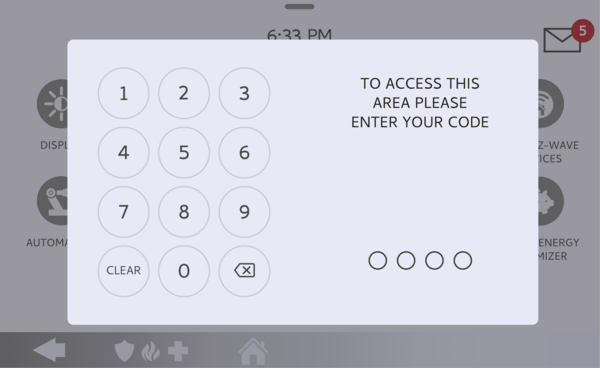 Enter your Installer Code (1111 by default).
-
Touch About. On the Advanced Settings menu, touch ABOUT to open the panel's system information.
Touch About on the Advanced Settings menu. -
Find the System Serial Number. Scroll down the About page to the System Serial Number in the System Configuration area. You will also see a PCA Serial Number nearby for the internal board. Write down the System Serial Number, or take a photo, if you need to give it to support.
Read the System Serial Number on the About page.
Tips
If the panel is not powered on or still packed up, the serial number on the back-of-panel sticker and on the shipping box will match the System Serial Number shown here, so any of the three sources works. When giving the number to support, copy every character exactly, since these are long and easy to mistype. And remember the distinction: the System Serial Number is tied to your panel and account, while the PCA Serial Number refers only to the internal circuit board.
Finding the serial number on the IQ Panel 5 gives support and your provider the detail they need to pull up your exact panel. For help locating the serial number or with any question about your IQ Panel 5, contact the Alarm Grid support team. We are here Monday through Friday from 9:00 AM to 8:00 PM Eastern Time. Email us at support@alarmgrid.com, call us at 888-818-7728, or visit our website and chat with a live support agent.
Did you find this answer useful?
We offer alarm monitoring as low as $10 / month
Click Here to Learn MoreRelated Products


- Answered