
How Do I Run a Help Videos Test on the IQ Panel 5 System?
To run a Help Videos test on the IQ Panel 5, swipe down and touch Settings, then Advanced Settings, and enter your Installer Code. Next, touch System Tests, then Panel Test, and select Run right next to the Help Videos test to confirm that the panel's help videos are installed correctly here.
About the Help Videos Test
The IQ Panel 5 (available in AT&T LTE and Verizon LTE) includes short built-in help videos that walk through common tasks, and you watch them from the panel's Message Center. The Help Videos item inside the Panel Test simply confirms those videos are installed on the panel. It is a quick way to check that the tutorials are present on your security system, which is handy after a software change or a fresh setup.
The Help Videos test is one item within the Panel Test. Select Run beside it to check just the help videos, which does not sound the siren. Running every test at once with Run All is more thorough but will sound the siren, so for a help-videos-only check, use the individual Run.
Before You Begin
The Panel Test is in System Tests, which requires the Installer Code (1111 by default) or Dealer Code (2222 by default). The steps below use the Installer Code. Choosing Run All rather than the individual Help Videos test will sound the siren as part of the full test, so stick to the single Help Videos test if that is all you want to check.
Run the Help Videos Test
-
Swipe down and touch Settings. Swipe down from the top of the screen to open the Settings Tray, then touch SETTINGS.
 Swipe down from the top of the screen to open the Settings Tray.
 Touch Settings in the Settings Tray.
-
Touch Advanced Settings and enter your Installer Code. Touch ADVANCED SETTINGS, then enter your Installer Code (1111 by default). The Dealer Code (2222) works here too. The panel advances automatically after a valid code.
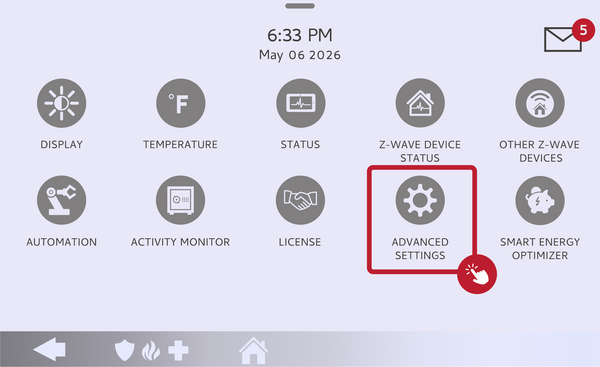 Touch Advanced Settings.
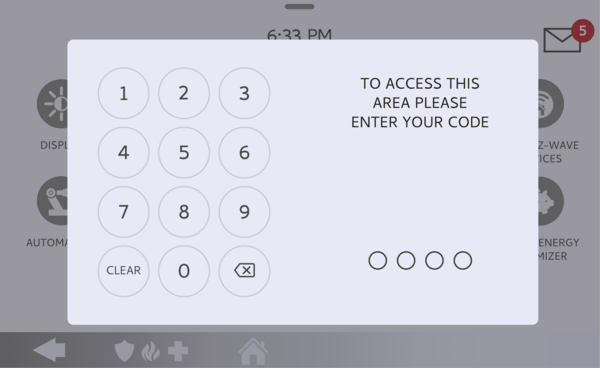 Enter your Installer Code (1111 by default).
-
Touch System Tests, then Panel Test. Touch SYSTEM TESTS, then open PANEL TEST to see the list of individual panel checks.
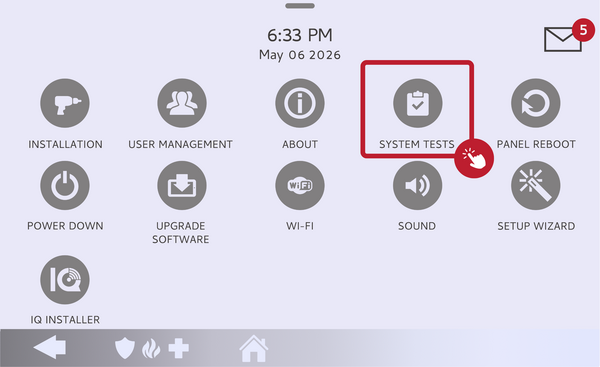 Touch System Tests, then open Panel Test.
-
Run the Help Videos test. Find the Help Videos item in the Panel Test list and select Run next to it. Choosing this single item checks only the help videos, without sounding the siren.
Select Run next to the Help Videos test. -
Read the result. Wait for the test to finish and check the pass or fail result on screen. A pass means the help videos are installed; a fail means they are not currently loaded on the panel.
Read the pass or fail result for the Help Videos test.
Tips
If the Help Videos test fails, the videos simply are not loaded on the panel, which does not affect any security function. They can be loaded using a Patch Tag, a code your dealer or monitoring provider can supply, so reach out to them if you want the tutorials restored. When the videos are present, you can watch them any time from the Message Center on the panel's home screen.
Running a Help Videos test on the IQ Panel 5 confirms the built-in tutorials are available on the panel. For help running the test or loading the help videos on your IQ Panel 5, contact the Alarm Grid support team. We are here Monday through Friday from 9:00 AM to 8:00 PM Eastern Time. Email us at support@alarmgrid.com, call us at 888-818-7728, or visit our website and chat with a live support agent.
Did you find this answer useful?
We offer alarm monitoring as low as $10 / month
Click Here to Learn MoreRelated Products


- Answered