
How Do I Run a Siren Test on the IQ Panel 5 Alarm System?
To run a siren test on the IQ Panel 5, swipe down and touch Settings, then Advanced Settings, and enter your Installer Code. Next, touch System Tests, then Panel Test, then scroll down to the Siren test and select Run to sound the siren and confirm that it is working correctly on its own.
About the Siren Test
The IQ Panel 5 (available in AT&T LTE and Verizon LTE) lets you test the built-in siren from the Panel Test. Unlike the other panel checks, the Siren test works by actually sounding the siren, so you can confirm it is loud and working. It is a good check after an install, after changing siren settings, or any time you want to be sure the audible alarm on your security system will be heard when it matters.
The Siren test is one item within the Panel Test, which you reach by scrolling down the test list and selecting Run beside it. This sounds the siren on its own without running the full battery of tests. Running every test at once with Run All will also sound the siren as part of the sequence, but the individual Siren test is the direct way to check just the siren.
Before You Begin
The Panel Test is in System Tests, which requires the Installer Code (1111 by default) or Dealer Code (2222 by default). The steps below use the Installer Code. This test is loud, so let everyone in the home know before you run it, keep it away from anyone sensitive to loud sound, and be ready to stop it. If the system is monitored, you may also want to place it on test with your provider first so a signal is not misread.
Run the Siren Test
-
Swipe down and touch Settings. Swipe down from the top of the screen to open the Settings Tray, then touch SETTINGS.
 Swipe down from the top of the screen to open the Settings Tray.
 Touch Settings in the Settings Tray.
-
Touch Advanced Settings and enter your Installer Code. Touch ADVANCED SETTINGS, then enter your Installer Code (1111 by default). The Dealer Code (2222) works here too. The panel advances automatically after a valid code.
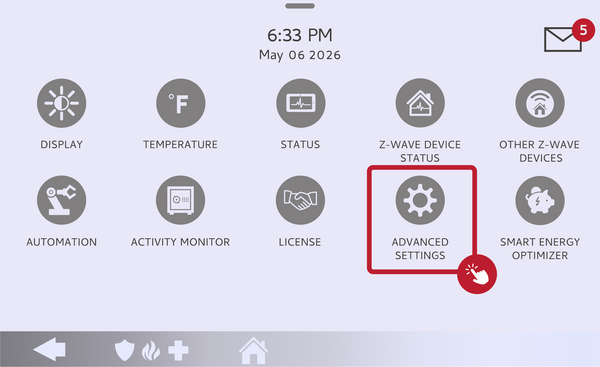 Touch Advanced Settings.
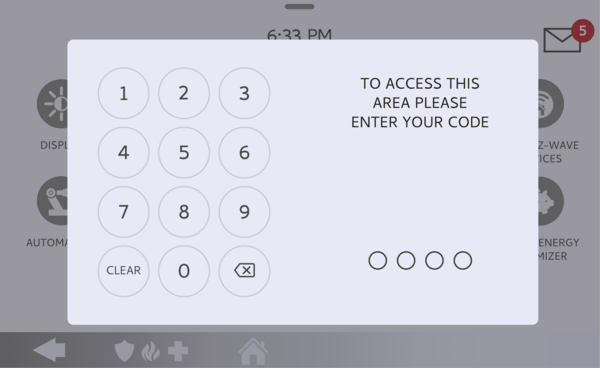 Enter your Installer Code (1111 by default).
-
Touch System Tests, then Panel Test. Touch SYSTEM TESTS, then open PANEL TEST to see the list of individual panel checks.
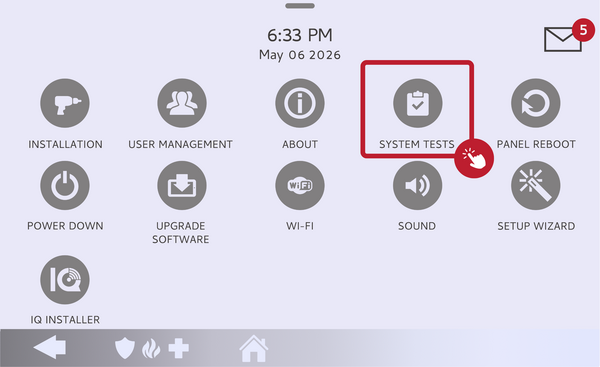 Touch System Tests, then open Panel Test.
-
Scroll to the Siren test and select Run. Scroll down the Panel Test list to the Siren item and select Run. The panel sounds the siren so you can confirm it is working and audible.
Scroll to the Siren test and select Run. -
Confirm the siren and stop the test. Listen to confirm the siren sounds clearly, then stop the test when you are done. If the siren does not sound, there is a siren setting or hardware issue to look into.
Confirm the siren sounds, then stop the test.
Tips
The panel siren is very loud at close range, so do not stand right next to the panel when you run the test. If the siren does not sound or seems quiet, check that the panel's sound and siren settings are not turned down, and confirm the siren was not disabled in programming. If you want to adjust how long the siren runs during a real alarm, see our guide on how to change the siren timeout on the IQ Panel 5.
Running a siren test on the IQ Panel 5 confirms your audible alarm will be heard during a real event. For help running the test or with any siren settings on your IQ Panel 5, contact the Alarm Grid support team. We are here Monday through Friday from 9:00 AM to 8:00 PM Eastern Time. Email us at support@alarmgrid.com, call us at 888-818-7728, or visit our website and chat with a live support agent.
Did you find this answer useful?
We offer alarm monitoring as low as $10 / month
Click Here to Learn MoreRelated Products


- Answered