
How Do I Run an Arm/Disarm Test on the IQ Panel 5 System?
To run an arm/disarm test on the IQ Panel 5, swipe down and touch Settings, then Advanced Settings, and enter your Installer Code. Next, touch System Tests, then Panel Test, and select Run right next to the Arm-Disarm test to confirm that the panel arms and disarms correctly on its very own.
About the Arm/Disarm Test
The IQ Panel 5 (available in AT&T LTE and Verizon LTE) can test its own arming and disarming from the Panel Test. The Arm-Disarm item confirms the panel is able to cycle through arming and disarming correctly, which is a quick way to verify the core function of your security system after a software update, a service call, or any time the system has been acting up.
The Arm-Disarm test is one item within the Panel Test. Select Run beside it to test just the arming operation, which does not sound the siren. Running every test at once with Run All is more thorough but will sound the siren, so for an arm-disarm-only check, use the individual Run.
Before You Begin
The Panel Test is in System Tests, which requires the Installer Code (1111 by default) or Dealer Code (2222 by default). The steps below use the Installer Code. Choosing Run All rather than the individual Arm-Disarm test will sound the siren as part of the full test, so stick to the single Arm-Disarm test if that is all you want to check.
Run the Arm/Disarm Test
-
Swipe down and touch Settings. Swipe down from the top of the screen to open the Settings Tray, then touch SETTINGS.
 Swipe down from the top of the screen to open the Settings Tray.
 Touch Settings in the Settings Tray.
-
Touch Advanced Settings and enter your Installer Code. Touch ADVANCED SETTINGS, then enter your Installer Code (1111 by default). The Dealer Code (2222) works here too. The panel advances automatically after a valid code.
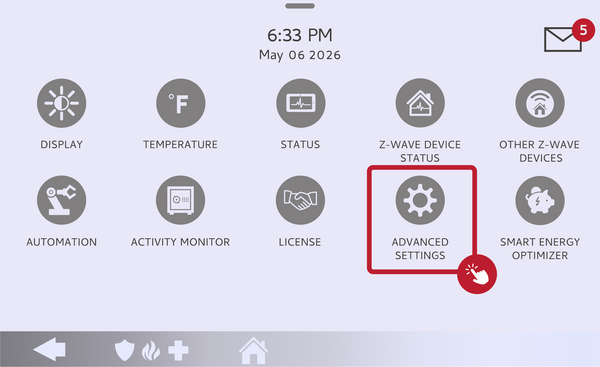 Touch Advanced Settings.
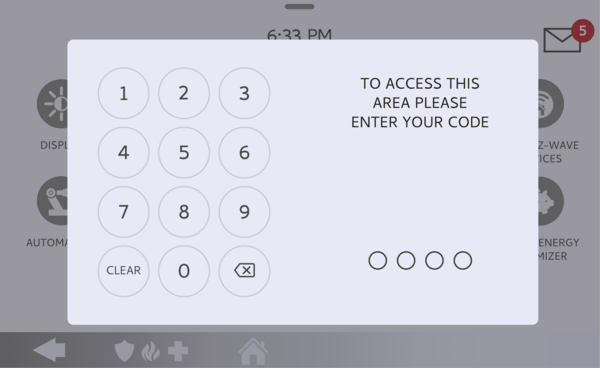 Enter your Installer Code (1111 by default).
-
Touch System Tests, then Panel Test. Touch SYSTEM TESTS, then open PANEL TEST to see the list of individual panel checks.
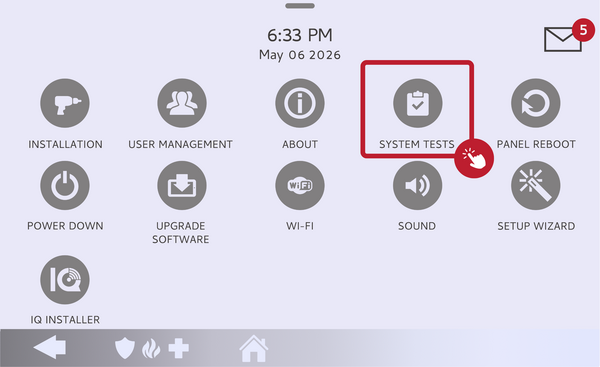 Touch System Tests, then open Panel Test.
-
Run the Arm-Disarm test. Find the Arm-Disarm item in the Panel Test list and select Run next to it. Choosing this single item tests only the arm and disarm operation, without sounding the siren.
Select Run next to the Arm-Disarm test. -
Read the result. Wait for the test to finish and check the pass or fail result on screen. A pass means the panel arms and disarms correctly; a fail points to an issue to troubleshoot.
Read the pass or fail result for the Arm-Disarm test.
Tips
If the Arm-Disarm test fails, reboot the panel and run the test again, since a restart clears many temporary issues; if it still fails, a master reset and repeat is the next step, or reach out for service. This test checks the panel's internal arming logic, separate from your day-to-day arming settings like the exit delay on the IQ Panel 5, which you can adjust in the Security and Arming menu.
Running an arm/disarm test on the IQ Panel 5 confirms the core arming function is working as it should. For help running the test or with any arming settings on your IQ Panel 5, contact the Alarm Grid support team. We are here Monday through Friday from 9:00 AM to 8:00 PM Eastern Time. Email us at support@alarmgrid.com, call us at 888-818-7728, or visit our website and chat with a live support agent.
Did you find this answer useful?
We offer alarm monitoring as low as $10 / month
Click Here to Learn MoreRelated Products


- Answered