
How Do I See Which Cellular Carrier My IQ Panel 5 Uses?
To see what carrier your IQ Panel 5 uses, swipe down and touch Settings, then Advanced Settings, and enter your code. Next, touch About and scroll to the Cellular section, where the Carrier is listed. This tells you whether your panel connects over the AT&T or the Verizon LTE network here.
About the Panel's Cellular Carrier
The IQ Panel 5 (available in AT&T LTE and Verizon LTE) has a built-in cellular radio that connects to one of those two networks for its cellular monitoring. The carrier is set by the cellular radio installed in your panel, and you can confirm which one it is on the About page. Knowing your carrier is useful when checking coverage in your area or when a support agent is helping with a connection issue.
The Carrier appears in the Cellular section of the About page, right alongside the connection status and signal strength. Looking it up is a quick, view-only task that changes nothing on your security system. The same section holds the cellular identifiers like the IMEI and IMSI, so it is the one place to check anything about the panel's cellular connection.
Before You Begin
The About page sits in Advanced Settings, which you can reach with any of your codes: the Master Code (1234 by default), Installer Code (1111 by default), or Dealer Code (2222 by default). The steps below use the Master Code. The carrier is determined by the panel's hardware, so this is a lookup only; it is not a setting you change from the panel.
See Your Carrier
-
Swipe down and touch Settings. Swipe down from the top of the screen to open the Settings Tray, then touch SETTINGS.
 Swipe down from the top of the screen to open the Settings Tray.
 Touch Settings in the Settings Tray.
-
Touch Advanced Settings and enter your code. Touch ADVANCED SETTINGS, then enter your Master Code (1234 by default). The Installer Code (1111) or Dealer Code (2222) work here too. The panel advances automatically after a valid code.
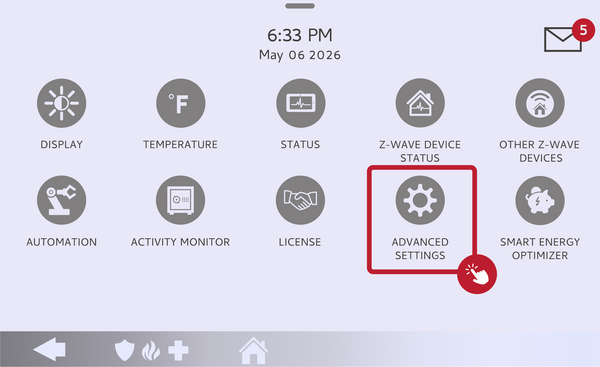 Touch Advanced Settings.
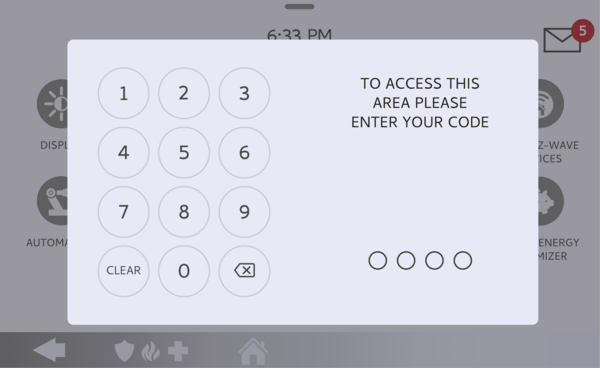 Enter your Master Code (1234 by default).
-
Touch About. On the Advanced Settings menu, touch ABOUT to open the panel's system information.
Touch About on the Advanced Settings menu. -
Scroll to the Cellular section. Scroll down the About page to the Cellular section and read the Carrier line. It shows your network, such as AT&T or Verizon, along with the current connection status and signal strength.
Read the Carrier in the Cellular section.
Tips
While you are in the Cellular section, the Cellular Connection and Signal Strength lines sit right under the Carrier, so you can see how well the panel is reaching the network at a glance. For a more detailed reading, you can run a cellular test; see our guide on how to check the cellular signal strength on the IQ Panel 5. If your signal is weak, a different mounting location or a cellular signal booster can help. The carrier is tied to the radio in the panel and is not something you switch on your own, so if you need a different network, that is a conversation to have with your monitoring provider.
Seeing which cellular carrier your IQ Panel 5 uses helps with coverage checks and support calls. For help confirming your carrier or improving your cellular signal on your IQ Panel 5, contact the Alarm Grid support team. We are here Monday through Friday from 9:00 AM to 8:00 PM Eastern Time. Email us at support@alarmgrid.com, call us at 888-818-7728, or visit our website and chat with a live support agent.
Did you find this answer useful?
We offer alarm monitoring as low as $10 / month
Click Here to Learn MoreRelated Products


- Answered