
How Do I Set the Dialer Delay on the IQ Panel 5 System?
To set the Dialer Delay on the IQ Panel 5, swipe down and touch Settings, then Advanced Settings, and enter your Installer Code. Next, touch Installation, then Sirens and Alarms, and set Dialer Delay to the number of seconds before the panel reports an alarm to the central station itself.
About the Dialer Delay
The Dialer Delay on the IQ Panel 5 (available in AT&T LTE and Verizon LTE) is the amount of time the panel waits after an alarm is triggered before it calls the central station. This built-in pause gives you a chance to disarm and cancel a genuine false alarm, so an accidental trip does not immediately send a signal for monitoring and dispatch. It is set to 30 seconds by default, which suits most homes.
A delay is already active out of the box, so setting the Dialer Delay really means choosing how long that window is. The available range depends on whether SIA Limits are enabled: with SIA Limits on, you can set 15 to 45 seconds, and with SIA Limits off, the range is 0 to 254 seconds. Setting it to 0 with SIA Limits off effectively removes the delay, so the panel reports immediately, though that is not recommended for most setups on a security system.
Before You Begin
Dialer Delay is in the Sirens and Alarms menu, which requires the Installer Code (1111 by default) or Dealer Code (2222 by default). The steps below use the Installer Code. Keep in mind Dialer Delay is not used on EN Grade 2 installations, and the SIA Limits setting controls how wide a value you are allowed to enter.
Set the Dialer Delay
-
Swipe down and touch Settings. Swipe down from the top of the screen to open the Settings Tray, then touch SETTINGS.
 Swipe down from the top of the screen to open the Settings Tray.
 Touch Settings in the Settings Tray.
-
Touch Advanced Settings and enter your Installer Code. Touch ADVANCED SETTINGS, then enter your Installer Code (1111 by default). The Dealer Code (2222) works here too. The panel advances automatically after a valid code.
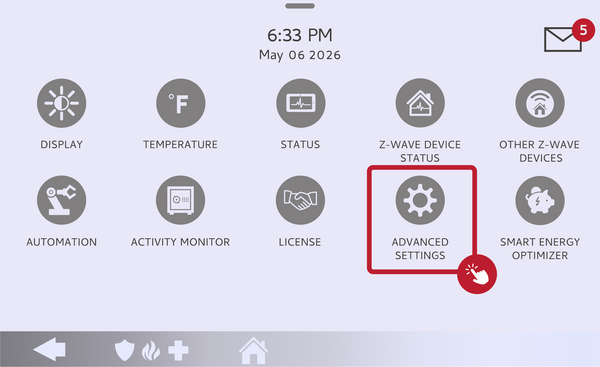 Touch Advanced Settings.
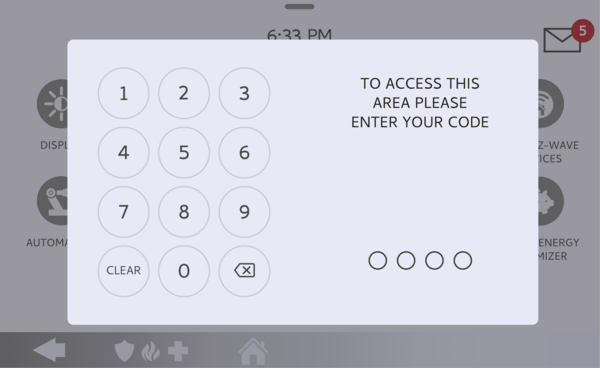 Enter your Installer Code (1111 by default).
-
Touch Installation, then Sirens and Alarms. Touch INSTALLATION, then touch SIRENS AND ALARMS and find the Dialer Delay setting.
Touch Sirens and Alarms, then find Dialer Delay. -
Set the Dialer Delay. Touch Dialer Delay and enter the number of seconds you want. Within the allowed range, a longer delay gives more time to cancel a false alarm, while a shorter one reports faster. The default is 30 seconds.
Enter the Dialer Delay in seconds.
Tips
The Dialer Delay is one of the most useful tools for cutting down on false alarm dispatches, since it gives you those seconds to disarm before a signal ever leaves the panel. A setting that is too short may report before you can reach the panel, while one that is too long delays a real emergency response, so the 30-second default is a sensible balance. If your system must follow SIA false alarm guidelines, keep the value within the 15 to 45 second range that SIA Limits enforces.
Setting the Dialer Delay on the IQ Panel 5 lets you control how much time you have to stop a false alarm before it reaches the central station. For help with the Dialer Delay or other alarm settings on your IQ Panel 5, contact the Alarm Grid support team. We are here Monday through Friday from 9:00 AM to 8:00 PM Eastern Time. Email us at support@alarmgrid.com, call us at 888-818-7728, or visit our website and chat with a live support agent.
Did you find this answer useful?
We offer alarm monitoring as low as $10 / month
Click Here to Learn MoreRelated Products


- Answered