
How Do I Turn Off Bluetooth on the IQ Panel 5 Alarm System?
To turn off Bluetooth on the IQ Panel 5, swipe down and touch Settings, then Advanced Settings, and enter your code. Next, touch Bluetooth Devices, then Settings, and un-select the Bluetooth box to disable the radio. This also turns off the ability to disarm the panel from your paired phone.
About Bluetooth on the Panel
The IQ Panel 5 (available in AT&T LTE and Verizon LTE) has a built-in Bluetooth radio that lets you pair a phone so the panel can disarm automatically when you walk up with your phone nearby. It is a convenient hands-free feature, but if you do not use it, or you simply want the radio off, you can disable Bluetooth entirely from the panel. Turning it off does not affect the security functions of your security system in any other way.
The Bluetooth radio is controlled from the Settings screen inside the Bluetooth Devices menu. Un-selecting the Bluetooth box shuts off the radio, which stops any paired phones from connecting and disables Bluetooth disarm. You can turn it back on the same way whenever you want to use phone-based disarming again.
Before You Begin
The Bluetooth Devices menu is in Advanced Settings, which you can reach with any of your codes: the Installer Code (1111 by default), Master Code (1234 by default), or Dealer Code (2222 by default). The steps below use the Installer Code. Keep in mind that turning off Bluetooth disables Bluetooth disarm for every paired phone, so anyone who relies on phone disarming will need to use a code at the panel instead.
Turn Off Bluetooth
-
Swipe down and touch Settings. Swipe down from the top of the screen to open the Settings Tray, then touch SETTINGS.
 Swipe down from the top of the screen to open the Settings Tray.
 Touch Settings in the Settings Tray.
-
Touch Advanced Settings and enter your Installer Code. Touch ADVANCED SETTINGS, then enter your Installer Code (1111 by default). The Master Code (1234) or Dealer Code (2222) work here too. The panel advances automatically after a valid code.
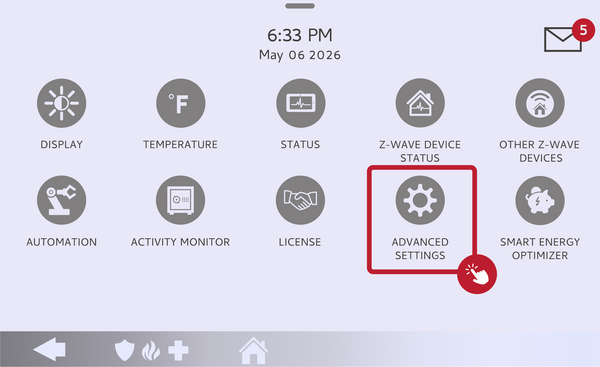 Touch Advanced Settings.
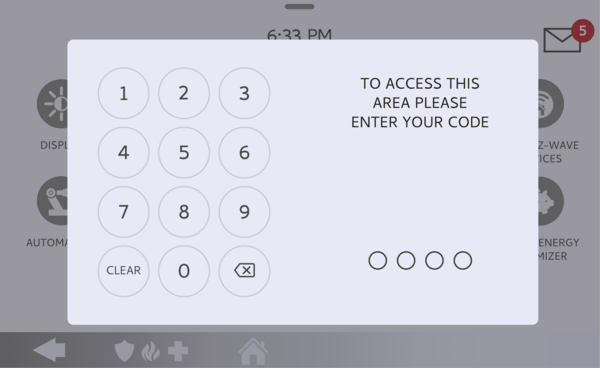 Enter your Installer Code (1111 by default).
-
Touch Bluetooth Devices. On the Advanced Settings menu, touch BLUETOOTH DEVICES to open the Bluetooth options.
Touch Bluetooth Devices on the Advanced Settings menu. -
Open Settings and un-select Bluetooth. Touch SETTINGS, then un-select the Bluetooth box to disable the radio. The panel's Bluetooth turns off right away, disconnecting any paired phones.
Un-select the Bluetooth box to turn off the radio.
Tips
If you like Bluetooth disarm but want it to behave differently, you do not have to turn Bluetooth off completely. In the same Settings screen you can leave the radio on and instead un-select Bluetooth Disarm to keep pairing available without automatic unlocking, or adjust the Bluetooth Disarm Timeout, which sets how long after arming to Away the panel waits before allowing a phone to disarm it. The Settings Tray also shows the current Bluetooth status at a glance, so you can confirm it is off after making the change.
Turning off Bluetooth on the IQ Panel 5 shuts down the radio while leaving the rest of your system fully protected. For help with Bluetooth or phone disarm settings on your IQ Panel 5, contact the Alarm Grid support team. We are here Monday through Friday from 9:00 AM to 8:00 PM Eastern Time. Email us at support@alarmgrid.com, call us at 888-818-7728, or visit our website and chat with a live support agent.
Did you find this answer useful?
We offer alarm monitoring as low as $10 / month
Click Here to Learn MoreRelated Products


- Answered