
What Do the LED Indicator Lights Mean on My 2GIG GC Touch?
The 2GIG GC Touch features a multi-color LED located in the upper-right corner of the panel. It displays status at a glance. Solid blue indicates standby, solid red means armed or arming, flashing red shows an active alarm or entry delay, and solid white means the panel is not ready to arm.

The 2GIG GC Touch panel (available in both AT&T LTE and Verizon LTE versions) uses an LED indicator system to communicate system status without requiring users to look at the screen. Understanding these visual signs helps you quickly assess your security system's condition from across the room or through a window.
LED Status Reference
| LED Color | Behavior | System Status |
|---|---|---|
| Blue | Solid | Standby (disarmed, no issues) |
| Blue | Flashing | Low Power Mode (battery operation) |
| Red | Solid | Arming or Armed |
| Red | Flashing | Alarming or Entry Delay countdown |
| White | Solid | System Faults / Not Ready to Arm |
Understanding Blue LED Status
The blue LED indicates normal standby operation. When you see a solid blue light, your system is disarmed and functioning properly with no open zones or issues requiring attention. A flashing blue LED means the panel is operating on battery power in low power mode. This typically occurs during a power outage when the backup battery takes over.
Understanding Red LED Status
The red LED communicates armed status and alarm conditions. A solid red light appears when the system is arming or fully armed in either Away or Stay mode. When the red LED flashes, it indicates either an active alarm condition or that the entry delay countdown is in progress. If you see flashing red while entering your home, enter your user code and press Enter to disarm before the countdown expires.
If you can see your alarm system through a window or door before you open the door to enter, and the red LED is flashing, that means an alarm occurred in your absence. By default, the sounder timeout is set to four (4) minutes. That means when an alarm occurs, the sounder will automatically shut off after four (4) minutes. It's likely you would have received a call from the monitoring station, a notification from Alarm.com, or both. But, just in case you missed the message, be careful when entering your home under these circumstances.
Understanding White LED Status
A solid white LED indicates system faults or that the panel is not ready to arm. Common causes include open doors or windows, sensor troubles, or communication issues. To resolve a white LED, tap the notification icon on the home screen to view which zones require attention. You may need to close a door, check a sensor, or bypass the zone before arming.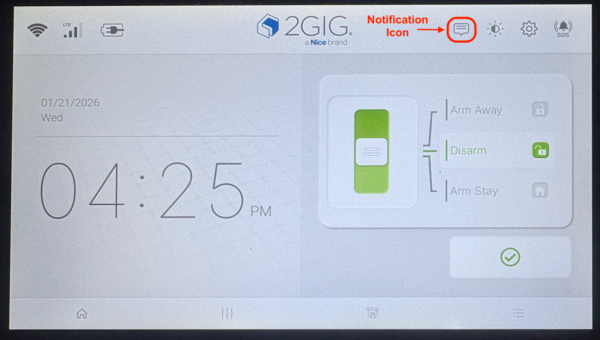
Battery Operation Differences
When operating on battery power during an outage, all LEDs will flash instead of displaying solid. This helps conserve battery life while still providing visual feedback about system status. The panel will automatically return to solid LED behavior once AC power is restored.
Understanding LED indicators on the 2GIG GC Touch helps you monitor your home automation and monitoring system status at a glance.
For help with LED indicators or other features on your GC Touch panel, contact the Alarm Grid support team at support@alarmgrid.com, Monday - Friday from 9:00 AM - 8:00 PM Eastern Time. You can also call 888-818-7728 during these hours. Our website offers live chat support most of these days from 9:00 AM - 6:00 PM Eastern Time.
Did you find this answer useful?
We offer alarm monitoring as low as $10 / month
Click Here to Learn MoreRelated Products


Related Videos

Related Categories
- Home Security Systems
- Home Security Systems
- Apartment Security Systems
- DIY Wireless Security Systems
- Touchscreen Alarm Panels
- Touchscreen Alarm Panels
- Small Business Security Systems
- Wireless Touchscreen Alarm Panels
- Answered