
What Is a Cross Zone and How Do I Enable It on GC Touch?
Enabling Cross Zones on a 2GIG GC Touch requires two or more sensors to trip before triggering an alarm, reducing false alarms from single activations. To program Cross Zones, access Settings with the Installer Code (1561 by default), navigate to Sensor Settings, and select zones to include.
The 2GIG GC Touch, (available in AT&T LTE and Verizon LTE versions) supports Cross Zone programming as a false alarm reduction feature. This is particularly useful in environments where single sensors might be triggered accidentally, such as areas with pets or where environmental factors could cause individual sensor activations.
How Cross Zones Work
When Cross Zone is configured, the security system monitors all zones included in the Cross Zone group. An alarm will only trigger if all selected sensors within the group are activated. If only one sensor trips, the system registers the event but does not sound the alarm or send signals to the monitoring station. This verification approach significantly reduces false alarms while maintaining security.
Common Use Cases
Cross Zone programming is ideal for homes with pets where motion sensors might detect animal movement. It also works well in areas with environmental factors like HVAC vents near sensors, high-traffic areas where accidental trips are common, and commercial settings requiring alarm verification. Any burglar zone type programmed into the panel can be included in a Cross Zone configuration.
Steps to Program Cross Zones
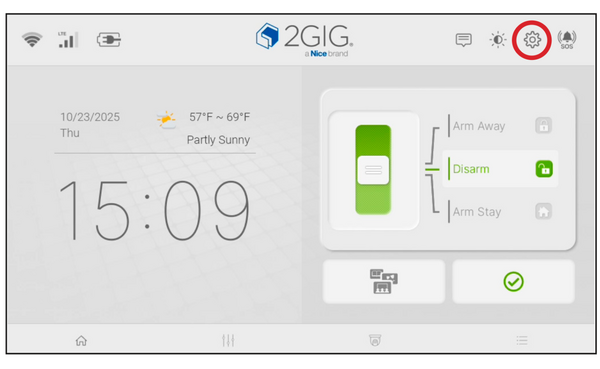
- Disarm the system. The panel must be disarmed to access Settings. If armed, slide the mode selector to Disarm and enter your code, then press Enter (↵).
-
Tap Settings (gear icon). The gear icon is located in the top-right corner of the home screen.
- Enter the Installer Code. Enter the current Installer Code (default is 1561) and press the Enter key (↵). Cross Zone configuration requires Installer-level access.
-
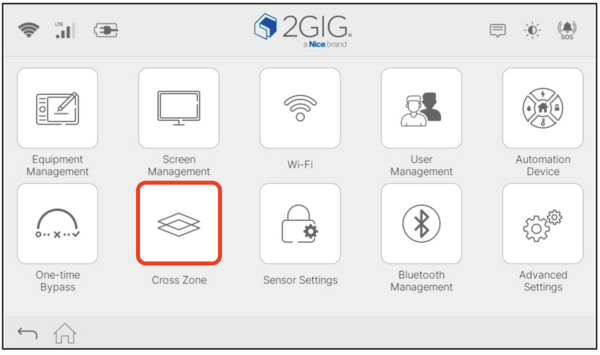
Tap Cross Zone. This opens the Cross Zone list where you can view all enrolled burglary sensors and choose Cross Zone configuration.
-
Select Zones. This option displays a list of all burglar-type sensors that can be included in the Cross Zone group. Choose two or more zones. Remember that all zones selected as Cross Zones have to be activated while the system is armed before any of those zones will go into alarm. Do not select zones to cross that are not within the same general area of the home or business.
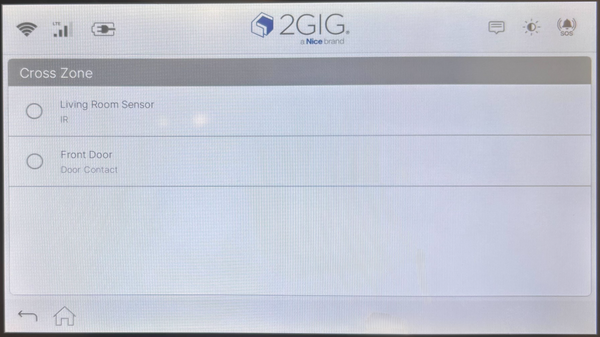
- Select the zones to include. Tap the circle next to each sensor you want in the Cross Zone group. You must select at least two sensors for Cross Zone to function. The selected zones will show a filled circle.
- Exit programming. After selecting your zones, the configuration is saved automatically. Tap the back arrow or home icon to exit and return to normal operation.
Important Considerations
Only burglar zone types can be selected for Cross Zone configuration. Life safety sensors, such as smoke detectors and carbon monoxide sensors, cannot be included because they require an immediate response to any activation. Cross zoning also affects local alarm sounding and monitoring signals, so users with professional monitoring should coordinate any changes with their monitoring provider.
Zones included in a Cross Zone configuration should protect the same general area. Pairing sensors from opposite sides of a building is not recommended, since an alarm may never occur even during an actual intrusion. For example, if a motion detector in a living room has caused false alarms, it should be crossed with another sensor that also covers the living room.
Cross Zone programming on the 2GIG GC Touch can help reduce false alarms while still maintaining effective security protection. This feature must be configured through Installer programming using the Installer Code, which is 1561 by default. For help with Cross Zone setup or other sensor programming on your GC Touch panel, contact the Alarm Grid support team at support@alarmgrid.com, Monday - Friday from 9:00 AM to 8:00 PM Eastern Time.
Did you find this answer useful?
We offer alarm monitoring as low as $10 / month
Click Here to Learn MoreRelated Products


Related Categories
- Home Security Systems
- Home Security Systems
- Apartment Security Systems
- Small Business Security Systems
- Smart Home Controllers
- DIY Wireless Security Systems
- Wireless Touchscreen Alarm Panels
- Answered