
Can I Connect the 2GIG GC Touch Panel to Apple HomeKit?
No. The 2GIG GC Touch does not support Apple HomeKit integration. The panel uses Alarm.com for automation and remote control through its mobile app. While HomeKit is unavailable, Apple users can still use Siri Shortcuts through Alarm.com to control the system using custom voice commands.
Understanding the Smart Home Platform
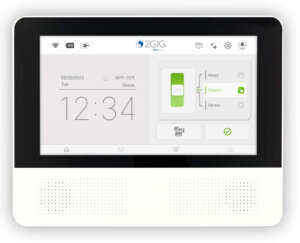
The 2GIG GC Touch, available in AT&T LTE and Verizon LTE versions, is designed to work exclusively with Alarm.com for its home automation features. Alarm.com is a cloud based platform that provides remote access to your security system, automation controls, and video monitoring through a single app. This platform operates independently from Apple HomeKit, so devices enrolled on the GC Touch cannot be controlled through the Apple Home app.
Apple HomeKit requires specific hardware certification and direct integration with Apple software services. The 2GIG GC Touch does not include this certification and instead relies on Alarm.com for automation and smart home control. This approach is consistent across the 2GIG product line, including earlier panels such as the GC2 and GC3.
Available Voice Control Options
Although the GC Touch does not support Apple HomeKit, Alarm.com offers Siri Shortcuts as an alternative for Apple users. Siri Shortcuts allow custom voice commands to be created within the Alarm.com app, enabling actions such as arming or disarming the system, running scenes, controlling Z-Wave devices, and viewing live video on compatible iOS devices.
To Enable Alarm.com Siri Shortcuts:
- Log in to the Alarm.com app. Open the Alarm.com customer app on your iPhone or iPad and sign in using your Alarm.com account credentials. This option can only be enabled using the App, not the customer website.
- Open App Settings. Tap the menu icon, then select App Settings to access customization and voice control options.
- Select Siri Shortcuts. Tap Siri Shortcuts to view the available actions that can be controlled using custom voice commands.
- Choose an action. Select the action you want to control, such as arming or disarming the system, running a Scene, controlling lights, or viewing live video.
- Create a custom phrase. Record the phrase you want Siri to respond to, making sure it is easy to remember and spoken exactly the same each time.
- Test the shortcut. Say your custom phrase to Siri to confirm the shortcut runs correctly and performs the expected action.
In addition to Siri Shortcuts, the GC Touch also supports Amazon Alexa and Google Assistant. These integrations allow users to arm and disarm the system, check sensor status, and control smart home devices using voice commands. Voice platforms are linked through the Alarm.com app and may require a voice PIN for certain security actions.
Z-Wave Device Compatibility
The GC Touch includes a built in Z-Wave Plus controller that supports door locks, thermostats, lighting, and other smart home devices. These Z-Wave devices are controlled through the Alarm.com app or directly from the panel. While Z-Wave devices cannot be added to HomeKit, they offer full automation within the Alarm.com ecosystem.
Alarm.com Scenes allow multiple automation actions to run at once. For example, a single scene can arm the system, lock doors, turn off lights, and adjust the thermostat. Scenes can be activated from the panel, the Alarm.com app, or through supported voice assistants and Siri Shortcuts.
Alternatives for Apple Users
Apple users who want HomeKit native security integration should consider systems designed specifically for that ecosystem. Very few professional security panels support HomeKit due to Apple certification requirements. The 2GIG GC Touch instead provides deep smart home and automation features through Alarm.com.
Even without HomeKit, Apple users can control the GC Touch using the Alarm.com app and Siri Shortcuts on iPhone, iPad, Apple Watch, or HomePod. For help configuring automation or voice control on your GC Touch panel, contact the Alarm Grid support team. We're here Monday - Friday from 9:00 AM - 8:00 PM Eastern Time. Reach us by emailing support@alarmgrid.com.
Did you find this answer useful?
We offer alarm monitoring as low as $10 / month
Click Here to Learn MoreRelated Products


Related Categories
- Home Security Systems
- Home Security Systems
- Apartment Security Systems
- Smart Home Controllers
- Small Business Security Systems
- DIY Wireless Security Systems
- Answered
- Answered By
- Julia Ross