
Does a 2GIG GC Touch Have a Photo Slideshow Screen Saver?
Yes. As of firmware 1.1.072, the 2GIG GC Touch supports a digital picture frame and slideshow. On earlier firmware versions, screen saver options are limited to a blank screen that activates after a configurable period of inactivity, helping to preserve the display and extend its life.
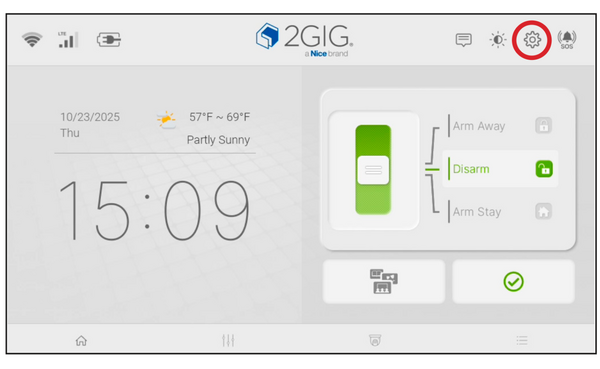
The Settings gear icon (⚙) is located in the top-right corner of the home screen
The 2GIG GC Touch (available in AT&T LTE and Verizon LTE versions) provides screen management options through the Screen Management menu in Settings. With firmware 1.1.072 and later, the Screen Saver Content options include a digital picture frame mode alongside the original blank screen option, allowing the panel to display rotating photos as a slideshow when idle. On earlier firmware versions, only the blank screen option is available. For help setting up the Photo Frame option, check out this helpful FAQ.
Available Screen Saver Options
The screen saver function helps extend the life of the display and reduce power consumption during periods of inactivity. Users on firmware 1.1.072 and later can choose between a blank screen or the digital picture frame mode. Unlike some other systems, such as the 2GIG Edge, the GC Touch does not currently support uploading personal photos directly from the panel interface — photo management for the slideshow feature is handled separately.

Screen Management menu V 1.1 shown, including Brightness, Night Mode, Screen Saver, Photo Frame Settings, and Clean Screen. Older software versions omit the Photo Frame Settings option.
Sleep Mode Timer
Regardless of which Screen Saver Content option is selected, the Sleep Mode Timer determines how long the panel waits before activating the screen saver. Available timer options include 30 sec(s), 1 min(s), 2 min(s) (the default setting), 5 min(s), and 10 min(s). When the screen is blank or displaying the slideshow, simply touch the display to wake it and return to the home screen.
To access the screen saver settings on the 2GIG GC Touch:
- Tap Settings (⚙) in the top-right corner of the home screen.
- Enter code. Enter your Installer Code (1561 by default) or Master Code (1111 by default).
- Tap Screen Management.
- Select Screen Saver.
- Under Screen Saver Content, tap Blank to use a blank screen, or select the digital picture frame option if running firmware 1.1.072 or later.
- Under Sleep Mode Timer, choose from one of the options: 30 sec(s), 1 min(s), 2 min(s), 5 min(s), or 10 min(s).

The Screen Saver settings for Version 1.1+ show Screen Saver Content options, including Photo Frame.

The Sleep Mode Timer sets the period of touchscreen inactivity that prompts the screen saver to commence.

In Version 1.1, a duration option was added, allowing you to select how long each photo is displayed before the transition to the next photo.

In Version 1.1 a transition option was also added. Currently only the default transition is available, but future updates may add more options such as Fade, Dissolve, and others. Photo Sequence, also added in Version 1.1, lets you choose a randomized or sequential photo display order.
Alternative Display Features
The GC Touch home screen also displays useful information including the current time, date, and local weather conditions when connected to the internet. The 7-inch high-resolution touchscreen provides quick access to security system controls and home automation devices.
Additional display customization options include adjusting the screen brightness, enabling Night Mode for reduced brightness during evening hours, and switching between light and dark themes. These settings help make the panel comfortable to view in various lighting conditions without affecting its core security functionality.
The 2GIG GC Touch screen saver settings are accessible through the Screen Management menu, offering both a blank screen and — with firmware 1.1.072 or later — a digital picture frame slideshow. For help with screen settings or other configurations on your GC Touch panel, contact the Alarm Grid support team at support@alarmgrid.com, Monday - Friday from 9:00 AM - 8:00 PM Eastern Time.
Did you find this answer useful?
We offer alarm monitoring as low as $10 / month
Click Here to Learn MoreRelated Products


- Answered