
How Do I Change the Font Size on the IQ Panel 5 System?
To change the font size on the IQ Panel 5, swipe down from the top of the screen, touch Settings, then Display. Touch the Font Size row and choose the size you want. The larger sizes make menus and status text easier to read from across the room, and no code is needed to change the setting.
About the Font Size Setting
The IQ Panel 5 (available in AT&T LTE and Verizon LTE) lets you adjust the size of the text shown on the panel. The Font Size setting lives on the Display page, in-between the brightness and time format options, and it changes how large the text appears across the panel's menus and status screens. A larger font is helpful if you want to read the display from a distance or prefer bigger text, while a smaller font fits more on each screen.
Font Size is a display preference and does not change how your security system operates or reports. Like brightness, it needs no user code to change, so anyone in the household can set the text to a comfortable size. The panel updates the text right away when you pick a new size.
Change the Font Size
-
Swipe down from the top of the screen and touch Settings. The Settings Tray opens; touch SETTINGS to open the main Settings page.
 Touch Settings in the Settings Tray.
-
Touch Display. On the Settings page, touch DISPLAY. This page holds the Font Size, Brightness Level, time format, and other display options.
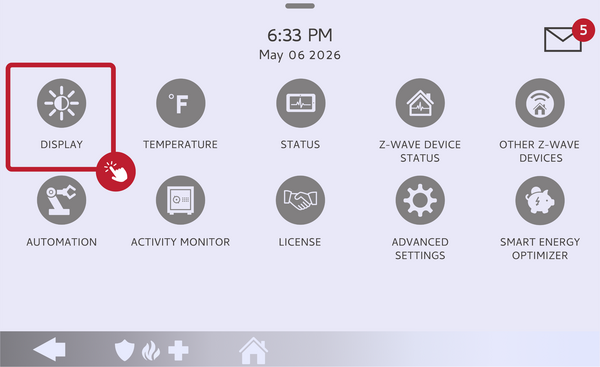 Touch Display on the Settings page.
-
Touch Font Size and choose a size. Touch the Font Size row to open the list of available sizes, then touch the size you want. The panel applies it immediately, so you can see how the text looks and pick another size if you prefer.
Touch the Font Size row and choose your size.
Tips
If the text feels hard to read, try the largest size first and step down until menus fit comfortably. Because Font Size sits on the same Display page as Brightness Level and Adaptive Brightness, you can fine-tune all of your readability settings in one place. The change stays in effect until you set a different size.
Changing the font size on the IQ Panel 5 makes the display easier to read at whatever distance works for you. For help with font size or other display settings on your IQ Panel 5, contact the Alarm Grid support team. We are here Monday through Friday from 9:00 AM to 8:00 PM Eastern Time. Email us at support@alarmgrid.com, call us at 888-818-7728, or visit our website and chat with a live support agent.
Did you find this answer useful?
We offer alarm monitoring as low as $10 / month
Click Here to Learn MoreRelated Products


Related Categories
- Home Security Systems
- Home Security Systems
- Apartment Security Systems
- Small Business Security Systems
- Monitored Home Security Systems
- Smart Home Controllers
- DIY Wireless Security Systems
- Wireless Touchscreen Alarm Panels
- Answered