
How Do I Change Which Sirens Are Enabled on the IQ Panel 5?
To change which sirens are enabled on the IQ Panel 5, swipe down and touch Settings, then Advanced Settings, and enter your Installer Code. Next, touch Installation, then Sirens and Alarms, and set the Panel Sirens option to All Sirens On, All Sirens Off, or the temporary Installer-Test Mode.
About the Panel Sirens Setting
The Panel Sirens setting on the IQ Panel 5 (available in AT&T LTE and Verizon LTE) is the master control for whether the built-in siren sounds during alarms. It is handy when you need to silence the siren for testing or service, or turn it back on afterward, without touching any of your other security system programming. There are three modes to choose from:
| Mode | What it does |
|---|---|
| All Sirens On Default |
Enables the siren for all alarms. This is the standard setting for a fully protected system. |
| All Sirens Off | Disables the siren for all alarm types except life-safety devices, including any hardwired or wireless external sirens. |
| Installer-Test Mode | Silences all sirens, including external ones, for 30 or 60 minutes, then re-enables them automatically. Good for testing. |
Beyond this master control, the Sirens and Alarms menu also has individual toggles for certain alarm types, so you can fine-tune which specific events produce a siren rather than turning everything on or off at once.
Before You Begin
The Panel Sirens setting is in the Sirens and Alarms menu, which requires the Installer Code (1111 by default) or Dealer Code (2222 by default). The steps below use the Installer Code. Keep in mind that All Sirens Off still allows life-safety sirens to sound, and Installer-Test Mode is temporary, so the sirens come back on their own after the time you select.
Change Which Sirens Are Enabled
-
Swipe down and touch Settings. Swipe down from the top of the screen to open the Settings Tray, then touch SETTINGS.
 Swipe down from the top of the screen to open the Settings Tray.
 Touch Settings in the Settings Tray.
-
Touch Advanced Settings and enter your Installer Code. Touch ADVANCED SETTINGS, then enter your Installer Code (1111 by default). The Dealer Code (2222) works here too. The panel advances automatically after a valid code.
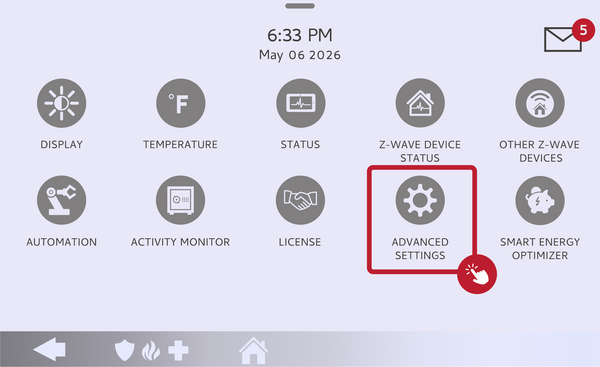 Touch Advanced Settings.
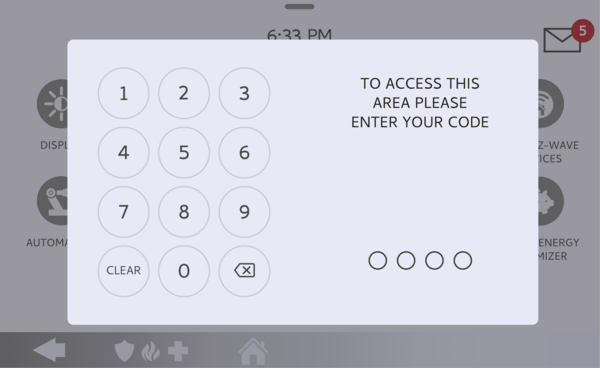 Enter your Installer Code (1111 by default).
-
Touch Installation, then Sirens and Alarms. Touch INSTALLATION, then touch SIRENS AND ALARMS and find the Panel Sirens setting.
Touch Sirens and Alarms, then find Panel Sirens. -
Set the Panel Sirens mode. Touch Panel Sirens and choose All Sirens On, All Sirens Off, or Installer-Test Mode. If you pick Installer-Test Mode, select the 30 or 60 minute duration. Your choice takes effect right away.
Choose All Sirens On, All Sirens Off, or Installer-Test Mode.
Tips
For finer control than the master setting, the Sirens and Alarms menu has individual siren toggles, such as the Severe Weather Siren Warning and the Water/Freeze/Temperature Siren, so you can decide exactly which alarm types produce a siren versus just a chime or tone. Remember that All Sirens Off does not silence life-safety devices, and Installer-Test Mode always re-enables the sirens on its own, so it is the safer choice when you only need quiet temporarily. If you want to change how long the siren runs during an alarm instead, see our guide on how to change the siren timeout on the IQ Panel 5.
Changing which sirens are enabled on the IQ Panel 5 lets you control when the panel siren sounds. For help with the Panel Sirens setting or other alarm settings on your IQ Panel 5, contact the Alarm Grid support team. We are here Monday through Friday from 9:00 AM to 8:00 PM Eastern Time. Email us at support@alarmgrid.com, call us at 888-818-7728, or visit our website and chat with a live support agent.
Did you find this answer useful?
We offer alarm monitoring as low as $10 / month
Click Here to Learn MoreRelated Products


- Answered