
How Do I Clear a Duress Code Alarm on the 2GIG GC Touch?
To clear a duress alarm on the 2GIG GC Touch, tap the Notification icon in the top-right corner, then select the Alarm tab. Next, tap Clear or Clear All. An uncleared duress alarm will not prevent the system from arming, but clearing it removes the alert from your notification log screen.
Understanding Duress Alarms
A duress alarm on the 2GIG GC Touch (available in AT&T LTE and Verizon LTE versions) is triggered when someone uses a special Duress Code to arm or disarm the system. Using the Duress Code arms or disarms the system like any standard code. But, in addition the panel silently sends a panic signal to the central monitoring station. In addition to being silent, the panel does not display the fact that a signal is being sent. This allows a person under threat to alert authorities while appearing to comply with an intruder's demands.
The Duress Code is configured in the Special Users section of User Management and is typically set up by the system installer. When a Duress Code is used, the panel arms or disarms normally from the user's perspective, but a silent alarm signal is transmitted to the monitoring station. The duress alarm then appears in the Notifications area, where it can be acknowledged and cleared.
Steps to Clear a Duress Alarm
-
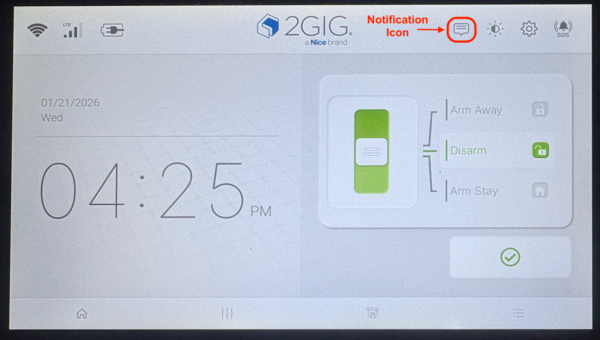
Tap the Notification icon. Look for the speech bubble icon in the top-right corner of the home screen. If new alarm events have occurred, this icon will flash orange to indicate unacknowledged alerts that require your attention. However, use of the Duress Code will not cause the icon to flash. In the image below, the pic was taken after using the Duress Code.
- Select the Alarm tab. The Notification screen displays three tabs: Alert, Alarm, and Dealer Message. Tap the Alarm tab to view any active alarm entries, including the duress alarm. Each alarm entry shows the issue type, date, time, and source.
-
Clear the alarm entry. Locate the duress alarm in the list and tap the Clear button next to it. Alternatively, tap Clear All in the bottom-right corner to dismiss all alarm notifications at once. Once cleared, any alarm entries will be removed from the list.
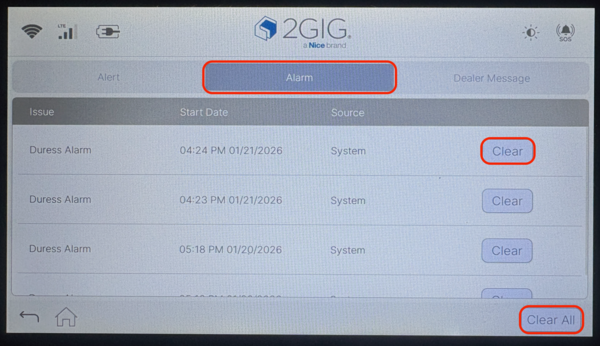
After clearing the Duress Alarm from Alarm Notifications, you can still see a record of it in the panel's Event History, as shown below: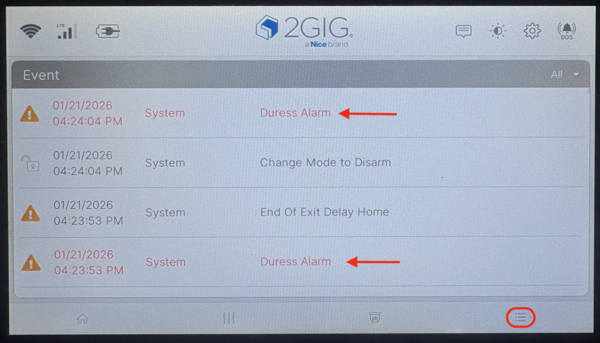
Important Considerations
When a duress alarm is activated, the central monitoring station receives a silent duress signal and may immediately dispatch emergency services, unless otherwise instructed during account setup. If the Duress Code was used in error, contact the monitoring station immediately. Provide your name, address, and false alarm password. Then let them know you need to cancel an accidental alarm.
Depending on the timing of your call, it is possible that the police will arrive before you have a chance to contact the monitoring station to cancel the response. Calmly answer the door and explain the situation. Remember, the monitoring station will not receive a signal telling them that you've cleared the duress alarm at the panel.
The Duress Code is managed separately from standard user codes in the Special Users section. Unlike regular users, duress entries cannot be added or deleted through the regular panel interface. Only the PIN code associated with an existing duress entry can be edited. This ensures the duress feature remains available as a critical safety option for all security system users.
Clearing a duress alarm on the 2GIG GC Touch removes the alert from the notification log, but not from event history. Remember to contact your monitoring company after any duress event to confirm the all-clear. For help with duress alarms or other security features on your GC Touch panel, contact the Alarm Grid support team at support@alarmgrid.com, Monday - Friday from 9:00 AM - 8:00 PM Eastern Time.
Did you find this answer useful?
We offer alarm monitoring as low as $10 / month
Click Here to Learn MoreRelated Products


Related Videos

Related Categories
- Home Security Systems
- Home Security Systems
- Apartment Security Systems
- DIY Wireless Security Systems
- Touchscreen Alarm Panels
- Touchscreen Alarm Panels
- Small Business Security Systems
- Wireless Touchscreen Alarm Panels
- Answered