
How Do I Delete All of the Sensors on the IQ Panel 5 System?
To delete all sensors on the IQ Panel 5, swipe down and touch Settings, then Advanced Settings, and then enter your Installer Code. Next, touch Installation, then Installer Settings, scroll down to the Delete All Sensors option, and confirm to erase every programmed sensor all at once here.
About Delete All Sensors
Delete All Sensors on the IQ Panel 5 (available in AT&T LTE and Verizon LTE) wipes every security sensor and Bluetooth device programmed into the panel in one step. It is a bulk action meant for a fresh start, such as decommissioning a system, clearing out an old sensor list before a full reconfiguration, or preparing the panel for a new owner. This is far faster than deleting zones one at a time, but it is also permanent, so it is a tool to use deliberately on your security system.
This action cannot be undone. Once you confirm, all security sensors and paired Bluetooth devices are gone from the panel, and you would have to enroll each one again from scratch to get them back. Note that Delete All Sensors does not touch your Z-Wave devices, which have their own separate reset, and it is not the same as a full Master Reset, which erases everything on the panel.
Before You Begin
Delete All Sensors is in the Installer Settings, which require the Installer Code (1111 by default) or Dealer Code (2222 by default). The steps below use the Installer Code. Because this erases every sensor and cannot be reversed, only do it if you truly want to clear the whole sensor list. If you just need to remove one device, see our guide on how to delete a single sensor on the IQ Panel 5 instead rather than wiping them all.
Delete All Sensors
-
Swipe down and touch Settings. Swipe down from the top of the screen to open the Settings Tray, then touch SETTINGS.
 Swipe down from the top of the screen to open the Settings Tray.
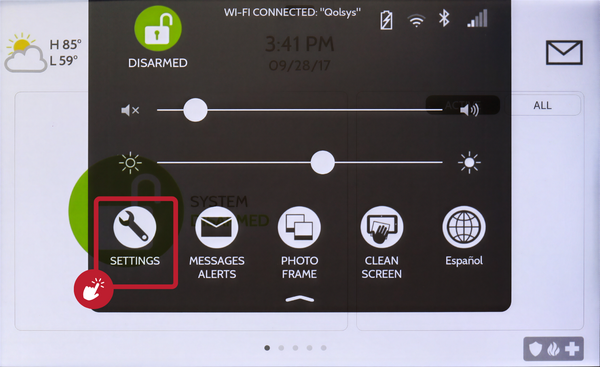 Touch Settings in the Settings Tray.
-
Touch Advanced Settings and enter your Installer Code. Touch ADVANCED SETTINGS, then enter your Installer Code (1111 by default). The Dealer Code (2222) works here too. The panel advances automatically after a valid code.
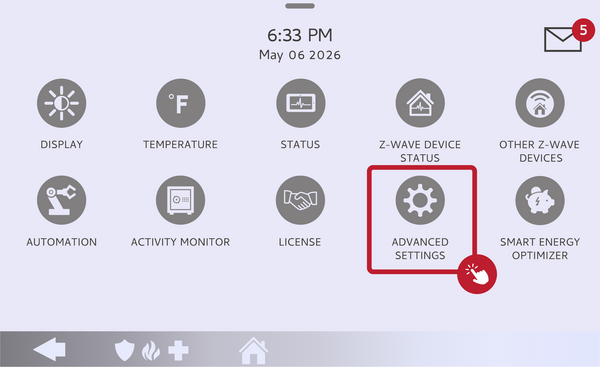 Touch Advanced Settings.
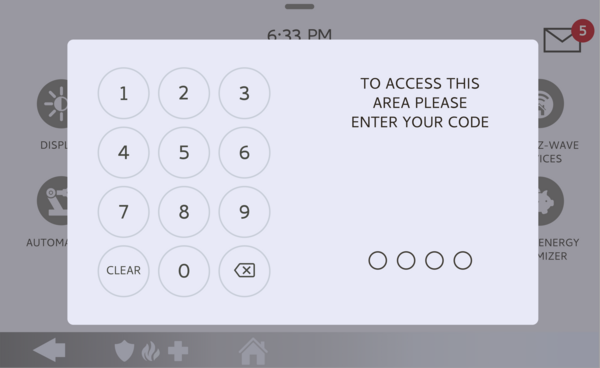 Enter your Installer Code (1111 by default).
-
Touch Installation, then Installer Settings. Touch INSTALLATION, then open INSTALLER SETTINGS and scroll down to the Delete All Sensors option near the panel's other reset options.
Open Installer Settings and scroll to Delete All Sensors. -
Delete all sensors and confirm. Touch Delete All Sensors, then confirm when the panel asks. Every security sensor and Bluetooth device is immediately removed from the panel, leaving the zone list empty.
Touch Delete All Sensors and confirm.
Tips
Before running this, it is smart to note down your current sensors and their zone names, since you will be rebuilding the list from nothing afterward. Remember that Delete All Sensors also removes paired Bluetooth devices, so any phones set up for touchless disarming will need to be paired again. If your goal is actually a clean slate for a new owner, a full Master Reset may be the better choice, since it clears everything rather than just the sensors.
Deleting all sensors on the IQ Panel 5 clears the entire sensor list in a single step. For help with Delete All Sensors or reconfiguring your system on your IQ Panel 5, contact the Alarm Grid support team. We are here Monday through Friday from 9:00 AM to 8:00 PM Eastern Time. Email us at support@alarmgrid.com, call us at 888-818-7728, or visit our website and chat with a live support agent.
Did you find this answer useful?
We offer alarm monitoring as low as $10 / month
Click Here to Learn MoreRelated Products


- Answered