
How Do I Enable Ambient Noise Detection on the IQ5 Hub?
To enable the Panel Ambient Noise Detector on the IQ5 Hub, swipe down and touch Settings, then Advanced Settings, and then enter your own Installer Code. Next, touch Installation, then Installer Settings, and enable the Panel Ambient Noise Detector to alert on loud noise above a set level.
About the Panel Ambient Noise Detector
The Panel Ambient Noise Detector on the IQ5 Hub (available in AT&T LTE and Verizon LTE) uses the panel's built-in microphones to monitor for loud noise above a set decibel threshold and generate an alert when it is crossed. It is aimed at multi-dwelling units, apartments, and short-term rentals, where a noise complaint can become a real problem. Instead of relying on a neighbor to report a loud party, the property owner gets a heads-up straight from the panel, which makes it a useful hosting tool to pair with your security system.
The threshold is set to 85 dB by default, and after an alert is generated the panel waits through a 30-second cool-down before it can alert again, which keeps a single noisy stretch from firing endlessly. It is disabled by default. There is one important limit to know first: the Panel Ambient Noise Detector cannot be enabled if the Panel Glass Break Detector is turned on, because both features use the same microphones, so you run one or the other.
Before You Begin
The Panel Ambient Noise Detector is in the Installer Settings, which require the Installer Code (1111 by default) or Dealer Code (2222 by default). The steps below use the Installer Code. If the Panel Glass Break Detector is currently on, you will need to disable it first, since the two cannot run at the same time. You can also adjust the Ambient Noise Threshold from its 85 dB default to make the alert more or less sensitive.
Enable the Panel Ambient Noise Detector
-
Swipe down and touch Settings. Swipe down from the top of the screen to open the Settings Tray, then touch SETTINGS.
 Swipe down from the top of the screen to open the Settings Tray.
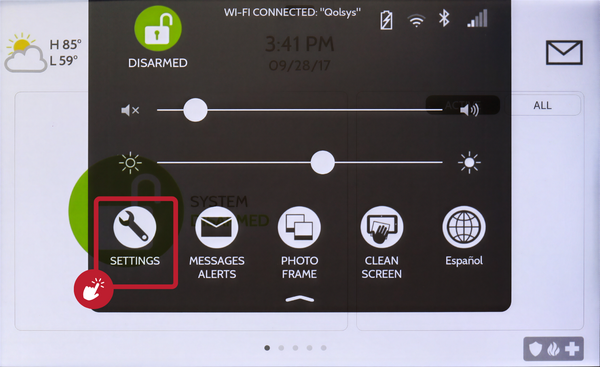 Touch Settings in the Settings Tray.
-
Touch Advanced Settings and enter your Installer Code. Touch ADVANCED SETTINGS, then enter your Installer Code (1111 by default). The Dealer Code (2222) works here too. The panel advances automatically after a valid code.
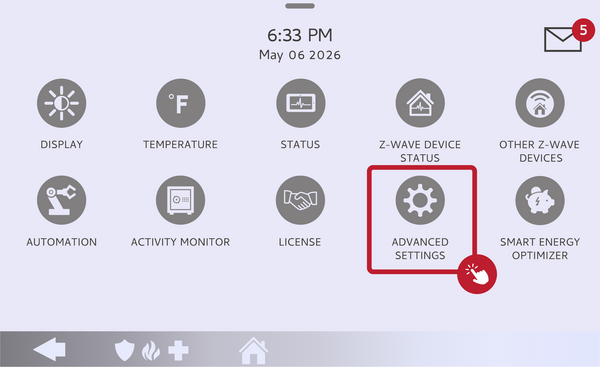 Touch Advanced Settings.
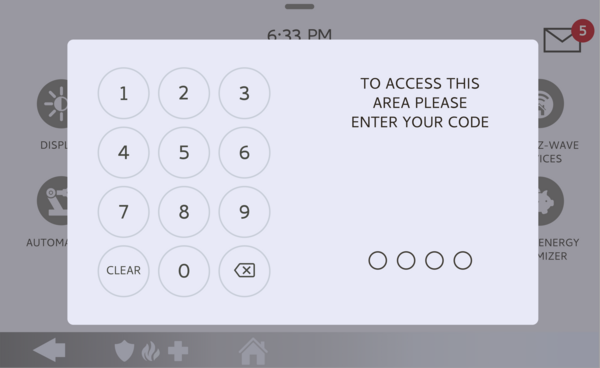 Enter your Installer Code (1111 by default).
-
Touch Installation, then Installer Settings. Touch INSTALLATION, then open INSTALLER SETTINGS and find the Panel Ambient Noise Detector setting.
Open Installer Settings and find Panel Ambient Noise Detector. -
Enable it and set the threshold. Toggle the Panel Ambient Noise Detector on, then set the Ambient Noise Threshold if you want something other than the 85 dB default. The panel now alerts when noise stays above that level. If it will not enable, turn off the Panel Glass Break Detector first.
Toggle it on and set the dB threshold.
Tips
The right threshold depends on the space, so if you get too many alerts, raise the dB level a bit, and if loud events are slipping by, lower it. The built-in 30-second cool-down means you will get one alert rather than a constant stream during a noisy stretch, which keeps notifications manageable. Remember this shares the panel's microphones with the Panel Glass Break Detector, so decide which one matters more for that location, since you cannot run both at once.
Enabling the Panel Ambient Noise Detector on the IQ5 Hub lets the panel alert you to excessive noise automatically. For help with the Panel Ambient Noise Detector or setting it up for a rental on your IQ5 Hub, contact the Alarm Grid support team. We are here Monday through Friday from 9:00 AM to 8:00 PM Eastern Time. Email us at support@alarmgrid.com, call us at 888-818-7728, or visit our website and chat with a live support agent.
Did you find this answer useful?
We offer alarm monitoring as low as $10 / month
Click Here to Learn MoreRelated Products


- Answered