
How Do I Find the Default Master Code on the IQ Panel 5?
To find the Master Code on the IQ Panel 5, note that the factory default Master Code is 1234. The Master Code grants access to User Management, Advanced Settings, and arming and disarming. For security purposes, change the default Master Code once the system is installed in the home.
About the Master Code
The IQ Panel 5 (available in AT&T LTE and Verizon LTE) ships from the factory with three default access codes. The Master Code is the primary user-facing code and is used to arm and disarm the system, access User Management to add or edit user codes, and enter Advanced Settings for user-related configuration. The default Master Code is 1234.
The Master Code sits between the Installer Code (1111 by default) and the Dealer Code (2222 by default) in terms of access level. A Master Code user can manage all household user codes, connect to WIFI, customize sounds, and access sensor settings. Unlike the Installer Code, the Master Code does not grant access to low-level installation settings like sensor enrollment or security arming behavior toggles. The Master Code is the code that homeowners and primary system users should have.
Where to Find the Default Master Code
The default Master Code on the IQ Panel 5 is 1234. This is the factory default setting for all IQ Panel 5 systems. To determine whether the code is still set to its default value, try accessing Advanced Settings using 1234. If the code has been changed, the person who programmed the system or the previous monitoring provider may be able to assist you in recovering or resetting it.
If you've recently moved into a home with an IQ Panel 5 and don't know the Master Code, Alarm Grid may be able to help. We offer no-contract monitoring services, and in some cases, we can help you regain access to the system. Contact us, and we'll help you locate the panel's IMEI number and determine whether it is currently registered with an alarm dealer.
If the panel is not registered, you can sign up for monitoring service with Alarm Grid, and we can usually register the system and reset the Master Code to its default value. You can then create a new Master Code of your choosing. Because our monitoring plans are contract-free, you can cancel service at any time if it doesn't meet your needs. If the panel is still registered with another alarm dealer, they will have to release the panel before any other company can register it. As long as the panel wasn't leased, they should have no problem doing so.
How to Access Advanced Settings with the Master Code
-
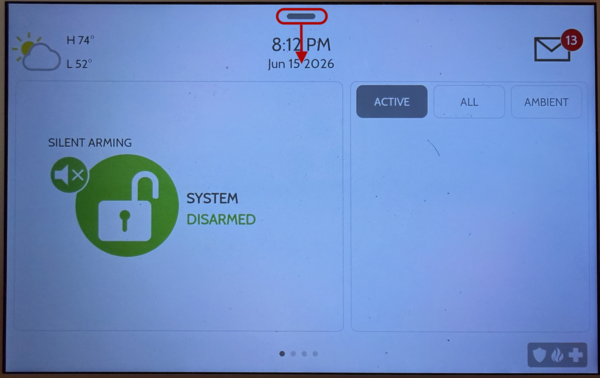
Access Settings. Touch above the date and time display on the panel screen, then swipe down. The Settings Tray opens showing the Settings button and other quick-access controls.
-
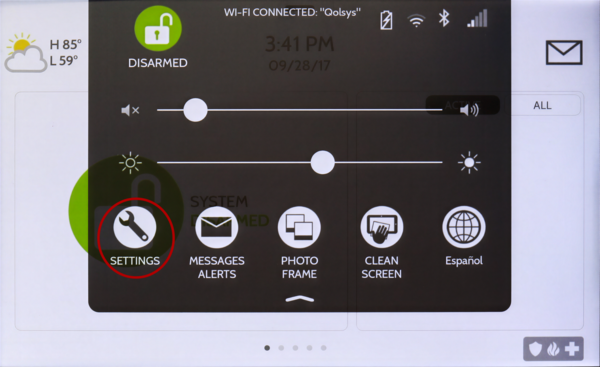
Go to Advanced Settings. Tap Settings. The Settings page opens showing Advanced Settings and other configuration options.
-
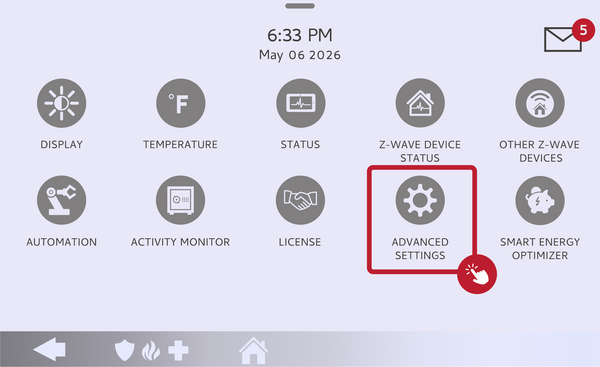
Access Advanced Settings. The code entry keypad appears on screen. Enter the current Master Code (default: 1234).
-
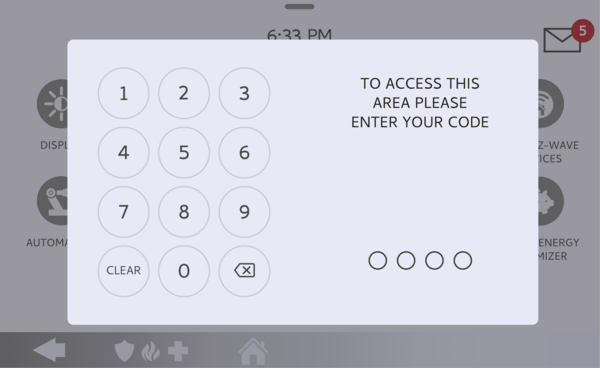
Login to Advanced Settings. Enter the Master Code (1234 by default). The Advanced Settings menu opens. With the Master Code, you have access to User Management, where you can edit the Master Code and program other codes, WIFI, Sound, and other options.
IQ Panel 5 Settings Tray opened by swiping down from the top of the screen
IQ Panel 5 Settings page overview
IQ Panel 5 Advanced Settings highlighted on the Settings page.
IQ Panel 5, enter the Master Code to access Master Code level Advanced Settings.

IQ Panel 5 Advanced Settings menu for the master user. The Available options differ when accessing this screen with the Installer or Dealer Code.
Why You Should Change the Default Master Code
The default Master Code of 1234 is the same on every panel that ships from the factory and is publicly documented. If you leave the Master Code set to the default, anyone who knows the default can arm and disarm your security system and access User Management to add their own codes.- Changing the Master Code to a unique value immediately after installation is one of the most important security steps for any new system. You can also add home automation devices and additional user codes once the system is properly secured.
Knowing the default Master Code on your IQ Panel 5 gives you immediate access to arm, disarm, and manage your security system on the IQ Panel 5.
- For help with Master Code access or other configurations on your IQ Panel 5, contact the Alarm Grid support team. We are here Monday through Friday from 9:00 AM - 8:00 PM Eastern Time. Email us at support@alarmgrid.com, call us at 888-818-7728, or visit our
website and chat with a live support agent (available from 9:00 AM - 6:00 PM Eastern).
Did you find this answer useful?
We offer alarm monitoring as low as $10 / month
Click Here to Learn MoreRelated Products


- Answered