
How Do I Register the SIM Card on the 2GIG GC Touch?
To register the SIM card on the 2GIG GC Touch, provide your alarm dealer with the panel Serial Number so they can create your Alarm.com account. After they complete activation, run a cell test at the panel to finish registration and confirm that the LTE communicator has a reliable signal.
The 2GIG GC Touch (available in AT&T LTE or Verizon LTE) uses an Alarm.com LTE cellular communicator that requires activation by your alarm dealer. End users cannot register or activate the SIM card themselves. Your dealer must create your Alarm.com account using the serial number from your panel and enable service before the panel can use cellular communication. The dealer will need you to provide the communicator serial number from your system.
You can locate the serial number directly on the GC Touch panel through the Settings menus. This allows you to quickly provide the correct number to your alarm dealer so they can complete the registration process. After the dealer enables the communicator through their Alarm.com portal, you can run a System Test at the panel to force a connection attempt, which helps complete the registration and confirm proper cellular operation.
- Contact your alarm dealer. The SIM can only be registered by the dealer through the Alarm.com dealer portal, where they must activate the communicator and link it to your account.
-
Find your communicator serial number. On the panel, at the top right, tap Settings > when prompted enter the Installer Code (default is 1561) > Equipment Management > System Test > Cellular Test. The communicator serial number is shown on this screen. Once your alarm dealer has activated the SIM, you can run a cellular test from this screen to complete the activation.
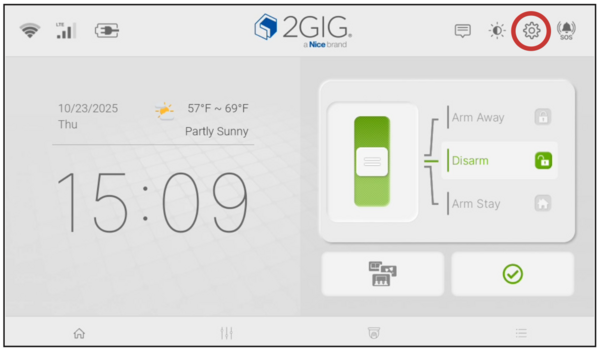
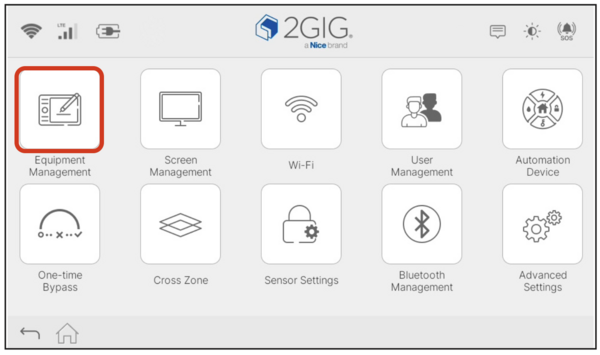
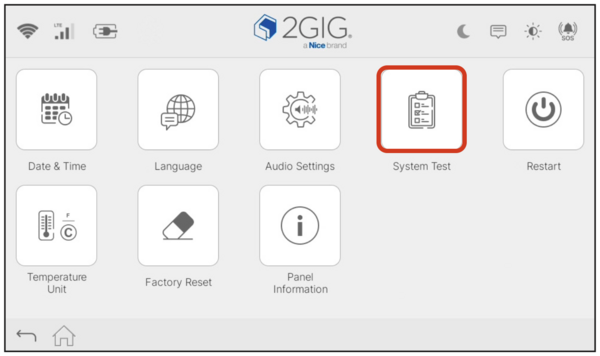
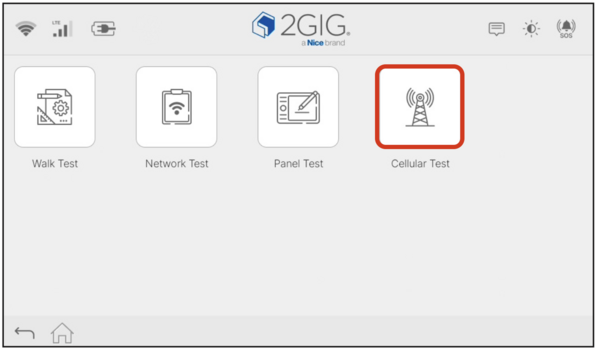

- Provide the serial number to your dealer. Your dealer uses this number to associate your GC Touch with your account and activate the communicator on Alarm.com so the radio can register and begin service.
- Allow the dealer to complete activation. Only your alarm dealer can finalize SIM registration and enable service in the Alarm.com dealer portal.
- Run a Cellular Test at the panel. Once your alarm dealer lets you know account creation is complete, press the Test button, as shown above. This forces the panel to check in with Alarm.com and complete registration.
- Verify cellular communication. Confirm that the panel shows proper signal strength and no longer displays any communication failure messages.

After activation is complete, the GC Touch will use WIFI as its primary communication method, with cellular serving as a reliable backup. A registered SIM ensures that alarm and system signals can still be transmitted even during WIFI outages. Even though the system uses WIFI as the primary communication path, you must register and activate the SIM in order to create an account. This is why you must choose a Gold Plan (Self or Full) or higher when signing up for service with Alarm Grid.
Did you find this answer useful?
We offer alarm monitoring as low as $10 / month
Click Here to Learn MoreRelated Products


Related Categories
- Answered
- Answered By
- Julia Ross