
How Do I Rename a Z-Wave Device on a 2GIG GC Touch Panel?
To rename a Z-Wave device on the 2GIG GC Touch, disarm the panel, tap Settings, then enter the Installer Code (1561 by default), and tap Enter (↵). Navigate to Automation Device, select Device List, then tap the device name field and use the on-screen keyboard to type a new descriptive name.
About Z-Wave Devices on the GC Touch
The 2GIG GC Touch, (available in AT&T LTE and Verizon LTE versions) includes a built-in Z-Wave Plus controller for home automation. You can connect smart locks, lights, thermostats, and other Z-Wave devices. Once added, devices can be automated by schedule, or alarm system event. Giving devices clear names helps identify them when controlling your smart home through the touchscreen or when using the Alarm.com app.
Steps to Rename a Z-Wave Device
- Disarm the system. The panel must be disarmed before accessing Settings. Slide the arm slider to the middle Disarmed position then enter your User Code.
-
Tap Settings. Locate the gear icon in the top-right corner of the home screen and tap it to open the Settings menu.
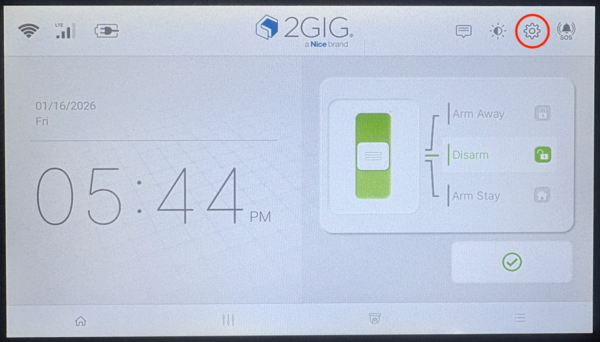
- Enter a Valid Code. When prompted, enter the Installer Code (1561 by default), or the Master Code (1111 by default) then tap Enter (↵). The Settings menu will appear with various configuration options, depending on the code used.
-
Tap Automation Device. This option manages all Z-Wave smart home devices connected to the panel.
-
Tap Device List. The panel displays all enrolled Z-Wave devices with their current names.
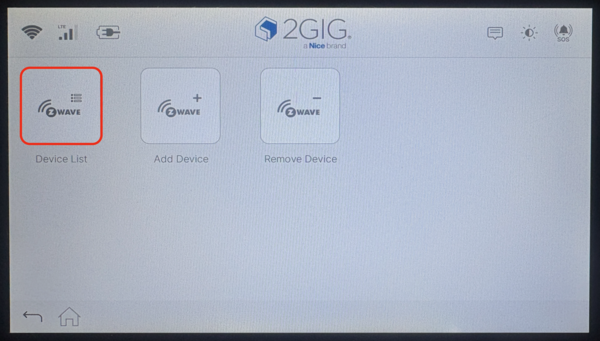
- Tap the device name. Select the device you want to rename. Tapping the name field opens an on-screen keyboard.
- Type the new name and tap Submit. Enter a descriptive name like Front Door Lock or Living Room Light. Press Submit to save the change. The device list will update to show the new name.
The image below shows the Settings screen when the Master Code is used to access it. The Installer Settings screen has a few more available options.

Renaming Z-Wave devices on the 2GIG GC Touch makes controlling your smart home easier. Clear device names help you quickly identify lights, locks, and thermostats. For help with Z-Wave configuration on your GC Touch panel, contact the Alarm Grid support team at support@alarmgrid.com, Monday - Friday from 9:00 AM - 8:00 PM Eastern Time.
Did you find this answer useful?
We offer alarm monitoring as low as $10 / month
Click Here to Learn MoreRelated Products


Related Categories
- Home Security Systems
- Home Security Systems
- Apartment Security Systems
- DIY Wireless Security Systems
- Touchscreen Alarm Panels
- Touchscreen Alarm Panels
- Small Business Security Systems
- Wireless Touchscreen Alarm Panels
- Answered