
How Do I Set Up Swinger Shutdown on the IQ5 Hub System?
To set up Swinger Shutdown on the IQ5 Hub, swipe down and touch Settings, then Advanced Settings, and enter your Installer Code. Next, touch Installation, then Installer Settings, and set Swinger Shutdown on or off, then choose the Swinger Shutdown Count for how many trips will be allowed.
About Swinger Shutdown
Swinger Shutdown limits how many times a single sensor on the IQ5 Hub (available in AT&T LTE and Verizon LTE) can trigger the alarm during one arming period. It is a false-alarm-reduction feature, so a faulty or repeatedly tripping sensor cannot set off alarm after alarm and cause repeated dispatches on your security system. Two settings work together to control it:
| Swinger Shutdown (On by default)Determines whether the panel limits how often one sensor can trip the alarm in a single arming period. When on, the sensor follows the count below. When off, a sensor may trip up to 128 times per arming period. |
| Swinger Shutdown Count (Default 1)Sets how many times the same sensor is allowed to trip the alarm during one arming period, from 1 to 6. Swinger Shutdown must be on for this to take effect. |
With the default settings, a given sensor can trip the alarm once per arming period, and further trips from that same sensor are ignored until the system is disarmed and armed again. This keeps one problem sensor from flooding the system while your other sensors keep working normally.
Before You Begin
These settings are in the Installer Settings, which require the Installer Code (1111 by default) or Dealer Code (2222 by default). The steps below use the Installer Code. Swinger Shutdown is enabled out of the box with a count of 1. For EN Grade 2 installations, the count should be set to 3.
Set Up Swinger Shutdown
-
Swipe down and touch Settings. Swipe down from the top of the screen to open the Settings Tray, then touch SETTINGS.
 Swipe down from the top of the screen to open the Settings Tray.
 Touch Settings in the Settings Tray.
-
Touch Advanced Settings and enter your Installer Code. Touch ADVANCED SETTINGS, then enter your Installer Code (1111 by default). The Dealer Code (2222) works here too. The panel advances automatically after a valid code.
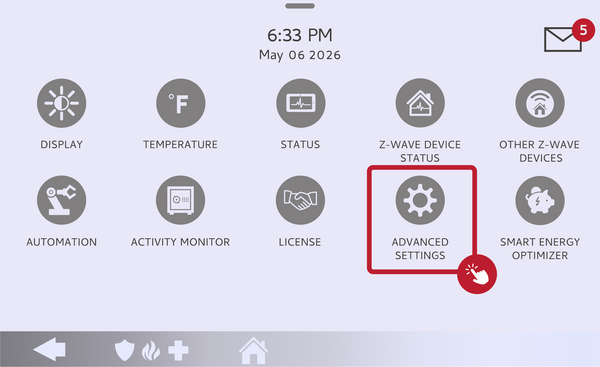 Touch Advanced Settings.
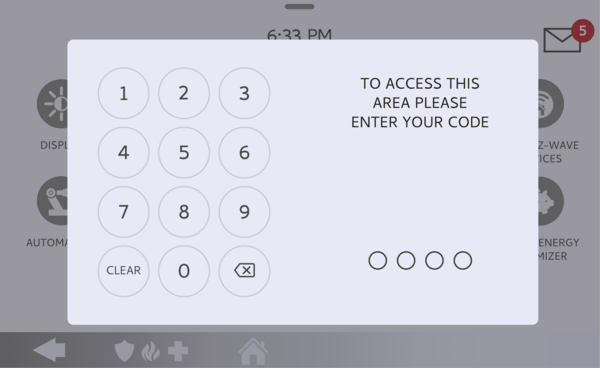 Enter your Installer Code (1111 by default).
-
Touch Installation, then Installer Settings. Touch INSTALLATION, then open INSTALLER SETTINGS and find the Swinger Shutdown settings.
Open Installer Settings and find Swinger Shutdown. -
Set Swinger Shutdown on or off. Toggle Swinger Shutdown on to limit repeat trips, or off to let a sensor trip freely. Leaving it on is recommended for false-alarm control.
Toggle Swinger Shutdown on or off. -
Set the Swinger Shutdown Count. Choose the Swinger Shutdown Count from 1 to 6 for how many times a single sensor may trip the alarm per arming period. The default is 1.
Choose a Swinger Shutdown Count from 1 to 6.
Tips
Swinger Shutdown only limits repeat trips from the same sensor; a different sensor tripping still triggers the alarm normally, so your protection stays intact. It pairs well with the Dialer Delay for cutting down false-alarm dispatches overall. Keep in mind that once a sensor hits its count, it stops reporting further alarms until you disarm and rearm, so if a sensor seems to have stopped alarming, disarming and rearming resets it for the next period.
Setting up Swinger Shutdown on the IQ5 Hub keeps one problem sensor from causing repeated false alarms. For help with Swinger Shutdown or other false-alarm settings on your IQ5 Hub, contact the Alarm Grid support team. We are here Monday through Friday from 9:00 AM to 8:00 PM Eastern Time. Email us at support@alarmgrid.com, call us at 888-818-7728, or visit our website and chat with a live support agent.
Did you find this answer useful?
We offer alarm monitoring as low as $10 / month
Click Here to Learn MoreRelated Products


- Answered