
How Do I Turn Off the Chime Sound on the IQ5 Hub System?
To turn off the chime on the IQ5 Hub, swipe down and touch Settings, then Advanced Settings, and enter your code. Next, touch Sound, and then Chime Settings. Toggle off All Chimes to silence every panel chime, or turn off just Sensor Chimes to mute only your door and window sensors here.
About the Chime
The IQ5 Hub (available in AT&T LTE and Verizon LTE) plays a chime each time a sensor is triggered while the system is disarmed, so you hear a tone when a door or window opens. It is a useful feature, but you may want it off at night, during a party, or if a busy entry door is chiming constantly. The panel lets you turn chimes off globally or narrow it down to just the type you want silenced.
The Chime Settings section gives you a few toggles. All Chimes is the global switch that controls every chime on the panel at once. Below it, Sensor Chimes covers your door, window, and motion sensors, Panel covers panel message tones, and Activity Sensor covers activity monitoring chimes. Turning off the right one lets you quiet a nuisance chime on your security system without silencing everything.
Before You Begin
Chime Settings live in the Sound menu under Advanced Settings, which uses the Installer Code (1111 by default) or Dealer Code (2222 by default). Turning off the chime does not affect your alarm response in any way; the siren still sounds on an alarm even with every chime disabled. This only changes the informational tones the panel plays as sensors open and close.
Turn Off the Chime
-
Swipe down and touch Settings. Swipe down from the top of the screen to open the Settings Tray, then touch SETTINGS.
 Swipe down from the top of the screen to open the Settings Tray.
 Touch Settings in the Settings Tray.
-
Touch Advanced Settings and enter your code. Touch ADVANCED SETTINGS, then enter your Installer Code (1111 by default) or Dealer Code (2222 by default). The panel advances automatically after a valid code.
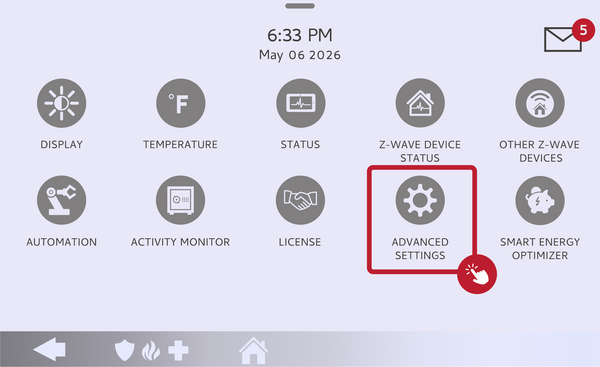 Touch Advanced Settings.
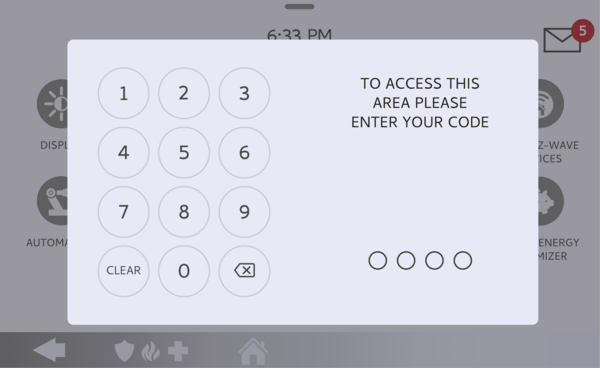 Enter your Installer Code (1111) or Dealer Code (2222).
-
Touch Sound, then Chime Settings. In Advanced Settings, touch SOUND, then scroll to the Chime Settings section.
Touch Sound, then find Chime Settings. -
Toggle off the chime. Toggle off ALL CHIMES to silence every chime at once. To keep some chimes but mute your door and window sensors, leave All Chimes on and toggle off SENSOR CHIMES instead. The change takes effect immediately.
Toggle off All Chimes, or just Sensor Chimes.
Tips
If only one door is the problem, you do not have to silence everything. Each sensor has its own Chime Type setting, and you can set that single sensor's chime to Off in its sensor settings while leaving the rest of your chimes on. This is the better approach when just one busy entry door is chiming too often. To bring chimes back later, return to the same Chime Settings screen and toggle them back on.
Turning off the chime on the IQ5 Hub lets you quiet the panel on your terms without affecting your alarm protection. For help with chime settings or other configurations on your IQ5 Hub, contact the Alarm Grid support team. We are here Monday through Friday from 9:00 AM to 8:00 PM Eastern Time. Email us at support@alarmgrid.com, call us at 888-818-7728, or visit our website and chat with a live support agent.
Did you find this answer useful?
We offer alarm monitoring as low as $10 / month
Click Here to Learn MoreRelated Products


Related Categories
- Answered