
How Do I Turn On PowerG Siren Trouble Beeps on IQ Panel 5?
To enable PowerG Siren Trouble Beeps on the IQ Panel 5, swipe down and touch Settings, then Advanced Settings, and then enter your own Installer Code. Next, touch Installation, then Installer Settings, and enable PowerG Siren Trouble Beeps so that your PowerG sirens chirp for troubles too.
About PowerG Siren Trouble Beeps
Trouble beeps are the periodic chirps a panel makes to remind you about a system trouble, like a low battery or a sensor that has lost supervision. By default the IQ Panel 5 (available in AT&T LTE and Verizon LTE) sounds those beeps from the panel itself. The PowerG Siren Trouble Beeps setting extends that to your PowerG sirens, so an auxiliary siren also chirps for a trouble, which is useful if a siren is in a part of the home where the panel cannot be heard on your security system.
This setting is disabled by default, which is why PowerG sirens do not play trouble beeps out of the box. When it is off, only the panel beeps for a trouble; when you enable it, your PowerG sirens join in. It is a good choice when you want the trouble reminder to be audible throughout a larger property, and you can simply leave it off if you would rather keep the beeping limited to the panel.
Before You Begin
PowerG Siren Trouble Beeps is in the Installer Settings, which require the Installer Code (1111 by default) or Dealer Code (2222 by default). The steps below use the Installer Code. You will also need at least one PowerG siren on the system for this to have any effect, since it only controls whether those sirens chirp for a trouble.
Enable PowerG Siren Trouble Beeps
-
Swipe down and touch Settings. Swipe down from the top of the screen to open the Settings Tray, then touch SETTINGS.
 Swipe down from the top of the screen to open the Settings Tray.
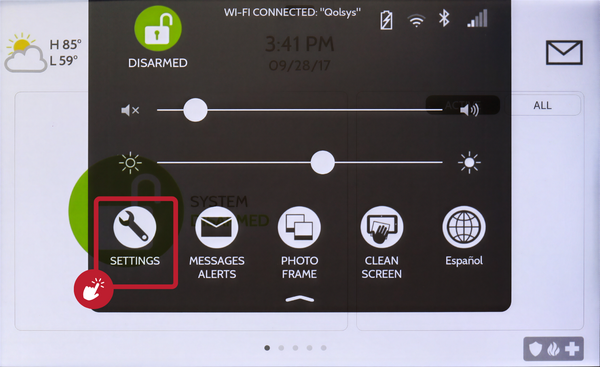 Touch Settings in the Settings Tray.
-
Touch Advanced Settings and enter your Installer Code. Touch ADVANCED SETTINGS, then enter your Installer Code (1111 by default). The Dealer Code (2222) works here too. The panel advances automatically after a valid code.
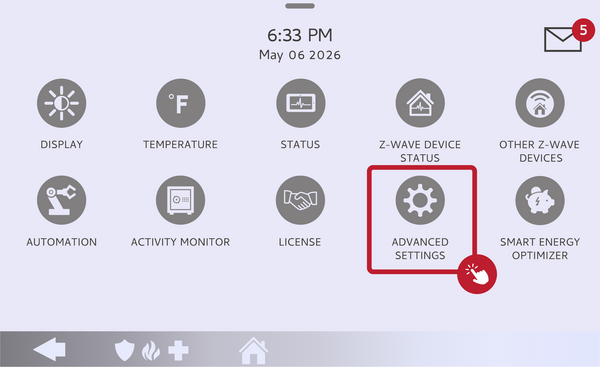 Touch Advanced Settings.
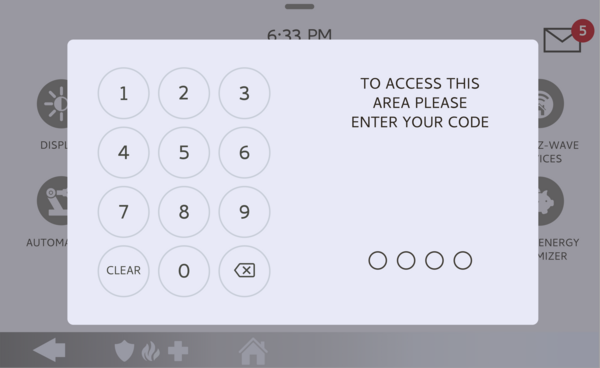 Enter your Installer Code (1111 by default).
-
Touch Installation, then Installer Settings. Touch INSTALLATION, then open INSTALLER SETTINGS and find the PowerG Siren Trouble Beeps setting.
Open Installer Settings and find PowerG Siren Trouble Beeps. -
Enable PowerG Siren Trouble Beeps. Toggle PowerG Siren Trouble Beeps on. Your PowerG sirens will now chirp along with the panel whenever there is a trouble condition. Toggle it off any time to keep trouble beeps on the panel only.
Toggle PowerG Siren Trouble Beeps on.
Tips
Enabling this makes the trouble reminder harder to miss in a large home, since the beeping is not limited to the panel. If you find the beeping too much, you can turn this setting back off to keep it on the panel alone, or adjust the panel's own trouble beeps. For how the panel's trouble beeps work and how to silence them, see our guide on how to turn off trouble beeps on the IQ Panel 5. Either way, it is best to resolve the underlying trouble rather than only quieting the beeps.
Enabling PowerG Siren Trouble Beeps on the IQ Panel 5 makes your PowerG sirens chirp for a system trouble. For help with PowerG Siren Trouble Beeps or trouble conditions on your IQ Panel 5, contact the Alarm Grid support team. We are here Monday through Friday from 9:00 AM to 8:00 PM Eastern Time. Email us at support@alarmgrid.com, call us at 888-818-7728, or visit our website and chat with a live support agent.
Did you find this answer useful?
We offer alarm monitoring as low as $10 / month
Click Here to Learn MoreRelated Products


- Answered