
How Do I Turn On the SIA Power Restoration on the IQ5 Hub?
To turn on SIA Power Restoration on the IQ5 Hub, swipe down and touch Settings, then Advanced Settings, and enter your Installer Code. Next, touch Installation, then Installer Settings, and enable SIA Power Restoration so the panel ignores sensor activity for 60 seconds at power restore.
About SIA Power Restoration
SIA Power Restoration is a false-alarm-reduction feature on the IQ5 Hub (available in AT&T LTE and Verizon LTE). When power is restored after an outage, sensors can briefly report activity as they power back up, and that can cause a nuisance alarm. With this setting enabled, the panel holds and ignores all sensor activity for 60 seconds after power comes back, giving your security system a moment to settle before it acts on any sensor signals.
The feature is disabled by default, so out of the box the panel responds to sensors immediately when power returns. Turning it on follows the SIA false alarm guidelines and is a smart choice in areas with frequent power blips. The 60-second hold applies only right after power is restored and does not change how sensors behave during normal operation.
Before You Begin
SIA Power Restoration is in the Installer Settings, which require the Installer Code (1111 by default) or Dealer Code (2222 by default). The steps below use the Installer Code. There is also a separate ULC Commercial Power Restoration setting that ignores sensor activity for 120 seconds, intended for commercial installations rather than typical homes.
Turn On SIA Power Restoration
-
Swipe down and touch Settings. Swipe down from the top of the screen to open the Settings Tray, then touch SETTINGS.
 Swipe down from the top of the screen to open the Settings Tray.
 Touch Settings in the Settings Tray.
-
Touch Advanced Settings and enter your Installer Code. Touch ADVANCED SETTINGS, then enter your Installer Code (1111 by default). The Dealer Code (2222) works here too. The panel advances automatically after a valid code.
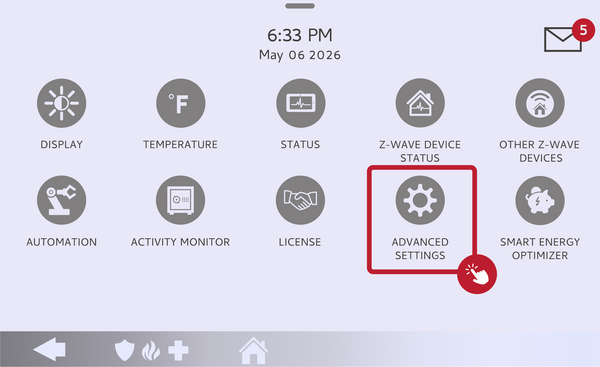 Touch Advanced Settings.
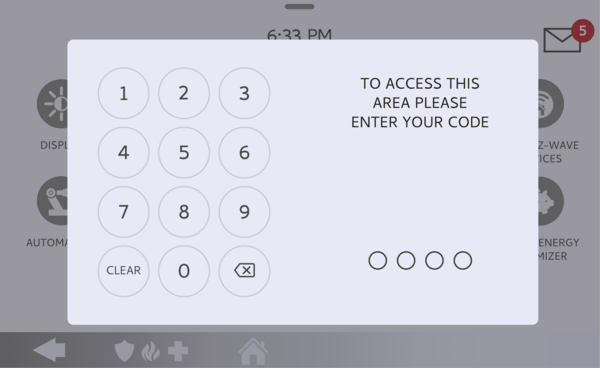 Enter your Installer Code (1111 by default).
-
Touch Installation, then Installer Settings. Touch INSTALLATION, then open INSTALLER SETTINGS and find the SIA Power Restoration setting.
Open Installer Settings and find SIA Power Restoration. -
Enable SIA Power Restoration. Toggle SIA Power Restoration on. From now on, the panel will ignore all sensor activity for 60 seconds after power is restored. Toggle it off here any time to return to the default behavior.
Toggle SIA Power Restoration on.
Tips
SIA Power Restoration pairs well with the panel's other false-alarm tools, so if nuisance alarms are a concern you may also want to review your Swinger Shutdown settings on the IQ5 Hub, which limit repeat trips from a single sensor. The 60-second hold is brief and only happens right after power returns, so it does not meaningfully reduce your protection. If your system must meet a specific commercial standard, the ULC Commercial Power Restoration option extends the hold to 120 seconds.
Turning on SIA Power Restoration on the IQ5 Hub helps prevent false alarms when power comes back after an outage. For help with SIA Power Restoration or other false-alarm settings on your IQ5 Hub, contact the Alarm Grid support team. We are here Monday through Friday from 9:00 AM to 8:00 PM Eastern Time. Email us at support@alarmgrid.com, call us at 888-818-7728, or visit our website and chat with a live support agent.
Did you find this answer useful?
We offer alarm monitoring as low as $10 / month
Click Here to Learn MoreRelated Products


- Answered