
How Do I Change the Cell Signal Timeout on the IQ5 Hub?
To change the Loss of Cell Signal Timeout on the IQ5 Hub, swipe down and touch Settings, then Advanced Settings, and enter your Installer Code. Next, touch Installation, then Installer Settings, and set the Loss of Cell Signal Timeout to anywhere from 10 to 120 minutes for your own panel.
About the Loss of Cell Signal Timeout
The Loss of Cell Signal Timeout on the IQ5 Hub (available in AT&T LTE and Verizon LTE) is how long the panel waits after losing its cellular connection before it reports a loss of cell signal. This window keeps a brief, normal dropout from immediately flagging a trouble, while still making sure a real loss of the cellular monitoring path gets reported. It is set to 30 minutes by default and can be adjusted from 10 to 120 minutes.
A shorter timeout means the panel tells you about a cellular problem faster, while a longer one avoids nuisance troubles in areas where the signal naturally comes and goes. Because the cellular path is a key way your security system reaches the monitoring station, this setting only changes how quickly a loss is reported, not whether the panel uses cellular.
Before You Begin
The Loss of Cell Signal Timeout is in the Installer Settings, which require the Installer Code (1111 by default) or Dealer Code (2222 by default). The steps below use the Installer Code. Note that certain UL commercial burglary installations use a fixed cellular supervision time rather than this adjustable window, so check your requirements if your system must meet that standard.
Change the Cell Signal Timeout
-
Swipe down and touch Settings. Swipe down from the top of the screen to open the Settings Tray, then touch SETTINGS.
 Swipe down from the top of the screen to open the Settings Tray.
 Touch Settings in the Settings Tray.
-
Touch Advanced Settings and enter your Installer Code. Touch ADVANCED SETTINGS, then enter your Installer Code (1111 by default). The Dealer Code (2222) works here too. The panel advances automatically after a valid code.
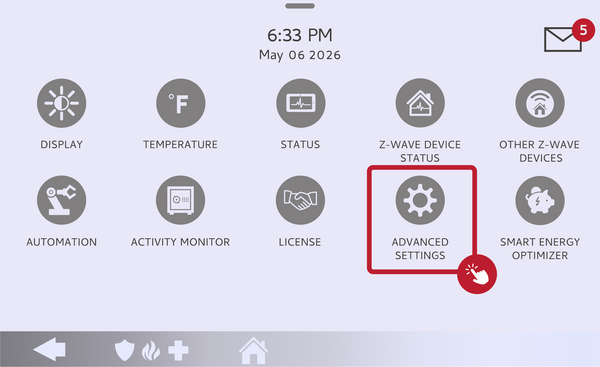 Touch Advanced Settings.
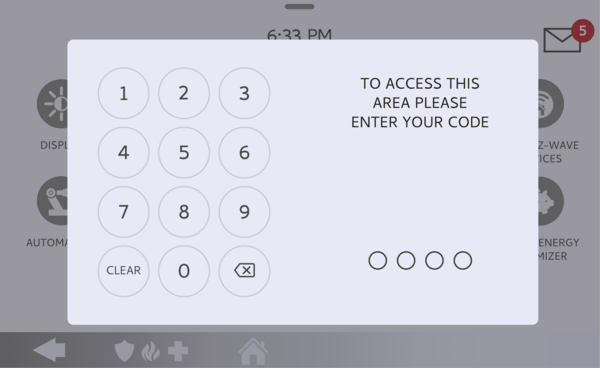 Enter your Installer Code (1111 by default).
-
Touch Installation, then Installer Settings. Touch INSTALLATION, then open INSTALLER SETTINGS and find the Loss of Cell Signal Timeout setting.
Open Installer Settings and find Loss of Cell Signal Timeout. -
Set the Loss of Cell Signal Timeout. Touch Loss of Cell Signal Timeout and choose a value from 10 to 120 minutes. The panel will now wait that long after losing cellular signal before reporting a loss. The default is 30 minutes.
Choose a value from 10 to 120 minutes.
Tips
If you get occasional cell loss troubles that clear on their own, a longer timeout usually quiets them, since it gives the signal time to come back before the panel reports anything. If your signal is genuinely weak, a different mounting location or a cellular signal booster often helps more than changing this setting. This timeout covers only the cellular connection and is separate from the sensor supervision settings on the IQ5 Hub, which govern how long before a missing sensor is reported.
Changing the Loss of Cell Signal Timeout on the IQ5 Hub lets you tune how quickly a lost cellular connection is reported. For help with the cell signal timeout or your cellular connection on your IQ5 Hub, contact the Alarm Grid support team. We are here Monday through Friday from 9:00 AM to 8:00 PM Eastern Time. Email us at support@alarmgrid.com, call us at 888-818-7728, or visit our website and chat with a live support agent.
Did you find this answer useful?
We offer alarm monitoring as low as $10 / month
Click Here to Learn MoreRelated Products


- Answered