
How do I mount a VISTAH3 panel?
To mount the First Alert VISTAH3, choose a secure, climate-controlled, indoor location, out of reach of visitors, but easy for you to access. Locate the cabinet's mounting holes, remove any necessary knockouts from the back of the cabinet, then secure the panel using the provided hardware.
The power wires should be as short as possible to prevent voltage drop between the DC power adaptor and the panel. So, choose a mounting location that is near a standard, non-switched power outlet. Secure the cabinet to clean drywall with six (6) screws and drywall anchors provided, if required. Follow these steps:
- Choose the location. Install the VISTAH3 indoors, in a climate-controlled area such as a utility room, closet, or structured wiring cabinet. Avoid attics, garages, and damp basements. Choose a location near a non-switched outlet for the DC power adaptor and with enough clearance to fully open the cabinet door. When using the cellular and/or WIFI communicator, be sure these communication modules will have adequate signal strength in the mounting location. If using wireless sensors, a central location within the protected premises will provide the best coverage for wireless sensors.
-
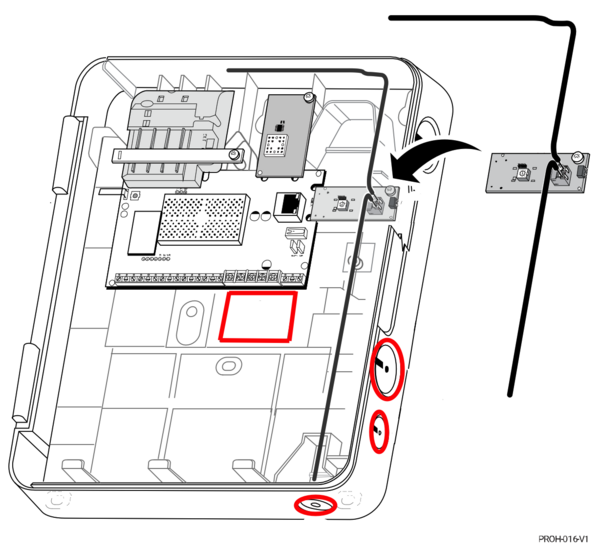
Plan wiring entry points. Identify where wires for power, keypad, siren, and sensors will enter. Plan to protect wires using zip ties or other means. The cabinet has access holes for zip ties in various locations such as the top, sides, and on either side of the battery position. If you plan to use the VISTAHTKVRWL wireless takeover module, pay special attention to the recommended wiring access knockouts (outlined in red). This is found on Page 9 of the VISTAH3 Install Guide. These knockouts are recommended to prevent interference with the takeover module's antennas. These antennas must be installed according to the VISTAHTKVRWL instructions.
-
Mark and drill pilot holes. With a level on top, hold the cabinet against the wall and mark hole positions through the pre-punched mounting slots. Make sure the cabinet is level before making your marks. Use appropriate anchors for drywall or masonry. For wooden studs, standard screws are sufficient. Don't forget to mark the hole for the rear cabinet tamper screw. Whenever possible, mount this screw to a stud to ensure the tamper knockout breaks free in the event someone tries to tear the panel off the wall.

- Mount the cabinet. Secure it firmly, ensuring it’s level and stable. If you use all of the available mounting holes and the rear tamper, you'll need a total of seven (7) screws. Do not over tighten the mounting screws. This can torque the cabinet plastic and prevent the cover from closing securely. Doing so may cause the cover tamper to activate even though the cabinet lid appears secured. The bottom edge of the cabinet should be about 4 - 5 feet above the floor for easy servicing.
- Route and secure wiring. Run all necessary low-voltage wires into the cabinet, leaving enough slack to make wiring connections to the panel. Once connections have been made, labeling as you go, bundle wires, using zip ties or similar items to secure and manage wiring.
- Mount the battery. Place the backup battery in the designated location at the bottom of the cabinet. Use Velcro or a large zip tie to secure the battery in place and prevent it from shifting or falling out when you open the cabinet door. Wait to connect the battery leads until all wiring is complete, expansion and communication modules have been added, and the DC power adaptor has been plugged in.

Mounting the VISTAH3 correctly is the first step in setting up your panel your way. Choosing the best possible mounting location will reduce the need for troubleshooting and lead to seamless protection for you, your loved ones, and your belongings.
Did you find this answer useful?
We offer alarm monitoring as low as $10 / month
Click Here to Learn MoreRelated Products

- Answered
- Answered By
- Julia Ross