
How Do I Set the Noise Detector Duration on the IQ5 Hub?
To set the Noise Detector Duration on the IQ5 Hub, swipe down and touch Settings, then Advanced Settings, and then enter your own Installer Code. Next, touch Installation, then Installer Settings, and then set the Noise Detector Duration with the Panel Ambient Noise Detector enabled first.
About the Noise Detector Duration
The Noise Detector Duration on the IQ5 Hub (available in AT&T LTE and Verizon LTE) sets how long the panel must detect noise above the threshold level before it generates a noise notification. In other words, the noise has to stay loud for that whole stretch of time, not just spike for a second, for the panel to alert you. This keeps a brief slam of a door or a quick shout from triggering a notification, so you only hear about sustained noise on your security system.
The duration ranges from 5 to 20 minutes and is set to 20 minutes by default. It works hand in hand with the Ambient Noise Threshold, which sets how loud counts as loud, while the duration sets how long that loudness must continue. The setting appears greyed out and cannot be changed until the Panel Ambient Noise Detector is enabled, so if you cannot select it, the detector is still turned off.
Before You Begin
The Noise Detector Duration is in the Installer Settings, which require the Installer Code (1111 by default) or Dealer Code (2222 by default). The steps below use the Installer Code. The Panel Ambient Noise Detector must be enabled for this to be selectable, so turn it on first if needed. See our guide on how to enable the Panel Ambient Noise Detector on the IQ5 Hub for that step.
Set the Noise Detector Duration
-
Swipe down and touch Settings. Swipe down from the top of the screen to open the Settings Tray, then touch SETTINGS.
 Swipe down from the top of the screen to open the Settings Tray.
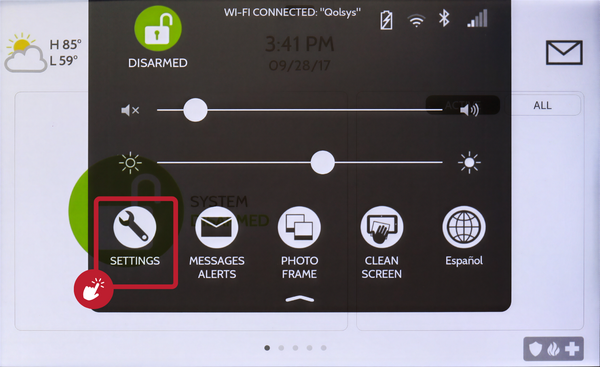 Touch Settings in the Settings Tray.
-
Touch Advanced Settings and enter your Installer Code. Touch ADVANCED SETTINGS, then enter your Installer Code (1111 by default). The Dealer Code (2222) works here too. The panel advances automatically after a valid code.
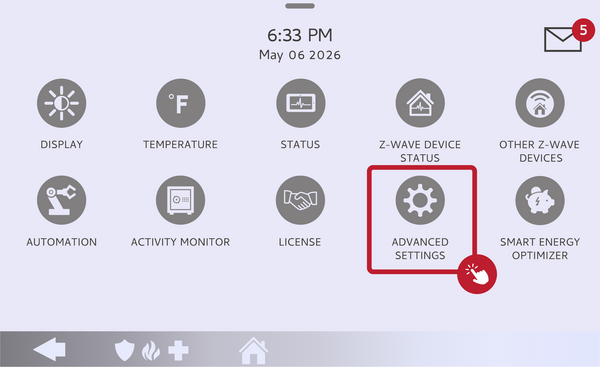 Touch Advanced Settings.
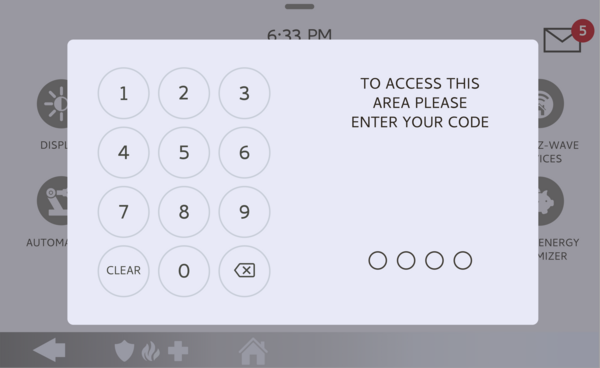 Enter your Installer Code (1111 by default).
-
Touch Installation, then Installer Settings. Touch INSTALLATION, then open INSTALLER SETTINGS and find the Noise Detector Duration, just below the Ambient Noise Threshold.
Open Installer Settings and find Noise Detector Duration. -
Choose the duration. Touch the Noise Detector Duration drop-down and select a length of time between 5 and 20 minutes. If it is greyed out, enable the Panel Ambient Noise Detector first, then set the duration.
Select a duration from 5 to 20 minutes.
Tips
A longer duration like the 20-minute default means the noise has to be sustained before you are alerted, which is good for ignoring short bursts and only flagging a genuine ongoing problem like a party. A shorter duration closer to 5 minutes alerts you faster but is more likely to catch briefer loud stretches. Pair this with the Ambient Noise Threshold so the two work together: the threshold decides how loud is loud, and the duration decides how long it has to stay that way before the panel notifies you.
Setting the Noise Detector Duration on the IQ5 Hub controls how long loud noise must last before the panel alerts you. For help with the Noise Detector Duration or noise monitoring on your IQ5 Hub, contact the Alarm Grid support team. We are here Monday through Friday from 9:00 AM to 8:00 PM Eastern Time. Email us at support@alarmgrid.com, call us at 888-818-7728, or visit our website and chat with a live support agent.
Did you find this answer useful?
We offer alarm monitoring as low as $10 / month
Click Here to Learn MoreRelated Products


- Answered