
How Do I Turn On the Wellness Page on the IQ5 Hub System?
To turn on the Wellness Page on the IQ5 Hub, swipe down and touch Settings, then Advanced Settings, and enter your Installer Code. Next, touch Installation, then Installer Settings, and enable the Wellness Page to add a Wellness page onto the panel's primary home screen interface here.
About the Wellness Page
The Wellness Page adds a dedicated wellness screen to the primary interface of the IQ5 Hub (available in AT&T LTE and Verizon LTE). It is the on-screen home for the panel's wellness and care features, which makes it a natural fit for aging-in-place and medical-monitoring setups. Turning it on puts a Wellness page in the rotation of pages you swipe through on your security system, right alongside the security and other pages.
The Wellness Page is disabled by default, and it is also the gateway to the Check-in/Check-out feature, which lets a visiting nurse check in and out and have their picture taken by the panel as a record of the visit. Check-in/Check-out cannot be turned on unless the Wellness Page is enabled first. Note that the Wellness Page cannot be enabled if Partitions are turned on, so you will need to choose between the two.
Before You Begin
The Wellness Page setting is in the Installer Settings, which require the Installer Code (1111 by default) or Dealer Code (2222 by default). The steps below use the Installer Code. If you intend to use the panel as a quiet medical alert, you will likely also want Wellness Support turned on, and remember that Partitions must be disabled for the Wellness Page to be available.
Turn On the Wellness Page
-
Swipe down and touch Settings. Swipe down from the top of the screen to open the Settings Tray, then touch SETTINGS.
 Swipe down from the top of the screen to open the Settings Tray.
 Touch Settings in the Settings Tray.
-
Touch Advanced Settings and enter your Installer Code. Touch ADVANCED SETTINGS, then enter your Installer Code (1111 by default). The Dealer Code (2222) works here too. The panel advances automatically after a valid code.
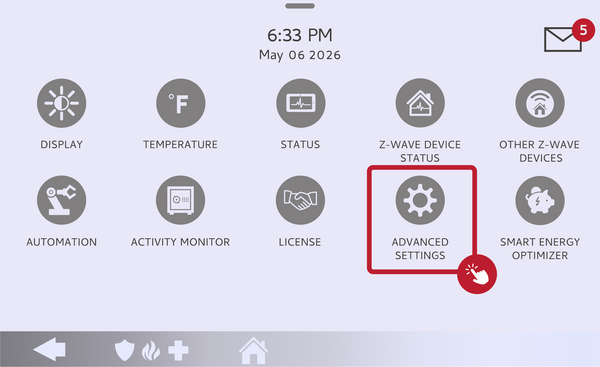 Touch Advanced Settings.
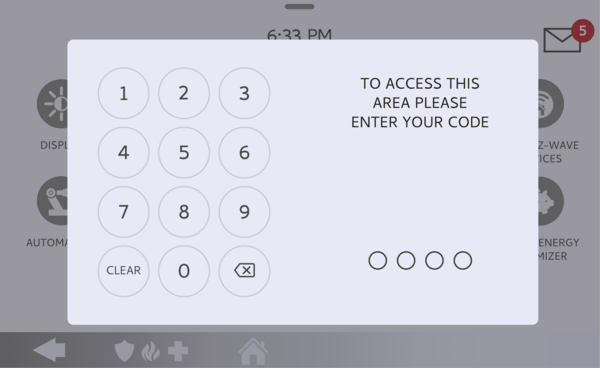 Enter your Installer Code (1111 by default).
-
Touch Installation, then Installer Settings. Touch INSTALLATION, then open INSTALLER SETTINGS and find the Wellness Page setting.
Open Installer Settings and find the Wellness Page. -
Enable the Wellness Page. Toggle the Wellness Page on. A Wellness page now appears in the panel's home screen rotation. From here you can also enable Check-in/Check-out if you want that feature. Toggle it off any time to remove the page.
Toggle the Wellness Page on.
Tips
The Wellness Page is the on-screen side of the panel's wellness features, while Wellness Support on the IQ5 Hub is what makes a pendant act like a quiet medical alert, so the two often go together in a care setup. If you want the nurse Check-in/Check-out buttons, enable the Wellness Page first, then turn on Check-in/Check-out in the same Installer Settings area. Keep in mind the whole wellness feature set, including this page, is unavailable while Partitions are enabled.
Turning on the Wellness Page on the IQ5 Hub adds a dedicated wellness screen to the panel for care and monitoring. For help with the Wellness Page or other wellness features on your IQ5 Hub, contact the Alarm Grid support team. We are here Monday through Friday from 9:00 AM to 8:00 PM Eastern Time. Email us at support@alarmgrid.com, call us at 888-818-7728, or visit our website and chat with a live support agent.
Did you find this answer useful?
We offer alarm monitoring as low as $10 / month
Click Here to Learn MoreRelated Products


- Answered