
What Is the Default Installer Code for a 2GIG GC Touch?
The default installer code for the 2GIG GC Touch is 1561. This code grants access to advanced programming functions, sensor configuration, and system settings inaccessible to other users. It is the highest administrative code on the panel and is meant for professionals or advanced DIY users.

Understanding Installer Code Functions
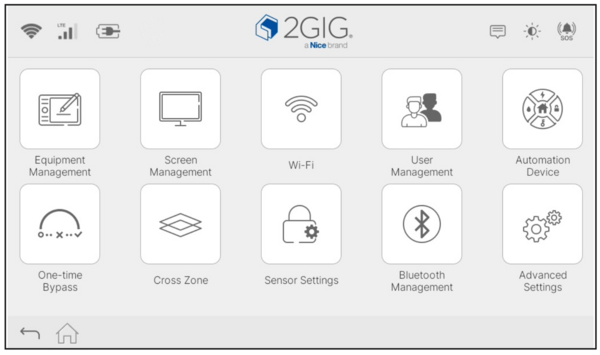
The installer code unlocks a complete settings menu with ten configuration categories on the 2GIG GC Touch (AT&T LTE and Verizon LTE versions available). These categories include Equipment Management, Screen Management, WIFI, User Management, Automation Device, One-time Bypass, Cross Zone, Sensor Settings, Bluetooth Management, and Advanced Settings. The master code provides access to only seven of these categories. This keeps critical programming functions separate from daily operation.
GC Touch Installer Settings:
GC Touch Master Settings:
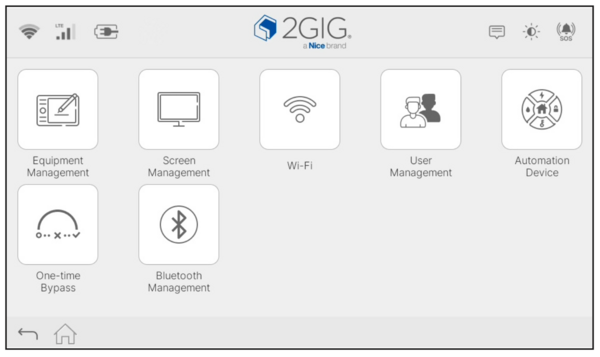
Use of the installer code is necessary during initial security system setup, sensor enrollment, communication configuration, and user code creation. The installer code also provides exclusive access to factory reset operations and system timing parameters that affect core panel behavior.
The panel only allows settings access when the system is disarmed. Tapping the Settings icon while the system is in Arm Away or Arm Stay mode displays an error message stating that the operation is not allowed while armed. This restriction prevents unauthorized configuration changes during protected periods.
Comparing Installer and Master Code Access
The 2GIG GC Touch uses two main access codes with different permission levels. The Master Code is 1111 by default and lets homeowners handle everyday tasks like managing secondary users, setting up WIFI, adjusting screen options, and using Bluetooth. It supports normal operation without opening up deeper programming.
The Installer Code allows nearly everything that the Master Code can do, plus full programming access. In Sensor Settings, you can manually add sensors or use Quick Add to enroll wireless sensors faster. Cross Zone settings let you link zones for added verification. Advanced Settings covers panel parameters, system timing, and changing the Installer Code.
Accessing Settings with the Installer Code
With the system disarmed, start from the Home screen and tap the gear icon in the upper right. When the panel asks for a code, enter the Installer Code. Remember, the default Installer Code is 1561. Tap the checkmark and if the correct code was entered, the Installer User Settings menu will appear.
The panel has a 30-minute inactivity timeout. If you leave the screen idle during programming, it will automatically return to the Home screen after thirty minutes. This helps prevent unauthorized access. To access programming again, you will need to repeat the process above.
Changing the Default Installer Code
Security best practices usually suggest changing the default Installer Code during setup. The default is 1561, and it is published in 2GIG documentation, so it is widely known. That said, leaving it unchanged is not as risky as it may sound because the Installer Code cannot disarm the system unless it was used to arm it. For most users, the chance of someone accessing programming just because the default code is still in place is fairly low.
If you still prefer to change the Installer Code, you can do so from the Installer menu. With the system disarmed, tap the gear icon, enter the current Installer Code, then open Advanced Settings. Select Installer Code to bring up the change screen.
Choose a code that matches your system’s PIN length. The GC Touch supports either four- or six-digit PINs, and the Installer Code must follow the same format. For example, if your panel is set for six-digit PINs, your new Installer Code must also be six digits.
The panel checks the new code before saving it. If it matches any existing user code, the Master Code, or the duress code, the panel will reject it and show an error. This prevents conflicts that could cause access issues later.
If you sell your home or transfer the system to a new owner, set the Installer Code back to the default 1561 before handing it over. This ensures the next owner can access full programming and get the most out of the system without needing dealer intervention. If you're an Alarm Grid monitored customer, let us know the system will be changing hands and we can reach out to the new owners with helpful information.
When to Use the Installer Code
You will need the Installer Code during the initial setup to program sensors, configure zones, and set up communication. To add door and window contacts, motion detectors, glass break sensors, or life safety devices*, open Sensor Settings. From there, the Installer Code lets you set zone numbers, names, response types, and other sensor options.
You will also need Installer level access to turn on and fine-tune advanced features. Options like cross zone detection, Bluetooth disarming, entry and exit delays, and communication settings all live in the Installer menu. Because these settings change how the system behaves, they should be adjusted carefully.
Some troubleshooting steps require the Installer Code as well. A factory reset can only be initiated from the Installer menu and restores the panel to default settings. You may also need to access Installer Settings to track down communication problems or fix sensor programming issues.
*Important Note: 2GIG E+ Extended Range 900 MHz sensors are not compatible with the 2GIG GC Touch.
Security Considerations
The Installer Code is the highest access level on the GC Touch, so it should be treated like an admin password. While the default 1561 code is widely known, it is not an automatic security problem because the Installer Code cannot disarm the system unless it was used to arm it. Still, anyone with the code could access programming and change settings, so it is worth thinking about who has the code and access to the system.
Keep the Installer Code limited to people who actually need to program the system. Most family members and day-to-day users only need the Master Code or a secondary User Code. If you decide to change the Installer Code, store it somewhere safe, like a password manager, since it is not used often and can be easy to forget when you need it later.
You may also want to change the Installer Code after a technician visit, or if you switch alarm monitoring companies. This is not required for everyone, but it adds another layer of protection if you want the system locked down as much as possible.
The GC Touch keeps everyday use and programming separate by using separate codes. The Master Code handles normal operation, while the Installer Code unlocks advanced settings. If you change the default code and later need help getting back into installer settings or adjusting programming, contact your alarm dealer. They can assist you. For Alarm Grid monitored customers, you can email us at support@alarmgrid.com. We're here Monday - Friday from 9:00 AM - 8:00 PM Eastern Time.
Did you find this answer useful?
We offer alarm monitoring as low as $10 / month
Click Here to Learn MoreRelated Products


Related Categories
- Answered
- Answered By
- Julia Ross