
How Do I Connect a Communicator to a VISTAH3?
To connect a communicator to a First Alert VISTAH3, install a PROLTE-A2 or PROLTE-V2 LTE radio for cellular reporting, connect an Ethernet cable, or add a PROWIFI or PROWIFIZW module for WIFI. Power down, insert the module, power up, activate it in AlarmNet 360, and run a communicator test.
The VISTAH3 supports multiple communication paths for reporting and remote services. Cellular reporting uses the PROLTE-A2 (AT&T) or PROLTE-V2 (Verizon) radios. IP reporting can consist of WIFI reporting using the PROWIFI (WIFI only) or PROWIFIZW (WIFI + Z-Wave) module, or wired IP through the built-in Ethernet jack. When both IP and cellular are enabled, this is dual-path reporting, where IP is used whenever available, and the system automatically falls back to cellular if IP is unavailable.
-
Choose your communication path. Decide whether you need LTE cellular (PROLTE-A2 or PROLTE-V2), WIFI IP (PROWIFI or PROWIFIZW), wired IP (Ethernet), or a dual-path combination for redundancy. The available communication paths are:
- IP (Ethernet) – only
- IP (WIFI) – only
- Cellular – only
- WIFI + Cellular
- Ethernet + Cellular
- Shut down the system safely. Before installing or replacing any communication module, the control panel must be fully powered down. From a PROWLTOUCH or PROWLTOUCHC home screen, and with the system disarmed, tap the Menu (≡) icon > Tools > Enter the 4-digit installer code (default 4112) > Scroll down and tap Shutdown System > OK. Wait 30 seconds for the panel to shut down. Within three minutes of shutdown, unplug the control panel's power supply to remove primary power, then disconnect the backup battery. Failure to remove the panel's primary power within three minutes will cause the panel to reboot automatically. If you don't have access to a touchscreen keypad, simply unplug the panel's DC Power Adapter and disconnect the red lead from the battery. Verify the system powers down by making sure the LEDs on the main board turn off.
-
Install the module in the correct slot. Seat the PROLTE radio on the top-left communicator slot and secure it with the provided strap and screw; if needed, attach the external antenna (PROLTE-ANT or CELL-ANT3DB*) and move the antenna selector switch from INT to EXT. For WIFI, install PROWIFI/PROWIFIZW on the top-right slot and secure it with the included screw.
PROLTE Module shown with the antenna switch set to EXT (external). The default setting is INT (internal):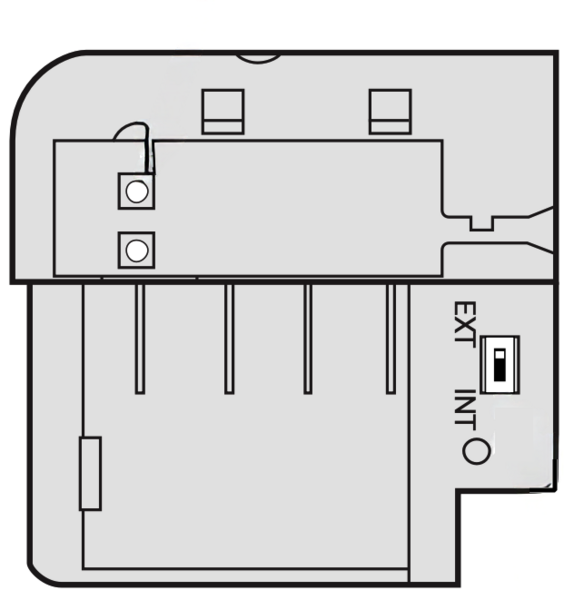
- Apply labels and restore power. Per the install guide, affix any required FCC/IC labels inside the cabinet. Reconnect the battery, then plug in the DC power adapter. Verify that the panel boots normally and the system LEDs indicate that it is powered.
- Activate and register via AlarmNet 360. Work with your alarm dealer to register your system. They will use AlarmNet 360 to create the account, enter the panel MAC/CRC, and enable the installed communicator(s), so be sure they know which communication paths you plan to use. Once they complete activation and commissioning the system can send central station reports, if full monitoring is being used. You can also set up your own personal notifications via text, email, and/or push notification and manage your system remotely.
- Configure WIFI or Ethernet networking. For WIFI, use the Total Connect 2.0 app’s Change Device WIFI Settings flow to join a 2.4 GHz network. For Ethernet, connect a Cat5e/6 cable to the VISTAH3 RJ45 port and confirm link/IP details in system information.
-
Run communicator and signal tests. From the panel’s Tools menu, perform a communicator test:
- From the main screen, tap Menu (≡) > Tools > Enter the Master or Partition Master code (default Master Code is 1234) > System Test.
- Tap Test Communicator. This will give you a list of options, depending on what communication modules you have installed and enabled in the system. The options may include:
- Test WIFI
- Test Ethernet
- Test Cellular
- Test All
-
Review Test Results. The display will show status and diagnostic information for each path:
- WIFI - Network name (SSID), signal strength (in dBm), speed, and Internet reachability.
- Ethernet - Connection status, DHCP, IP address, link speed, and Internet reachability.
- Cellular - Network, SIM status, signal strength (in dBm), registration status, and Internet reachability.
After activation and testing, your VISTAH3 can report reliably and support Total Connect 2.0 remote services. The features available to you will depend on which monitoring plan you choose. If you need help determining the best plan for your needs, our support team is happy to help. You can email us at support@alarmgrid.com. We're available Monday - Friday 9:00 AM - 8:00 PM EST/EDT. You can also reach us by phone at 888-818-7728.
*If you determine you need an external antenna, and you don't already have the coax cable needed to connect the communicator to the antenna, check out the AlarmNet CELL3DB5KT, CELL3DB25KT, or CELL3DB50KT antenna kits. These kits come with 5', 25', or 50' of coaxial cable, respectively.
Did you find this answer useful?
We offer alarm monitoring as low as $10 / month
Click Here to Learn MoreRelated Products

- Answered
- Answered By
- Julia Ross