Resideo Discontinues Weather on Some Tuxedo Keypads

Posted By

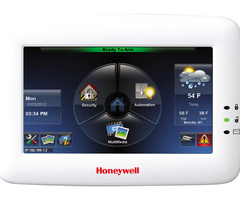
If you’ve followed the Tuxedo keypad over the years, you know the weather feature has had its ups and downs. First introduced, then paused, then brought back again, it’s been quite a journey. Now, Resideo has confirmed that weather updates will no longer be supported on certain Tux models.

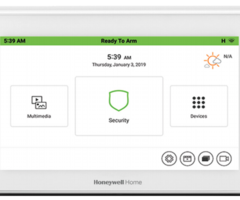
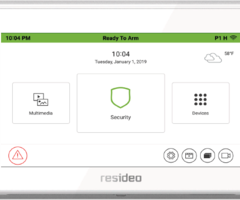
The announcement earlier this week confirmed that the TUX, TUXWIFIS, and TUXWIFIW will no longer support the weather display after August 15, 2025. However, the Honeywell Home TUXEDOW and Resideo TUXEDOWC, the newer touchscreens for the VISTA-21IPLTE, VISTA-20P, VISTA-15P, and VISTA-128BPT, will continue to support the feature.

If you’ve programmed automation scenes that use “Sunset” as a trigger, those automation scenes will no longer function on the affected TUX models. For example, if you have lights set to turn on automatically at sunset, that scene will no longer work now that the weather service is discontinued. The TUXEDOW and TUXEDOWC will continue to support "Sunset" as an automation trigger.

Quick Facts:

Which models no longer support weather as of August 15, 2025?

  • TUX
  • TUXWIFIS
  • TUXWIFIW

Which models still support weather?

  • Honeywell Home TUXEDOW
  • Resideo TUXEDOWC

What happens to my sunset scenes?

On affected TUX models, automation scenes that use “Sunset” as a trigger will stop working (e.g., lights set to turn on at sunset will no longer automatically do so).

What should I do if I’m affected?

If you rely on weather or sunset triggers, consider upgrading to a TUXEDOW or TUXEDOWC. If you don’t use those features, no action is required.

If you are an Alarm Grid customer and you have questions or need assistance, you can contact us at support@alarmgrid.com. Our support hours are Monday - Friday, 9:00 AM - 8:00 PM Eastern Time. Our support number is 888-818-7728.
Tags: , , , , , , , , , ,

Comments


That didnt work is there another code I can use
Thank you hopefully the weather app will come back im call my alarm company to contact honeywell
Go to settings, then system, the CS setup, enter installer code (try 4112), click options and the deselect weather forecast and click apply. Done
How did you remove the weather position
This is very sad. Thank you Kenneth for the tip on removing the weather portion from the home screen. That was a HUGE help. I'm surprised with all of the ups and downs of the weather feature no one has figured that out before. I just turned my weather feature off.
Hi Sccpsteve And Kenneth, Honeywell was not bought out by Resideo, but a By product of a spin off curated by Honeywell creating Resideo as its own independent company and portfolio of products. See more here. <a href="https://www.alarmgrid.com/blog/alarm-grid-welcomes-resideo">https://www.alarmgrid.com/blog/alarm-grid-welcomes-resideo</a> <a href="https://www.honeywell.com/us/en/press/2018/10/honeywell-completes-spin-off-of-resideo-technologies-incpt">https://www.honeywell.com/us/en/press/2018/10/honeywell-completes-spin-off-of-resideo-technologies-incpt</a> <a href="https://www.alarmgrid.com/faq/what-is-the-difference-between-ademco-and-resideo">https://www.alarmgrid.com/faq/what-is-the-difference-between-ademco-and-resideo</a> As they phase out the older product lines, other changes will most likely happening in the future.
I agree. Resideo seems to be neglecting the original Ademco Vista panels and putting most of the work into the newer more proprietary wireless panels. :( I at least discovered the option to remove the weather from the Home Screen so I won’t have to constantly see the error message on the screen. For others that may wish to remove the weather option from the screen, it’s under Settings&gt;System&gt;CS Setup&gt;Options:Weather Forecast. https://uploads.disquscdn.com/images/63feded5590530296f0a1dd296411f6805724ad35b0cd9065a0dc9af29c30258.jpg
It is absolutely annoying that Resideo bought out Honeywell only to do this. Shame. The new models are not great in my opinion. Honeywell needs to change.
Mine also stopped getting weather data on April 1, 2026. I had no idea this was something that wasn’t supposed to be working until I started googling the issue. It’s going to annoy me to no end that the Home Screen is going to have an error message where the weather should be! And I don’t like the interface/minimalist graphics of the newer touchpads. https://uploads.disquscdn.com/images/c520217201a54bb65aa55927479bc3dd66eb9728ecc7d7dac88b69bb3e1f8739.jpg
Update: Weather finally quit. I will reply to this thread if it ever comes online again. Edit: this is NOT an April fools prank.
Hi SccpSteve, If your TuxWifi is still getting weather, consider that a win. As for the rebooting, that may be another problem with the keypad starting to have issues.
Weather works fine for me as of November 2025. Many times, the keypad will reboot several times before establishing a Wi-Fi connection. Ancient technology. Running V5.3.21.0. https://uploads.disquscdn.com/images/1e98dcbb65840425d3a21abfb0852d0990924188771219de5be82005c03d9ccf.jpg

Related Products

Resideo Tuxedo-RES - Commercial Touchscreen Keypad w/ Built-In Z-Wave Plus Controller for VISTA
Resideo Tuxedo
Commercial Touchscreen Keypad w/ Built-In Z-Wave Plus Controller for VISTA
List Price: $556.00
Our Price: $362.99
Honeywell Tuxedo Touch WIFI - Talking Color Graphic Touchscreen Alarm Keypad
Honeywell Tuxedo Touch WIFI
Talking Color Graphic Touchscreen Alarm Keypad
Honeywell Home Tuxedo-RES - Residential Touchscreen Keypad w/ Built-In Z-Wave Plus Controller for VISTA
Honeywell Home Tuxedo
Residential Touchscreen Keypad w/ Built-In Z-Wave Plus Controller for VISTA
List Price: $556.00
Our Price: $362.99