March 2026 Archives

Posted By

Due to updates affecting AlarmNet360 connectivity, Honeywell Lyric security systems will see important changes as of April 15, 2026. While existing systems will continue to function normally, new system registration and remote programming features will no longer be supported after that date.
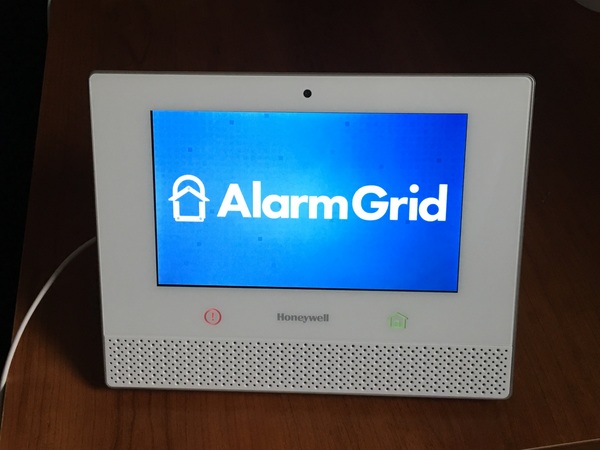
Honeywell Lyric Alarm System

Lyric panels that are already active and monitored will continue to arm, disarm, and report alarms to a central station, if enabled. Total Connect functionality also will not change. However, after April 15, no Lyric system can be newly registered for monitoring.

This is especially important for anyone considering purchasing a used Lyric panel. If it is not already registered, it cannot be activated, even for self-monitoring. In that case, the system will only function as a local noise-making alarm and a basic Z-Wave controller.

Because firmware updates for the Lyric are delivered through AlarmNet360, any monitored system should be updated to the latest version prior to the deadline. The Lyric panel was discontinued in 2021, and no further firmware updates will be provided at this point.

Although remote programming through AlarmNet360 will no longer be available, users may still be able to make local programming changes directly from the Lyric touchscreen. This includes adding or deleting sensors and adjusting system settings. Although Resideo has said that they don't recommend, and will not support, local programming changes with the Lyric after the deadline, it is likely that these changes will be possible.

If you have a Lyric system using SiX Sensors and are concerned about long-term panel reliability, it may be a good time to consider upgrading to a PRO Series panel. Sadly, there is no migration path between systems. Each sensor must be removed from the Lyric and then enrolled with the new panel. If the Lyric panel fails before the sensors are removed, they will remain locked to the non-functioning panel and must be replaced along with the system.

Alternatively, you can ensure that each sensor is powered up and within range of the Lyric, then default the system. This will cause the Lyric panel to send a signal to all SiX sensors releasing them. As long as a sensor receives this signal, it can then be added to a PRO Series panel. Once enrolled, the sensor will be updated to the PROSIX protocol and will no longer be compatible with any Lyric panel.

Please note, if you have any SiXFOB key fobs associated with the Lyric panel, be sure they are within range of the panel during the default. Once the default is completed, you'll need to press any button on the SiXFOB to complete the release process. Once completed, the SiXFOB is ready to be paired with the new PRO Series panel.

We wrote a series of posts last year about preparing for the eventual Lyric end-of-life. It is a four-part series, with part one linked above. The additional parts are linked at the bottom of each post. The series outlines your options with product recommendations, along with the pros and cons of each approach.

Tags: , , , , , , , , , , ,

Comments


Posted By

Alarm Grid is excited to introduce the Alarm.com ADC-V530, a next-gen indoor camera designed to rethink privacy, visibility, and control. With powerful analytics, built in spotlight, and a unique privacy shield, this camera delivers smarter awareness without compromising your peace of mind.

Alarm.com ADC-V530 shown with the LED on:

The ADC-V530 is not just another indoor camera. It tackles one of the biggest concerns people have always had with indoor video: privacy. Instead of just turning the camera on or off, this model includes an Automatic Privacy Shield that can physically block the lens when the system is disarmed or based on custom scenes and schedules. It is a big step forward, giving users real, visible control and peace of mind.

That privacy control goes even further with a physical button right on the camera. A quick tap opens or closes the shutter instantly, so you always know exactly when the camera can and cannot see. Even better, this works even if the camera is offline, so you are never dependent on an app or connection to maintain your personal privacy.

ADC-V530 Shown with the privacy shutter closed:


The reset (🔄) button, located on the back of the camera housing, is used to manually control the privacy shutter. Manual control is available as long as the camera has power. To toggle the shutter between open and closed, quickly press and release the button. This is the same button used to factory reset the camera. If the button is pressed and held for ten (10) seconds, a factory reset will begin. So, be careful when manually controlling the shutter.

A few things to keep in mind: if the privacy shutter is manually closed, it must also be manually opened. Automation schedules or system events will not change the shutter’s position once it has been manually set. If the camera loses power, the shutter will remain in its last position when power is restored.

Of course, privacy is only part of what makes this camera stand out. The ADC-V530 delivers sharp 4MP HDR video with a wide 110 degree field of view. That means clearer images in both bright and low light conditions, making it easier to see what is really happening inside your home.

HDR, or High Dynamic Range, is what helps the camera handle both very bright and very dark areas at the same time. Instead of losing detail in shadows or having bright spots get washed out, HDR balances the image so you can see everything more clearly. This is especially helpful indoors when sunlight is coming through a window, keeping faces and important details easy to make out.

The built in LED spotlight adds another layer of awareness that many indoor cameras simply do not have. It can brighten up a dark space or draw attention to unexpected activity, helping make sure nothing slips by unnoticed. It can also act as a deterrent, letting would-be burglars know they're being watched.

You also get full duplex two way audio, which makes conversations feel natural instead of awkward or delayed. Whether you are checking in on family, talking to a visitor, or addressing something unexpected, communication is smooth and immediate.

Where this camera really shines is in its smart video analytics. It can tell the difference between a person and general motion, which helps cut down on annoying false alerts. Pair that with the Smart View timeline, and you can quickly jump to important moments like when a person is detected or a door is accessed. And with onboard recording enabled (MicroSD card required), you can also scroll through continuous footage instead of being limited to just event-activated clips.

When it comes to storage, the ADC-V530 brings some welcome improvements. It supports encrypted onboard recording with a microSD card, along with SVR options. That means your important video is still preserved even if your network goes down, solving a common frustration with cloud-only cameras.

Setup is also flexible and straightforward. The camera supports both 2.4 GHz and 5 GHz WIFI, and you can even use Ethernet if you want a more stable connection. It is designed to fit into just about any installation without hassle.

Features like Perimeter Guard and manual warning sounds also help you take action when it matters. Instead of just recording what happens, the camera gives you tools to respond in real time.

Overall, the Alarm.com ADC-V530 feels like a smart step forward for indoor cameras. It focuses on what users actually care about, like privacy, smarter alerts, and better control. If you are looking to upgrade your system, this is definitely a camera to be excited about.

For Alarm Grid customers, a Platinum Plan (Self or Full) or a Video Monitoring account is needed to use the Alarm.com ADC-V530. If you have questions about this, or any Alarm.com camera, our support team is available from 9:00 AM - 8:00 PM Eastern Time, Monday - Friday. You can also visit our website to chat with a live support agent Monday - Friday from 9:00 AM - 6:00 PM.

Tags: , , , , , , , , , ,

Comments


Posted By

Resideo has announced that the VISTA-21iP and VISTA-21iPLT control panels will be discontinued for sale in the U.S. and Canada effective May 1, 2026. These panels are not compatible with modern LTE cellular networks, making them unsuitable for new installations moving forward.

According to the notice, this discontinuation is limited specifically to the VISTA-21iP and VISTA-21iPLT models. Other VISTA hybrid panels are not affected and will remain available. However, dealers are advised to stop installing these legacy panels in the U.S. and Canada and begin transitioning to LTE-ready alternatives.

For new system installations, Resideo recommends using the VISTAH3 or the VISTA-21IPLTE. These panels are designed to support LTE cellular communication and align with current carrier requirements. There is also a Canadian version of the VISTAH3, known as the VISTAH3CN, though it is not offered by Alarm Grid.

You can view the recommended alternative panels here:

At Alarm Grid we always recommend dual-path communication for your alarm panel, even though we offer monitoring plans that allow for IP-only monitoring. So, when upgrading to one of these panels, we recommend that you also select a compatible LTE cellular communicator.

Alarm Grid offers options such as the Honeywell Home PROLTE-A2 and PROLTE-V2, both of which are designed to work with supported VISTA and PRO Series systems and provide reliable cellular connectivity.

Shop LTE communicators here:

The key takeaway is that LTE compatibility is now essential for any new security system installation. Even if you do not plan to add a cellular communicator today, selecting a system that supports LTE gives you the flexibility to upgrade in the future without replacing your panel.

By moving to a VISTAH3 or VISTA-21IPLTE panel paired with an LTE communicator, users can ensure continued service and avoid issues tied to outdated cellular technologies and internet outages.

If you are still using a VISTA-21iP system or planning a new installation, now is the time to make the switch. Explore the recommended replacements from Alarm Grid to find the right solution for your installation.

If you need help, reach out to our support team at support@alarmgrid.com. We're here Monday - Friday from 9:00 AM - 8:00 PM Eastern Time. You can also visit our website and chat with a live support agent (9:00 AM - 6:00 PM Eastern Time) or call us at 888-818-7728.

Tags: , , , , , , , , , , , , , , , , , , , , , , , , ,

Comments