July 2025 Archives

Posted By

We would like to inform you about a temporary delay affecting some recent orders. Due to a major system upgrade on our vendor’s end, certain shipments are taking a little longer to process than usual. This may affect orders placed between Thursday, the 24th at noon, and today. Orders placed in the next couple of days may also be impacted.

Please rest assured—if you selected fast or expedited shipping, your order will still ship using that method and will arrive as quickly as possible once processed.

We are actively working with our vendor to move orders through the system and get them out the door as quickly as possible. We’re confident this situation will be short-lived and we’re here to support you every step of the way.

If your order is past the expected timeframe outlined in our shipping policy, feel free to reach out by emailing us here. This will open a support ticket and our team will get back to you as soon as possible.

Thank you for your patience and continued support of Alarm Grid. We will continue to provide any further updates as we receive them.

Tags: , , , ,

Comments


Posted By

As we told you in February, Resideo is sunsetting first-gen Total Connect 2.0 cameras. After July 31, 2025, they’ll no longer work in TC2 and will be removed from all accounts. Any recorded clips will also be deleted. Be sure to download and save any important footage outside of TC2 now.

The sunsetting of first-gen Total Connect 2.0 cameras is now just days away. If you still have any of the original TC2 cameras on your account, you should be preparing to replace those cameras with new ones. Otherwise, you will lose video coverage in those areas.

Even more important is downloading any critical video clips uploaded from first-generation cameras. Once the sunset occurs, both the cameras and their recorded footage will be removed from Total Connect 2.0 and will likely be unrecoverable.

It's easy to save these video clips from Total Connect 2.0.

  1. Log into TC2 as normal.
  2. Tap Activity from the menu options at the bottom of the screen, or from the left navigation pane, if you're logged in on the website.

  3. From the Activity screen, find the clip you want to save.
  4. Tap the three dots to the right of the clip title and then choose Download.
  5. In iOS you can access your downloaded clip from Photos. In Android devices, the options may vary depending on device manufacturer, but generally you can access the clip from Files (All or Downloads) and from Gallery:


  6. Recommended VX Series Replacements for EOL Cameras
    Product Name Recommended Replacement
    IPCAM-WI VX5 Indoor Camera
    IPCAM-WI2 VX5 Indoor Camera
    IPCAM-WL VX5 Indoor Camera
    IPCAM-WO VX3 Outdoor Camera
    IPCAM-PT/IPCAM-PT2/PT2A One or More VX5 Indoor Cameras
    ACU Replace ACU and Camera with appropriate Indoor or Outdoor VX5 Camera
    AP/WAP-PLUS/WREX No Replacement Available

The first Total Connect 2.0 cameras did their job well after launching in late 2011 or early 2012, but video tech has come a long way since then. Today's AI motion detection is way better than the old method of analyzing pixel-changes. The newer cameras, such as those in the table above, use AI to actually tell the difference between a person and an animal, for example. With all the available improvements, it makes sense to phase out the original cameras.

Tags: , , , , , , , , , , , , ,

Comments


Posted By

Are you clinging to an older alarm system that uses a phone line? You're not alone. Many reliable old systems are still in use, but finding POTS service may be a challenge. Dialer capture modules offer an easy way to update your older system, allowing it to communicate over cellular networks.

An LTEM-P is shown on the right, and the PRODCM is shown on the left below. The PRODCM mounts inside the enclosure for the LTEM-P:

This means you can keep your existing alarm panel and sensors while upgrading to a more reliable and future-proof communication method. Here we'll explore two popular options: the Resideo PRODCM and the all-new Alarm.com Universal Communicator (LX30B-Q50TU-AUC).

Resideo PRODCM Dialer Capture Module

The Resideo PRODCM is a compact plug-in module designed to work with Resideo's LTEM-PA and LTEM-PV communicators. It's a great choice for alarm panels that don't support Resideo's ECP data communication but can send signals in the Contact ID (CID) format through a telephone output.

Key Features of the Resideo PRODCM:

  • Seamless Integration: The PRODCM cleverly mimics a phone line. When your alarm panel tries to dial the central station, the module provides a dial tone, receives the dialed number, and then captures the Contact ID message. If a panel can report using CID format and has a working dialer, it can be used with the PRODCM
  • Reliable Communication: Once the alarm signal is captured, it's passed to the LTEM-P series communicator, which then sends it to the central monitoring station over the internet, if available, or a cellular network, if enabled.
  • One-Way Communication: It's important to note that the PRODCM only supports one-way communication from the control panel to the central station. This means features like remote access via Total Connect 2.0 or remote downloading to the panel are not supported.
  • Simple Installation: The module plugs directly into the main board of an LTEM-P series communicator. The alarm panel's Tip and Ring terminals are then wired to the terminals on the PRODCM.

Alarm.com Universal Communicator LX30B-Q50TU-AUC

The Alarm.com Universal Communicator (AUC) LX30B-Q50TU-AUC is another excellent option for upgrading older POTS-based security systems. It is compatible with a wide range of panels from manufacturers like DSC, Honeywell, GE, and Paradox. This device not only provides a modern communication path but also adds some smart features.

The Alarm.com LX30B-Q50TU-AUC is shown below:


Key Features of the Alarm.com LX30B-Q50TU-AUC:

  • Broad Compatibility: The AUC can work with many different brands of older alarm panels, making it a versatile choice. It supports both Contact ID (CID) and SIA signaling formats.
  • Interactive Services: A major advantage of the AUC is its ability to connect to the Alarm.com platform. This allows you to remotely arm and disarm a compatible system using the Alarm.com app and receive notifications for events, like alarms.
  • Remote Arming and Status: By using a keyswitch zone and a programmable output (PGM) on your existing panel, the AUC can provide remote arming capabilities and allow you to view the system's status from your phone. To clear an alarm, the user must log into the customer website. You cannot clear an alarm through the app. For VISTA panels, the alarm must be cleared locally through the panel keypad. The system can't be armed again until the alarm is cleared locally.
  • Flexible Installation: The AUC wires to the control panel's auxiliary power and telephone terminals. For remote arming and status updates, it also connects to a zone and a PGM on the panel.

Partial List of Alarm.com Universal Communicator Compatible Panels

Manufacturer Model/Series Version (If Tested)
DSC Impassa
DSC MaxSYS PC4020A V3.52
DSC PC585 70000034-16
DSC Power832 (PC5010) Rev. 04
Rev. 06
DSC PowerSeries Neo
DSC PowerSeries PC1616/PC1832/PC1864 Rev 4.2 EU/4.2 EU/4.5 EU
GE Concord 4
GE Hills NX-4V2
GE Hills NX-6V2 (EU)
GE Hills NX-8V2
Honeywell Galaxy 2-12
Honeywell Vista 15P/20P/21IP
Honeywell Vista128BPT
Honeywell Vista48LA Rev. 4.2
Honeywell Vista50P
NAPCO Gemini P9600
PIMA HUNTER 8 (Captain 8)
PIMA HUNTER-Pro-832
Paradox EVO192 Rev. 7.70
Paradox EVO48 Rev. 1.21
Paradox SP4000/6000
Texecom Premier 412/832

Feature Comparison

Feature Resideo PRODCM Alarm.com LX30B-Q50TU-AUC
Primary Function Captures Contact ID signals and sends them via an LTEM-P communicator Captures Contact ID (CID) or SIA signals previously sent via POTS for cellular communication, and adds interactive services
Interactive Services No, provides communication to the central station only Yes, through the Alarm.com platform (remote arm/disarm, notifications)
Panel Compatibility Works with panels that use Contact ID format via a dialer Compatible with a wide range of panels from various manufacturers (DSC, Honeywell, GE, Paradox, etc.)
Communication Path Works with an LTEM-P communicator (AT&T or Verizon 4G/LTE Cat-M1) for cellular or internet transmission Communicates directly over an AT&T 4G/LTE cellular network
Remote Arm/Disarm Not supported Yes, with panels that support keyswitch arm/disarm
Signaling Formats Contact ID only Contact ID and SIA

Which One is Right for You?

Choosing between the Resideo PRODCM and the Alarm.com LX30B-Q50TU-AUC really comes down to what you want to achieve.

If your main goal is to simply replace your old phone line with a modern, reliable cellular or internet communication path to a central station, and you already have or plan to purchase a Resideo LTEM-P series communicator, the PRODCM is a straightforward and effective solution.

However, if you're looking to not only upgrade your communication path but also add smart control to your existing system, the Alarm.com AUC LX30B is the clear winner. The ability to remotely arm and disarm your system and receive notifications through the powerful Alarm.com platform brings a whole new level of convenience and peace of mind to an older alarm panel.

Tags: , , , , , , , , , , , , , ,

Comments


Posted By

Qolsys is rebranding as IQ, taking a cue from its product line. IQ's parent company, JCI, announced the change on July 1, 2025. The end-user-facing site has already been updated with new branding. It will likely take a little longer for product packaging to follow suit. But, what does this mean?
Honestly, for customers not a lot. I don't know what precipitated the change, but it could be the result of market research showing that IQ is a more recognizable name than Qolsys. Or, perhaps, just a name that is more positively viewed. Whatever the reason, the product line we've all come to know and love will remain unchanged.

Speaking of changes, IQ has a new panel lineup on the horizon. The IQ Panel 5 debuted at ISC West this year. This panel lineup will follow the format of the IQ4 systems. Meaning there will be a good version in the IQ5 NS. A better version in the IQ5 Hub, and a best option in the IQ Panel 5. The differences that exist in the similar IQ Panel 4 lineup will be mirrored in the IQ5 series.

IQ Panel 5

Let’s start with the highlight of the new IQ Panel lineup, the upcoming IQ Panel 5. This next-generation panel will build on the foundation of the IQ Panel 4, launching with base firmware equivalent to version 4.6.1 — likely renamed as 5.0 for the new release.

The IQ Panel 5 will feature a Qualcomm Dragonwing™ chipset and run on Android 14, a big upgrade from the IQ Panel 4’s Qualcomm Snapdragon™ chipset and Android 9 base. This major update paves the way for new and enhanced features and a refreshed user experience, with future refinements driven by customer feedback once the system is in use.

With its base firmware, the IQ Panel 5 will support PowerG+ devices right out of the box. Another key improvement is how the panels will be configured and offered. Every IQ Panel 5 model will include a built-in PowerG transceiver rather than a PowerG daughter card. This includes the IQ5 Hub and IQ5 NS. If support for a legacy SRF frequency is needed, it can easily be added with a simple daughter card. This makes selecting the right panel variant much more straightforward.

The panel’s front-facing camera has also been improved. Instead of being adjustable up and down, the camera is now fixed in place, but rotated 90 degrees to provide a portrait view rather than a landscape one. This means the camera can capture clear disarm images whether the user is a child or an adult. The camera resolution has also been improved, increasing from 9MP to 13MP for better image clarity.

The following improvements have also been made:

  • LEDs: Smaller, less glaring.
  • Power Supply: Now uses a 12VDC power supply, allowing for longer power wire runs and better overall operation.
  • Mounting Plate: Improvements have been made to the smart mount layout so that it better lines up with single, double, and triple gang boxes.
  • Power Terminals: A new terminal block design uses pins rather than blades to connect the panel with power (when the barrel connector is not being used). This prevents power fluctuations during touchscreen use, when the panel may flex against the mounting plate.
  • Panel Tamper: The panel tamper has been moved slightly toward the center of the unit and is now a solid plastic piece, rather than a foam-tipped one.

IQ5 Hub

The IQ5 Hub, assuming it will follow in the footsteps of the IQ4 Hub will still be a powerhouse system, but will be slightly less feature-rich than the IQ Panel 5. The table below shows a comparison between the IQ Panel 4 and the IQ4 Hub. This will give an idea of the differences we can expect between the IQ Panel 5 and the IQ5 Hub.

Feature Comparison between the IQ Panel 4 and the IQ4 Hub:

(Features that differ are highlighted in yellow)

Feature IQ Panel 4 IQ4 Hub
Processor Qualcomm Snapdragon 8 core SOM Qualcomm Snapdragon 8 core SOM
Memory 16GB of NAND Flash 16GB of NAND Flash
User Codes Up to 242 (Role-based) Up to 242 (Role-based)
WIFI Support 802.11 a/b/g/n/ac dual-band 2.4/5Ghz - includes built-in Access Point Capability 802.11 a/b/g/n/ac dual-band 2.4/5Ghz - includes built-in Access Point Capability
Cellular Technology LTE Category 4 LTE Category 4
Automation Support Z-Wave Plus (800): Up to 137 Devices) Z-Wave Plus (800): Up to 137 Devices)
Bluetooth Support Bluetooth Low Energy (BLE) 4.2: For Disarming and Audio Streaming Bluetooth Low Energy (BLE) 4.2: For Disarming and Audio Streaming
LCD Display 7" LCD, 1280 x 800 pixels, 300 cd/㎡, RGB 24 bit, 16.9 Million Colors 7" LCD, 1024 x 600 pixels, 300 cd/㎡, RGB 24 bit, 16.9 Million Colors
Touchscreen Type Capacitive Glass Multi-touch Capacitive Glass
LED Indicator (Status LED) Triple, Full-color RGB LED Single, Full-color RGB LED
Speaker 4W x 4, QuadSound, 4x 4W Front-facing speakers w/85 dB siren 4W x 1, Front-facing speaker + 85 dB Piezo Siren
Microphone MEMS x 3, (Micro-Electro-Mechanical System) with Echo Cancellation MEMS x 1 (Front-facing)
Camera Front-facing Camera, 8MP, Wide-Angle 120° Field-of-View, Fixed-Focus Camera, with Flex-Tilt Adjustment No Camera
Two-Way Voice Support Yes No
Supports IQ Base Yes No

IQ5 NS

The IQ5 NS is a screenless version of the IQ Panel 5. While full specifications have not yet been released, the differences between these two systems will likely mirror those between the IQ4 NS and the IQ Panel 4. For the DIY installer, the most significant change will be the programming, which is handled through an app or web portal rather than an integrated touchscreen.
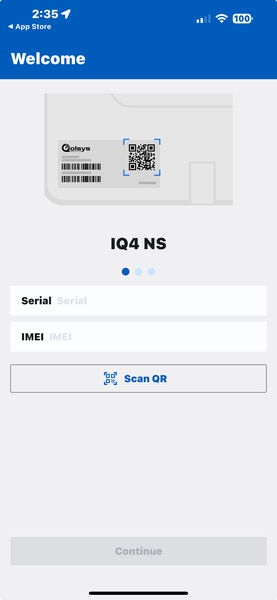
For local programming, the IQ Installer Interface app must be used. This is a free app available from the iOS App Store and Google Play Store. This allows you to connect to the panel via its built in wireless access point and program using the phone or tablet's touchscreen. The programming interface is very similar to programming through the panel's touchscreen. Below, you can see an example of the screen used to connect to an IQ4 NS.

The IQ5 NS is an excellent choice for those on a budget who still want many of the great features associated with IQ panels. These features include Z-Wave Plus with Z-Wave Long Range support, support for PowerG, and an updated Qualcomm Dragonwing™ processor. The chart below shows a comparison between all three versions of the IQ4 panel line. It's safe to assume that the differences between the panels in the IQ5 lineup will be similar.

Feature IQ4 NS IQ4 Hub IQ Panel 4
HARDWARE
7" Touchscreen NO YES YES
8-Core CPU YES YES YES
Built-in LTE & WIFI Comms YES YES YES
Dual SRF (PowerG + 1) NO NO YES
Single SRF YES YES NO
Z-Wave Plus (800-Series) YES YES YES
Bluetooth Disarming NO YES YES
Music Streaming NO YES YES
Microphones 0 1 3, with echo cancellation
8MP Panel Camera (w/Flextilt) NO NO YES
Built-in Panel Glass Break NO NO YES
Built-in Panel Motion Detector NO NO YES
24-Hour LiPo Backup Battery YES YES YES
Smart Mount Installation YES YES YES
Compatible with IQ Base NO NO YES
Available in Black Housing NO NO YES
SOFTWARE
Live View, Live Answer Doorbell & Cameras NO YES YES
Weather on Home Screen NO YES YES
Photo Frame Screensaver NO YES YES
Full Alarm.com Integration YES YES YES
SECURITY
4-Watt Speakers YES, 1 YES, 1 YES, 4
85dB Siren YES YES YES
Support for 128 Zones YES YES YES
Support for Partitioning YES, 4 YES, 4 YES, 4
242 User Codes YES YES YES
Encrypted Sensor Support YES (with PowerG or 319.5 MHz SRF) YES (with PowerG or 319.5 MHz SRF) YES
Support for Hardwired Zones YES (SRF will determine how) YES (SRF will determine how) YES (via PG9WLSHW8 or other SRF)
2-Way Voice NO NO YES
Residential Certification YES, (UL1023, UL985) YES, (UL1023, UL985) YES, (UL1023, UL985)
Commercial Certification YES, (UL2610) YES, (UL2610) YES, (UL2610)

So, the brand name change from Qolsys to IQ won't affect any existing customers or their products, and it won't change the product lineup, or the roadmap for future products. It's just less of a mouthful when discussing the brand and its products, and that's a good thing!

Tags: , , , , , , , , ,

Comments


Posted By

Alarm Grid is closed today, July 4 in observance of Independence Day. This holiday gives us a chance to relax and enjoy time with our families. We hope you're doing the same! On Monday, July 7, we'll return to our normal schedule. Tech support will be available from 9:00 AM to 8:00 PM EDT.

Please remember that our commitment to your safety and security never takes a holiday! Our 24/7 central station partners will remain fully staffed and operational throughout the holiday. Dedicated operators are always ready to process any alarms or other signals from your security system, ensuring uninterrupted protection for your home or business.

You can rest easy knowing that even when our administrative team is away, your alarm system is being monitored, and signals processed around the clock. If you need to contact the monitoring station to cancel an alarm, or verify a signal, it's easy:

Alarm Grid Monitored Customers In the United States:

  • Contact Criticom Monitoring Service (CMS) by calling 888-818-7728 and choosing Option 9.
  • Be ready to provide the monitoring station operator with your name, address, and your false alarm password. If you provide the wrong password, or provide the duress password, they will dispatch authorities, so be prepared.

Alarm Grid Monitored Customers In Canada:

  • Contact Rapid Response by calling (800) 932-3822 and following the prompts.
  • Be prepared to provide the operator with you name, address, and false alarm password. If you provide the wrong password, or the duress password, the operator will dispatch authorities.

The monitoring station can't take requests for account changes, billing inquiries, vacation scheduling, or other administrative tasks. If you need to contact Alarm Grid for those types of issues please send us an email. Our email address is support@alarmgrid.com. If you prefer to speak to someone, you can call us at 888-818-7728 during our regular business hours. Please be patient on Monday while we process any backlogged requests received during the long weekend.

Have a safe and happy Fourth of July!

Tags: , , , , , , ,

Comments