December 2025 Archives

Posted By

Happy New Year 2026 From Alarm Grid!

As we prepare to ring in 2026, we want to take a moment to thank all of our customers for another wonderful year. Whether you have been with us for years or just set up your first system last week, we are grateful for your trust and your patience when things get complicated. We could not do this without you, and we cannot wait to head into the new year with you.

Before we get into the festivities, here are our holiday hours. Support team, this affects you…

New Year's Eve (Wednesday, December 31st): Support available until 3:00 PM Eastern Time.

New Year's Day (Thursday, January 1st): Office closed.

Friday, January 2nd: Back to normal at 9:00 AM Eastern Time.

Support team, if you're still reading: Surprise! You are leaving early today. No, you did not miss a memo. There was no memo. This is the memo. Take the W and go home. You have spent all year helping customers, you're the main driver of our success. Thank you for another great year!

Monitoring Station Contact Information

Even while our offices are closed, professional monitoring continues without interruption. Our central station partners at Criticom Monitoring Services (CMS) and Rapid Response are open 24/7/365 and will continue monitoring alarms and dispatching help exactly as they always do.

If you need to contact the monitoring station during the holiday, to report a false alarm or to place your system on test mode, please use the appropriate number below:

US Customers with Full Monitoring Plans:

Call CMS at (888) 818-7728 and press Option [9]. Be sure to have your name, address, and false alarm password ready when the operator answers.

Canadian Customers with Full Monitoring Plans:

Call Rapid Response at (800) 932-3822 with your name, address, and false alarm password ready.

It is very important that you provide the correct password to the monitoring station operator. If you give an incorrect password when asked, or if you provide your Duress password, the monitoring station will dispatch emergency services, as designed.

If You Need Technical Support, Email Us!

The monitoring station can only assist with alarm-related events and emergencies, or system tests. They cannot help with technical support, programming questions, or account changes such as zone names or contact lists.

For those needs, email us at support@alarmgrid.com. We will respond as quickly as possible once the office reopens on Friday. Please note that there may be a brief backlog after the holiday, and we greatly appreciate your patience while we clear it. If you're an Alarm Grid customer and you have a more pressing issue give us a call at (888) 818-7728.

New Year's Eve Safety Reminder

If you are heading out to celebrate tonight, remember to arm your security system before you leave. Whether you are going to a party, watching fireworks, staying in for a quiet night, or spending two and a half hours watching the Stranger Things series finale and hoping the Duffer Brothers stick the landing, taking a few seconds to arm your system can give you peace of mind as you welcome the new year.

The Upside Down is not real, but burglars are.

Happy New Year!

Thank you for being a part of the Alarm Grid family. We are grateful for your trust and support throughout 2025, and we look forward to helping you stay safe and secure in 2026. Here is to a happy, healthy, and safe new year for everyone!

Tags: , , , , , , , , ,

Comments


Posted By

The holiday season is here, and we want to wish everyone a safe and happy season. Alarm Grid support offices will be closed Wednesday, December 24th and Thursday, December 25th, 2025. Our office will reopen Friday, December 26th at 9:00 AM Eastern Time.


During this time, Alarm Grid's super star support staff will be enjoying a well-deserved break to spend time with their loved ones. Even while our offices are closed, professional monitoring continues without interruption. If you have opted for full central station monitoring, your security system remains protected around the clock. That is, as long as you remember to arm it!

Monitoring Station Contact Information

Our central station partners at Criticom Monitoring Services (CMS) and Rapid Response are open 24/7/365 and will continue monitoring alarms and dispatching help exactly as they always do, unless you have provided them with specific instructions to the contrary.

If you need to contact the monitoring station during the holiday to report a false alarm or to place your system on test mode, please use the appropriate number below:

US Customers:

Call CMS at (888) 818-7728 and press Option [9]. Be sure to have your name, address, and false alarm password ready when the operator answers.

Canadian Customers:

Call Rapid Response at (800) 932-3822 with your name, address, and false alarm password ready.

It is very important that you provide the correct password. If an incorrect password or your Duress password is given, the monitoring station will dispatch emergency services, as designed.

If you're an Alarm Grid customer and you need Technical Support – Email Us Instead

The monitoring station can only assist with alarm-related events and emergencies or system tests. They cannot help with technical support, programming questions, or account changes such as zone names or contact lists.

For those needs, email us at support@alarmgrid.com. We will respond as quickly as possible once the office reopens. Please note that there may be a brief backlog after the holiday, and we greatly appreciate your patience while we catch up.

Holiday Travel Reminder

If you are traveling for the holidays, please be sure to arm your security system before you leave. It is also a good idea to double-check that you know your false alarm password ahead of time. A few minutes of preparation can prevent stress while you are away from home.

Happy Holidays!

Thank you for being a part of the Alarm Grid family. Whether you are traveling, hosting family, relaxing at home, or working through the holiday, we wish you a safe, peaceful, and happy Christmas and Hannukkah season!

Tags: , , , , , , , , ,

Comments


Posted By

Z-Wave has come a long way since its introduction in the early 2000s. From the original standard to Z-Wave Plus and Z-Wave Plus V2, each generation brings meaningful improvements to range, battery life, and performance. Now, Z-Wave 800-Series represents the most significant leap forward yet.

The Evolution of Z-Wave

To understand what makes the 800-Series special, it helps to look at how Z-Wave has evolved over the years.

The original Z-Wave protocol established the foundation for mesh networking in home automation, allowing devices to communicate with each other and extend the network's reach. Z-Wave Plus (500-Series) arrived around 2013 and brought improvements including 50% better range, 250% longer battery life, and faster processing speeds compared to the original standard.

Z-Wave Plus V2 (700-Series), released in 2018, pushed the boundaries further with additional range improvements, enhanced security through S2 encryption, and SmartStart functionality that simplified device pairing. The 700-Series became the go-to choice for premium smart home devices and earned a reputation for reliability and efficiency.

What Makes Z-Wave 800-Series Different

The Z-Wave 800-Series, built on Silicon Labs' latest chipset technology, takes everything that worked well in previous generations and improves upon it significantly. Here's what sets it apart:

Extended Range

The 800-Series delivers up to 1.5 miles of range in open air with Z-Wave Long Range (ZWLR) mode. While real-world performance in homes will vary based on walls, interference, and building materials, this represents a massive improvement over previous generations. For large homes, outbuildings, or properties with detached garages, this extended range can eliminate the need for additional repeaters.

Faster Communication

With improved RF performance and optimized protocols, 800-Series devices communicate more efficiently. Commands execute faster, and the mesh network responds more quickly to changes. This translates to snappier control when you're turning on lights, locking doors, or adjusting thermostats.

Better Battery Life

Battery-powered devices like door sensors, motion detectors, and smart locks benefit from the 800-Series' improved power efficiency. Manufacturers report battery life improvements that can extend the time between battery changes by months or even years in some applications.

Enhanced Security

Building on the S2 security framework introduced with Z-Wave Plus V2, the 800-Series includes hardware-level security features that make it even more resistant to tampering and unauthorized access. All Z-Wave 800 devices support S2 authentication out of the box, ensuring encrypted communication throughout your smart home network.

Backward Compatibility

One of Z-Wave's greatest strengths has always been backward compatibility, and the 800-Series continues this tradition. Your existing Z-Wave and Z-Wave Plus devices will work with 800-Series controllers and hubs. This means you can upgrade your system gradually without replacing every device at once.

Z-Wave Long Range Support

Perhaps the most exciting addition is native support for Z-Wave Long Range (ZWLR). This new mode allows point-to-point communication over much greater distances than traditional mesh networking. While standard Z-Wave mesh mode remains available for dense installations, ZWLR opens new possibilities for properties where devices are spread across larger areas.

Security Panels That Support Advanced Z-Wave Features

If you're looking to build a smart home system around a modern security panel, several options from Alarm Grid support Z-Wave for home automation control. These panels integrate security monitoring with Z-Wave device management, allowing you to control locks, lights, thermostats, and other smart devices from a single interface.

IQ Panel 4

The IQ Panel 4 represents IQ's (formerly Qolsys) latest generation of touchscreen security panels. It features built-in Z-Wave support for home automation along with PowerG sensor compatibility for long-range wireless security. The panel's 7" HD touchscreen makes it easy to manage both security and smart home functions from one central location. The IQ Panel 4 must be on version 4.4.0+ to support Z-Wave Long Range.

The IQ Panel 4 is available in multiple configurations:

2GIG Edge

The 2GIG Edge is a sleek, modern security panel that combines a compact design with powerful features. It includes Z-Wave support for home automation devices and offers advanced capabilities like facial recognition for touchless disarming. In order to support Z-Wave Long Range, the panel must be on firmware version 3.1.3.011+.

Available versions include:

Honeywell Home ProSeries PROA7PLUS

The First Alert PROA7 and PROA7PLUS are professional-grade security panels with optional Z-Wave support. Out of the box, they support ProSeries encrypted wireless sensors. With the addition of a PROTAKEOVER module, they can also support many legacy wireless sensors, and when you install the PROWIFIZW module, the system adds WIFI connectivity and support for Z-Wave home automation devices. When paired with Total Connect 2.0, you can arm, disarm, and control compatible devices remotely through the app.

At this time, the PROWIFIZW does not take full advantage of everything Z-Wave 800-Series offers, including Z-Wave Long Range. Thanks to Z-Wave’s backward compatibility, 800-Series devices will still work, but they’ll behave more like 700-Series devices when used with this controller. You still get solid Z-Wave performance today, and if Resideo updates the platform in the future, these newer devices should be well-positioned to benefit.

Options include:

2GIG GC Touch

The 2GIG GC Touch is another excellent option that combines security and smart home control. With its 7" high-resolution display and Z-Wave gateway functionality, the GC Touch provides a comprehensive solution that includes home security, home automation, energy management, and emergency monitoring.

Available in:

Compatible Z-Wave Devices

When building out your Z-Wave network, you'll find a wide variety of compatible devices available. Popular categories include:

Smart Locks – Z-Wave deadbolts and lever locks from manufacturers like Yale, Schlage, and Kwikset allow you to lock and unlock doors remotely, create temporary access codes, and receive notifications when doors are locked or unlocked.

Smart Lighting – In-wall switches, dimmers, and plug-in modules let you control lighting throughout your home. Many users create scenes that turn on lights when the system disarms or turn off all lights when arming at night.

Thermostats – Z-Wave thermostats like the Honeywell T6 Pro integrate with your security system to provide energy savings. You can automatically adjust temperatures based on whether the system is armed or disarmed.

Garage Door Controllers – Z-Wave garage door controllers let you open, close, and monitor your garage door status from anywhere. Get alerts if the garage door is left open or automatically close it when arming your system.

Water Valves – Smart water valves can automatically shut off your main water supply if a leak is detected, helping prevent costly water damage. This is a perfect example of how automation, working in conjunction with an alarm system, can save you money and prevent messy cleanup.

Making the Switch to Z-Wave 800

If you're starting fresh with a new smart home installation, choosing Z-Wave 800-Series devices whenever possible makes sense. You'll get the best performance, longest battery life, and most advanced security features available.

For those with existing Z-Wave networks, there's no need to rush out and replace everything. Backward compatibility means your current devices will continue to work as you gradually add 800-Series products. Over time, as you replace older devices, your network will naturally evolve to take advantage of the latest technology.

When shopping for Z-Wave devices, look for the Z-Wave 800 or "800-Series" designation on product packaging and specifications. As more manufacturers release 800-Series products, the selection continues to grow across all device categories.

Getting Started

Whether you're building a new smart home from scratch or expanding an existing system, Z-Wave 800-Series technology provides a reliable, secure, and responsive foundation for home automation.

Ready to see what Z-Wave can do for your home? Browse our selection of Z-Wave compatible products and security systems that support home automation. If you’re not sure which panel or devices are right for your situation, our support team is happy to help.

You can call us at 888-818-7728 during our support hours of 9:00 AM – 8:00 PM Eastern Time, Monday – Friday, or send an email to support@alarmgrid.com.

Tags: , , , , , , , , , , , , , , , , , , , , , , , , , , ,

Comments


Posted By

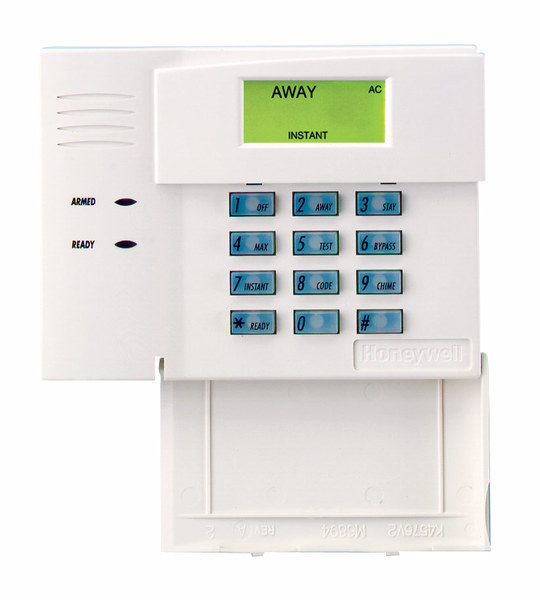
Resideo announced this week that the 6148 keypad family is discontinued upon stock exhaustion. The official technical notification confirms that the 6148, 6148ICON, 6148EX, and 6148SP are all going away. If you need a similar, budget-friendly alternative look no further than the 6150.


The 6148 was never a glamorous keypad. It didn't have a touchscreen. It didn't talk to you. It was just a simple, reliable Fixed English keypad that did exactly what it was supposed to do. And honestly, that's what made it great.

The 6148 was the kind of keypad you could explain to your grandmother over the phone. You pressed buttons, the system responded, and that was that. No learning curve. No software updates. No wondering if the display would freeze. Back when touchscreens were still a novelty, most homeowners just wanted something that worked. The 6148 worked.

The 6148ICON was the same idea but with pictures instead of words. Little icons showed you what each button did. Some installers loved it. Others thought it was unnecessary. But it found its audience with customers who preferred visual cues over text.

The 6148EX added a tamper switch, which made it popular for commercial installations where someone might try to mess with the keypad. The 6148SP served Spanish-speaking customers. Each version filled a specific need in the market.

Now they're all going away because that's how this industry works. Parts become obsolete. Manufacturing priorities shift. Products that served us well for years eventually reach the end of their run.

The good news is that Resideo has recommended solid replacements. The Honeywell 6150 Fixed English Keypad takes over for the 6148, 6148ICON, and 6148EX. It has the same Fixed English display and basic functions, plus four dedicated function keys for quick arming and emergency buttons. The only thing missing is the tamper feature from the 6148EX, so keep that in mind if tamper protection matters to your installation.

For the 6148SP, Resideo suggests upgrading to the First Alert VISTAH3 system with the VISTAHPKP or VISTAHLKP keypads. These offer Spanish and Portuguese language support on a 2x16 alpha display.

If you're still running 6148 keypads on your VISTA system, now is the time to think about stocking up or planning your upgrade. Once the remaining inventory is gone, it's gone for good.

It's strange to get sentimental about a keypad. But the 6148 represents an era of alarm products that valued simplicity and reliability above all else. No apps. No cloud connections. Just a keypad on the wall that lets you arm and disarm your system. There's something to be said for that.

The alarm industry keeps moving forward. Panels get smarter. Keypads get touchscreens. Everything connects to the internet. That's progress, and it's mostly good. But every now and then, when a product like the 6148 gets discontinued, I think about how far we've come and what we've left behind along the way.

If you have questions about replacing your 6148 keypads or need help choosing the right option for your VISTA system, reach out to us at Alarm Grid. The best way to reach us is at support@alarmgrid.com. We're here from 9:00 AM - 8:00 PM EST Monday - Friday and we're happy to help you navigate the transition. Check out our alarm monitoring plans while you're at it.

Tags: , , , , , , , , , , , , , , , , , , ,

Comments