The problem outlined in this notice arises if you attempt to pair an older firmware ProSeries touchscreen keypad to a newer or recently updated ProSeries panel. If the keypad is on version 3.324.46 or lower, and the panel is on 03.3206.57+, then the keypad won't pair and ceases functioning.
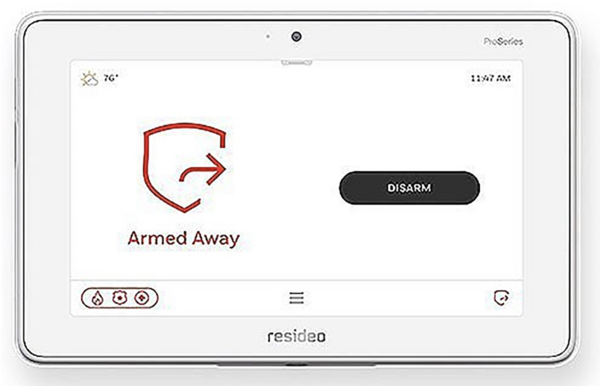
ProSeries keypads, specifically the PROWLTOUCH and PROWLTOUCHC, may require a special upgrade process to install the latest firmware in certain cases. Normally, these keypads receive updates from the ProSeries panel. However, if the keypad can’t pair with the panel, or loses connection, it won’t be able to receive the update.
If you have a ProSeries panel and touchscreen keypad that stay paired, connected to WIFI, and in regular communication most of the time, you shouldn’t have any issues. When the panel updates its firmware via WIFI, it will pass along any available update to the keypad automatically. If your keypad has trouble staying connected, you may want to set it up using Access Point (AP) Mode. This helpful FAQ can show you how.
As we mentioned earlier, most users won’t run into this issue. However, certain situations make it more likely. For example, if you buy a used ProSeries touchscreen keypad, or if you purchase one from stock that has been sitting on the shelf for a long time, you may encounter the problem.
If your panel hasn’t been updated regularly, jumping from an older firmware straight to the latest release can cause the issue described above. It can also occur with panels that have been installed for a long time and communicate with AlarmNet360 only over cellular.
If your system has a PROWIFI or PROWIFIZW module, the panel and keypad may have been paired using AP Mode. Since the panel can’t update firmware over cellular, suddenly connecting it to WIFI could trigger an upgrade to the latest version, potentially leaving the keypad behind on older firmware.
If you purchase a new keypad that has been sitting in stock, and you discover it suffers from this issue, you should be able to return it to the dealer or distributor for a refund or replacement. However, if you buy a used keypad, inherit one with a home purchase, or receive a second-hand keypad as a gift, you may need to follow specific steps to update it. The first step is to check the firmware version.
Our Advice: If you’re considering buying a used touchscreen keypad, ask the seller to verify its firmware before you commit. Request a picture of the firmware screen as proof. Even if the keypad isn’t paired to a panel, you can still see its firmware version.
To check the firmware, power on the keypad and let it attempt to connect to a panel. Press "Pair to Panel". On the next screen, you’ll see options for connecting the keypad to WIFI. At the bottom of that screen, the current firmware version is displayed.
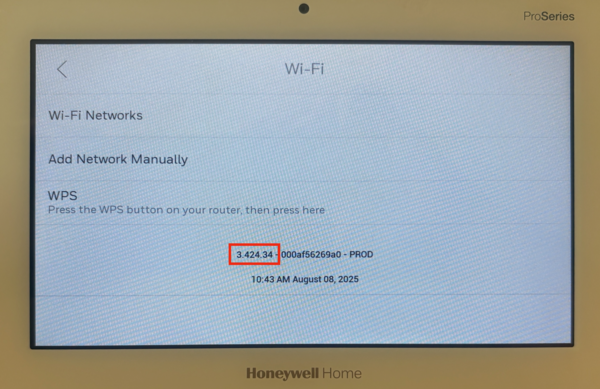
Once you know the keypad firmware, verify your ProSeries panel version. On the panel begin by tapping the Menu icon (≡) at the bottom center of the panel screen. Scroll down and tap Tools > Enter the Installer or Master Code (4112 or 1234, by default) > tap System Information > General. The panel firmware version will be displayed in a XX.XXXX.XX format.
If the keypad is on version 3.324.46 or lower and the ProSeries panel is on firmware version 03.2306.57 or higher, the touchscreen keypad will not pair with the panel. There is no way to make the keypad in this example pair with a panel at that firmware version. However, the keypad will still function if it is used with a panel on a lower firmware version that is then upgraded properly.
Important Note: You cannot downgrade the firmware on a ProSeries panel, per Resideo support.
Another drawback to this situation is that an end-user can't control when their panel updates, or to what version. The only control you have as an end-user is that if you remove your ProSeries panel from WIFI, it will not receive firmware updates. These panels don't update using cellular data.
Important Notes At A Glance:
- Keypads on v3.324.46 or lower can’t pair with panels on v03.2306.57 or higher.
- ProSeries panel firmware can’t be downgraded.
- Panels update only over WIFI, not cellular.
- Disconnecting WIFI stops panel updates.
- Check firmware before buying a used keypad.
- Contact your alarm dealer for upgrade help.
If you're a customer with concerns about this potential issue, contact your alarm dealer. They will be able to push the necessary upgrades to your ProSeries panel in the correct order. Alarm Grid has a list of customers with touchscreen keypads that may be susceptible and we are proactively reaching out via email or phone to those customers. If you are not an Alarm Grid customer your alarm dealer should have a similar list.

