September 2025 Archives

Posted By

Update 12:30 PM EDT: Total Connect 2.0 Email Notification Issue Resolved

This morning, Resideo identified and resolved an issue that was affecting Total Connect 2.0 email notifications. The temporary problem was caused by a third-party vendor, Mailjet, and may have prevented the delivery of system notifications, password reset emails, and welcome messages.

Apparently, the undelivered email messages were queued, and when service was restored these messages went through. This may cause some Total Connect 2.0 notifications to arrive out of sequence until all queued messages are delivered. Any time you receive a notification that you question, log into Total Connect 2.0 and check the Activity screen as well as the current status page. You can also check the panel's Event Log from the touchscreen by tapping Menu (≡) > Events.

Who Was Affected?

The service disruption was reported at approximately 8:44 AM EDT. If you were expecting an email from Total Connect 2.0 this morning and did not receive it, you were likely affected by this brief outage.

Why Redundancy Matters

This incident highlights the importance of enabling multiple notification methods. We strongly recommend setting up push notifications on your mobile device as a reliable backup. For customers affected by today's email issue, push notifications would have still been delivered successfully, ensuring no critical alerts were missed.

As of approximately 12:30 PM EDT the issue has been resolved. If you're an Alarm Grid monitored customer and you continue to have any issues receiving email notifications for TC2 alerts, you can contact our support team by calling 1-888-818-7728, M - F 9:00 AM - 8:00 PM. You can also email us at support@alarmgrid.com.

Tags: , , , , , , , , , ,

Comments


Posted By

Resideo recently announced that its VISTA and PRO Series panels are now fully certified to integrate with Control4 whole-home automation. Control4 is a premium automation platform, typically available only through authorized Control4 integrators, and it operates by using specialized drivers

Control4 drivers act as the essential software that enables communication between the Control4 automation system and various third-party devices. A certified Control4 driver allows for seamless integration and centralized control of different smart home products through the Control4 interface. The interface can be a touchscreen, an app, or even voice commands. For homeowners and installers, this means a unified experience where security, lighting, entertainment, and more can be managed from a single platform.

For homeowners, the benefits are clear. A certified integration allows the Resideo First Alert panel to do more than just secure the home, it becomes part of a larger ecosystem. Using Control4, you can arm the alarm system at night while having the doors lock automatically, the thermostat adjust to an energy-saving setting, and the lights dim across the house. That’s the type of seamless, one-touch automation that Control4 is known for, now enhanced with the proven reliability of a Resideo First Alert security system.

For dealers and installers, certification reduces guesswork and support headaches. Instead of relying on custom workarounds, they can now use official drivers that are tested and verified. This not only speeds up installation but also builds dealer confidence, by knowing their installations are backed by two major industry players working together.

The move also positions Resideo strongly in the high-end automation space. By joining the ranks of other security systems officially supported by Control4, VISTA and PRO Series panels are now a more compelling option for projects where premium automation is a requirement. It’s a win for integrators looking to expand their offerings, and a win for homeowners looking to unite all of their tech through a single interface.

VISTA panels use the 4232CBM Connected Building Module to integrate with Control4. The module connects the VISTA panel's ECP bus to the Control4 system through a wired serial RS232 or RS422 interface. This setup allows the Control4 driver to import zone alpha descriptors directly from the VISTA panel, which eliminates the need for manual programming of zone data within Control4. As a result, users can arm, disarm, and monitor the status of zones directly through the Control4 interface. Check out the 4232CBM Install Guide.

Another plus that shouldn't be overlooked is the fact that Control4 will import life-safety zones and descriptors. This allows an integrator to create automations based on fire or carbon monoxide zone triggers. For example, in the event of a fire alarm the system might automatically turn off the HVAC system and unlock the doors while turning on lights that illuminate a path out of the building.

Control4 and First Alert PRO Series Integration

You can find the steps for integrating the PRO Series panels with Control4 here. Here's a quick overview of what you'll need:

Before You Begin:

  • Control4 OS 4.1.0+ and Composer Pro Software.
  • PRO Series Firmware 03.2476.183+
  • PRO Series panel must have a PROWIFI or PROWIFIZW installed.
  • PRO Series panel should have all its partitions and zones configured before pairing with Control4, though you can add or remove zones after initial configuration.
  • Your alarm dealer must enable the Control4 feature through AlarmNet360. This is done as part of the Smart Home package (Packages > Smart Home > Add-Ons > Control4).
  • The Control4 system and the PRO Series panel must be connected to the same network through the same router.

After configuration with Control4’s Simple Service Discovery Protocol (SDDP), the PRO Series panel must always use the same IP address. SDDP is a lightweight protocol created by Control4 that lets WIFI enabled devices announce themselves on the network, making it easy for Control4 to find and identify them.

If the panel’s IP address changes, it will disconnect from Control4. Because setting a static IP directly on the alarm panel can be tricky, the better option is to reserve an IP address for the PRO Series panel in your router’s DHCP settings. Check your router’s documentation for instructions on how to set this up. Below is a list of names for this feature, and which manufacturers use each term:

  • DHCP Reservation – Netgear, ASUS, TP-Link (most common term)
  • Address Reservation – D-Link
  • IP Reservation – Linksys, Spectrum, Xfinity
  • Reserved IP Address – Some ISP-provided routers (AT&T, Verizon)

Basic Steps For Setup:

  1. Initiate discovery. From Control4 Composer Pro, initiate discovery (System Design > Items > Discovered).
  2. Create association. Double click on the PRO Series driver that you discovered in Step 1. If Composer Pro fails to discover the driver, make sure that all the prerequisites listed above have been met. Once the driver has been discovered and you double click, the driver is downloaded to your Control4 system. The panel's IP and other required information is sent to Composer Pro. The driver and the IP address can then be associated with one another within Composer Pro.
  3. Perform pairing. Within Composer Pro, click Actions > Start Pairing. You have 120 seconds to complete the next step. If two minutes elapse without a successful pairing, the process will timeout and you'll need to perform this step again.
  4. Pair PRO Series panel. On the PRO Series panel, tap Menu (≡) > Tools > Enter Installer Code (4112 by default) > Control4 Controller > Pair to Control4 Controller. When Composer Pro receives the pairing command, it will know, based on the panel's IP address, to associate the PRO Series driver with the panel and complete the pairing process. If the pairing is successful, the Control4 Controller information will automatically populate. If pairing fails this field will remain blank. In that case, verify that all of the requirements in "Before You Begin" have been met, and try again.

Complete Integration:

  1. Verify partition import. In Composer Pro select Properties. Partition information will be displayed here as the information is imported. Upon successful import, the partition state will update from "Unknown" to the current state. This process may take a minute, so please be patient. Verify that all partitions, along with proper status, are displayed in the left pane.
  2. Import and verify zone information. From Advanced Properties within Composer Pro select Get C4 Contacts to update and display individual PRO Series zones with proper status. The zones will also show in the left pane. When a zone is added (or removed), it will show which zones have been added or deleted there.
  3. Verify visibility. From a Control4 touchscreen, or the Control4 app, tap Security and verify that all partitions and zones are displayed. If a partition appears to be missing, check the visibility settings for that partition within Composer Pro:
    • In the left pane select PRO Series > Properties > Navigator.
    • Select Security in the navigator menu. This will display the Device Visibility settings. Partitions are either "Visible" or "Hidden". If any partition that should be visible within Control4 is listed as hidden choose the Modify option and move that partition from Hidden to Visible.
    • Click File > Refresh Navigators to update and display all partitions. Any partition that remains listed as hidden will not display on any Control4 touchscreen or within the Control4 app. Presumably, it will also remain hidden to any voice assistant you may be using.
  4. Test integration. Once the previous steps have been completed successfully, use the Control4 touchscreen or app to verify operation and status. Verify that all partitions show the proper status, i.e., Armed, Disarmed, etc. Walk around and fault zones, i.e., open and close doors, walk in front of motion detectors, etc. and verify that the status updates within the touchscreen or app.
Tags: , , , , , , , , , , , , , , , , , , , ,

Comments


Posted By

Resideo is about to launch three new surveillance cameras: the CX4B bullet, CX4T turret, and CX4D dome. Each model features impressive 8MP resolution with an advanced image sensor, ensuring a clear view of faces, license plates, and other important details for clear and dependable viewing.

Resideo has announced that the new CX4 cameras are expected to arrive in late Q3 or early Q4 of 2025. Alarm Grid will have them listed and ready to order as soon as they’re released. For now, you can click the links below to view each camera’s product page, but purchasing isn’t available just yet — stay tuned!

New First Alert CX4 Cameras

If you haven’t been following Resideo closely, you might be surprised to see these cameras branded as First Alert. When Resideo spun off from Honeywell, it originally used the Resideo name, a portmanteau of “residence” or “residential” and “presidio.” Most readers will recognize “residential,” but for reference, Merriam-Webster defines a presidio as “a military post or fortified settlement.”

Traditionally, Honeywell Home branding has been used for Resideo’s residential products, while the Resideo name identified commercial offerings. Over the past year, however, the company has shifted to the First Alert brand. First Alert has been established for decades and offers strong name recognition, without tying back to Honeywell, which is now a separate entity.

Important Note: All the cameras pictured below are shown mounted with junction boxes. Any junction box used must be purchased separately.

Each of these cameras have the following features:

  • Smart AI motion analysis helps identify genuine activity and minimizes false alerts, so you're notified only when it truly matters.
  • High-definition 8MP imaging captures fine detail, ensuring reliable recognition of people, license plates, and objects.
  • Flexible video storage with built-in edge recording plus secure cloud event archiving, gives you control over how footage is kept and accessed.
  • Wide operating temperature range allows dependable performance in harsh environments, from -22°F - +140°F (-30°C - +60°C).
  • Seamless system integration with ProSeries AIO and VISTA®H3 panels, while Total Connect® 2.0 and AlarmNet 360™ apps deliver full remote control and monitoring convenience from any location with internet access.
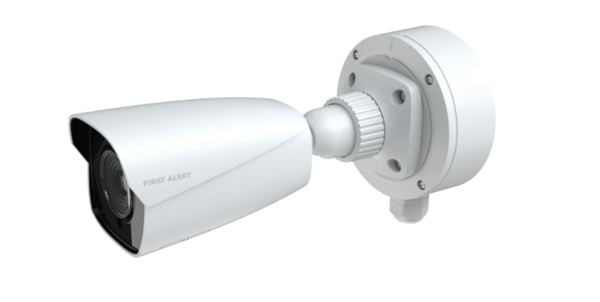
First Alert CX4B Bullet Camera


We don’t yet have specifications on these cameras, but generally speaking, bullet-style cameras are often optimized for longer viewing distances as compared to dome cameras. They are ideal for monitoring driveways, parking lots, and perimeters. Once mounted, these cameras typically can’t be adjusted remotely.
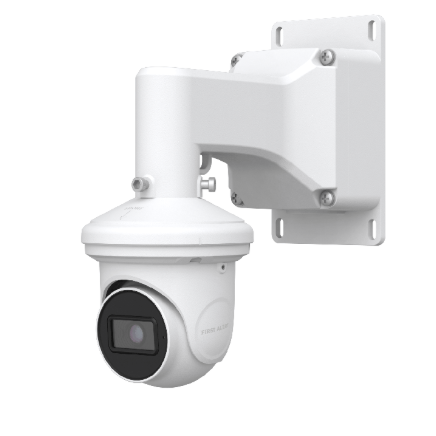
First Alert CX4T Turret Camera

The First Alert CX4T blends the flexibility of a dome with the clarity of a bullet. With no domed housing, issues with glare, scratches, or IR reflection are eliminated. Turret-style cameras are Ideal for both indoor areas like offices, retail spaces, and hallways, and outdoor spots including porches, entrances, parking lots. The CX4T will likely be suited for both wide-angle and medium-range surveillance. It's ideal for areas where facial recognition and detail are important, especially at night. We'll have to wait and see if remote camera repositioning is a possibility. Turret-style cameras are often limited to manual adjustment.
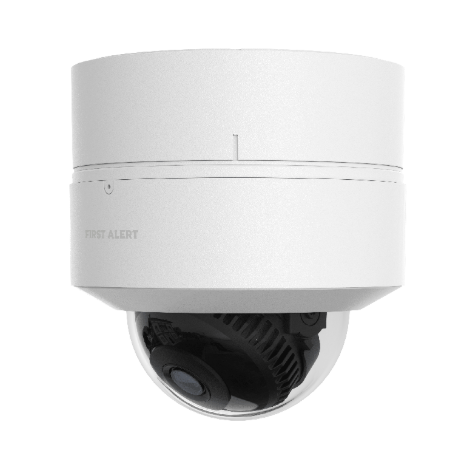
First Alert CX4D Dome Camera

The CX4D Dome Camera combines durability with a discreet look, making it perfect for both indoor and outdoor spaces. Unlike the more visible bullet camera or the more easily adjusted turret, the dome’s protective housing makes it more difficult to adjust after installation. However, the exterior dome helps guard against tampering, particularly when mounted outdoors. With wide coverage and built-in resiliance, it’s an ideal choice for monitoring lobbies, storefronts, hallways, and other high-traffic areas where both performance and aesthetics matter.

These are the most professional cameras yet from Resideo that work with its Total Connect 2.0 remote platform. With edge and cloud storage, you have flexible options for monitoring and saving AI-based video alerts. The cameras can differentiate between people, vehicles, animals and packages to provide notifications tailored to your needs.

Tags: , , , , , , , , , , ,

Comments