Total Connect 2.0 Posts

Posted By

We first told you about the new lineup of First Alert CX4 cameras in September. At that time, there wasn't much information available about the cameras and their specs. Now, Resideo has announced the release of the cameras and mounting accessories. So, let's take a closer look at them.

Each camera in the new CX4 lineup offers 8MP ultra-high-definition image quality. Intelligent AI-based event detection can distinguish people, vehicles, animals, and packages. The main differences between the various camera styles come down to design, mounting style, and placement options. Below is a quick reference table showing how each camera fits into your installation plan, along with the compatible accessories for that model.

First Alert CX4 Camera Product Matrix

Image Product Key Features & Accessories
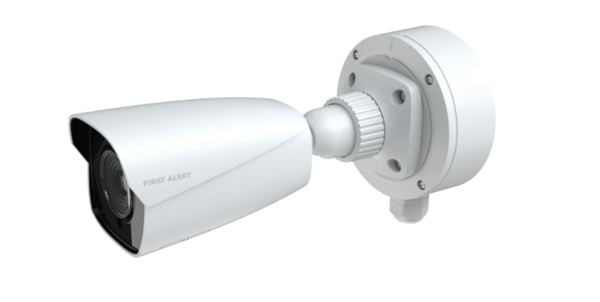
First Alert CX4B Bullet Camera First Alert CX4B 8MP AI Bullet Camera
Model: CX4BE08F28PW
  • Long-range coverage and visible deterrent design
  • Ideal for driveways, parking lots, and exterior perimeters
  • IP67 weather-rated housing
  • 2.8mm fixed lens (104° horizontal FOV)
  • PoE or 12VDC power options
  • Built-in microphone for one-channel audio
CX4AJBFTB – Fixed Turret/Bullet Extended Junction Box Provides space for cable connections; allows cleaner weather-sealed installations.
CX4AGBCP – Gangbox Converter Plate Adapter plate for mounting to existing electrical boxes or retrofit surfaces.
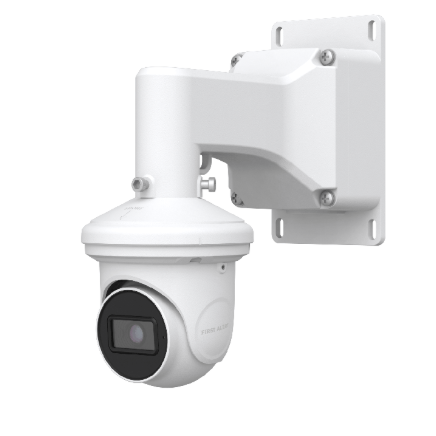
First Alert CX4T Turret Camera First Alert CX4T 8MP AI Turret Camera
Model: CX4TE08F28PW
  • Ball-and-socket design for flexible aiming
  • Built-in microphone for one-channel audio
  • Ideal for indoor or outdoor areas
  • Anti-glare design reduces IR reflection
CX4AWMFTJB – Wall Mount with Junction Box Wall mount providing added depth and protection for turret camera wiring.
CX4AWMFTDB – Wall Mount Bracket Used for angled installations or combined with other mounts.
CX4AJBFTB – Extended Junction Box Shared accessory for turret or bullet cameras; conceals cabling for neat installs.
CX4AGBCP – Gangbox Converter Plate Adapter plate for gangbox mounting.
First Alert CX4D Dome Camera First Alert CX4D 8MP AI Dome Camera
Model: CX4DE08F28PW
  • Discreet, low-profile design
  • IK10 rated tamper-resistant dome housing
  • 125° field of view for wide coverage
  • Perfect for retail, lobbies, or offices
  • Built-in microphone for one-channel audio
CX4AJBFD – Fixed Dome Extended Junction Box Adds space for wiring and conduit; helps weather-seal cable entry.
CX4AWMFDJB – Wall Mount with Junction Box Mounts dome camera securely on vertical surfaces; includes cable space.
↳ CX4AWMFTDB – Fixed Turret/Dome Wall Mount Bracket Universal bracket shared between turret and dome models.
CX4ACMFD – Fixed Dome Ceiling Flush Mount Provides clean, recessed ceiling mounting option for a low-profile look.
CX4AGBCP – Gangbox Converter Plate Adapter for dome camera installations using standard gangbox openings.

*All accessories are rated for operation from -40°F to 140°F (-40°C to 60°C) and are constructed of durable aluminum alloy or PC+ABS materials. Junction boxes are sold separately and recommended for clean, weather-resistant installations.

First Alert CX4 Product Feature Matrix

Feature CX4B
Bullet
CX4T
Turret
CX4D
Dome
Model Number CX4BE08F28PW CX4TE08F28PW CX4DE08F28PW
Form Factor Bullet – visible deterrent Turret – flexible aiming Dome – discreet, tamper-resistant
Supports WIFI No, Ethernet is required • Power over Ethernet is optional
Image Sensor / Resolution 8 MP (3840 × 2160) • 1/2.8″ CMOS • Fixed 2.8 mm Lens FOV: 104° Horizontal / 55° Vertical / 125° Diagonal)
Wide Dynamic Range 120 dB 120 dB 120 dB
Infrared (IR) Range 98 – 165 ft (30–50 m) 65 – 98 ft (20–30 m) 65 – 98 ft (20–30 m)
Built-In Microphone Yes Yes Yes
Edge Recording microSDXC slot (up to 1 TB) for 24/7 edge storage • microSDXC card sold separately
Cloud Storage Event-based clips via AlarmNet 360™ Plans (1–12 device options; 7 or 30 days) — Total Connect 2.0 account required
AI Event Detection Detects people, vehicles, packages, and animals to reduce false alerts
Video Compression / Frame Rate H.264 / H.265 • 15 fps @ 8 MP (3840×2160)
Ingress Protection / Impact Rating IP67 IP67 IP67 + IK10 (impact-resistant dome)
Operating Temperature –22 °F to 140 °F (–30 °C to 60 °C) –22 °F to 140 °F (–30 °C to 60 °C) –22 °F to 140 °F (–30 °C to 60 °C)
Power Options / Usage PoE (802.3af) or 12 VDC • <9 W
Integration / Apps Total Connect 2.0 (App + Web) • ProSeries AIO and VISTAH3 panels • AlarmNet 360 Dealer Portal
Security Protocols Secure boot • AES-256 encryption • TLS 1.2/1.3 • Encrypted video at rest and in transit • Automatic firmware updates
Regulatory Compliance NDAA Section 889 Compliant • RoHS • WEEE • REACH (EC 1907/2006)
Physical Dimensions / Weight 8.57" × 3.17" × 3.16" (21.76cm x 8.05cm x 8.02cm) • 1.5 lb (.68kg) Ø 3.72 × 3.25 in (94.6mm x 82.8mm) • 1.0 lb (.453kg) Ø 4.69" × 3.47" (119mm x 88mm) • 1.4 lb (.653kg)
Compatible Accessories CX4AJBFTB • CX4AGBCP CX4AWMFTDB • CX4AWMFTJB • CX4AJBFTB • CX4AGBCP CX4ACMFD • CX4AWMFTDB • CX4AWMFDJB • CX4AJBFD • CX4AGBCP

Each of the new First Alert CX4 Cameras offers the same 8MP ultra-HD clarity, AI-driven motion analytics, and Total Connect 2.0 integration, but each form-factor has distinct advantages:

  • The CX4B Bullet Camera is best for exterior spaces where visibility and deterrence are of particular importance.
  • The CX4T Turret Camera offers the best balance between installation flexibility and features, making it a great all-around option for both indoor and outdoor use.
  • Meanwhile, the CX4D Dome Camera delivers a sleek, tamper-resistant design suited for interiors like offices, stores, and lobbies, and outdoors such as parking lots, driveways, and exterior entrances where both aesthetics and protection against vandalism are key.

We’re genuinely excited to see how these new CX4 cameras help our customers feel safer and more connected. Whether you’re adding your first camera or upgrading to a full Pro Series or VISTAH3 system, these new models make it easier than ever to protect what you care about most.

To unlock remote viewing, cloud storage, and full Total Connect 2.0 integration, you’ll need a professional monitoring plan. If you’re not already set up, you can explore our no-contract monitoring plans here. If you have questions, we'd be glad to help, email us at support@alarmgrid.com. We're here Monday - Friday from 9:00 AM - 8:00 PM EST/EDT.

Tags: , , , , , , , , , , , , , , , , , , , , , , , , , , ,

Comments


Posted By

Update 12:30 PM EDT: Total Connect 2.0 Email Notification Issue Resolved

This morning, Resideo identified and resolved an issue that was affecting Total Connect 2.0 email notifications. The temporary problem was caused by a third-party vendor, Mailjet, and may have prevented the delivery of system notifications, password reset emails, and welcome messages.

Apparently, the undelivered email messages were queued, and when service was restored these messages went through. This may cause some Total Connect 2.0 notifications to arrive out of sequence until all queued messages are delivered. Any time you receive a notification that you question, log into Total Connect 2.0 and check the Activity screen as well as the current status page. You can also check the panel's Event Log from the touchscreen by tapping Menu (≡) > Events.

Who Was Affected?

The service disruption was reported at approximately 8:44 AM EDT. If you were expecting an email from Total Connect 2.0 this morning and did not receive it, you were likely affected by this brief outage.

Why Redundancy Matters

This incident highlights the importance of enabling multiple notification methods. We strongly recommend setting up push notifications on your mobile device as a reliable backup. For customers affected by today's email issue, push notifications would have still been delivered successfully, ensuring no critical alerts were missed.

As of approximately 12:30 PM EDT the issue has been resolved. If you're an Alarm Grid monitored customer and you continue to have any issues receiving email notifications for TC2 alerts, you can contact our support team by calling 1-888-818-7728, M - F 9:00 AM - 8:00 PM. You can also email us at support@alarmgrid.com.

Tags: , , , , , , , , , ,

Comments


Posted By

Resideo is about to launch three new surveillance cameras: the CX4B bullet, CX4T turret, and CX4D dome. Each model features impressive 8MP resolution with an advanced image sensor, ensuring a clear view of faces, license plates, and other important details for clear and dependable viewing.

Resideo has announced that the new CX4 cameras are expected to arrive in late Q3 or early Q4 of 2025. Alarm Grid will have them listed and ready to order as soon as they’re released. For now, you can click the links below to view each camera’s product page, but purchasing isn’t available just yet — stay tuned!

New First Alert CX4 Cameras

If you haven’t been following Resideo closely, you might be surprised to see these cameras branded as First Alert. When Resideo spun off from Honeywell, it originally used the Resideo name, a portmanteau of “residence” or “residential” and “presidio.” Most readers will recognize “residential,” but for reference, Merriam-Webster defines a presidio as “a military post or fortified settlement.”

Traditionally, Honeywell Home branding has been used for Resideo’s residential products, while the Resideo name identified commercial offerings. Over the past year, however, the company has shifted to the First Alert brand. First Alert has been established for decades and offers strong name recognition, without tying back to Honeywell, which is now a separate entity.

Important Note: All the cameras pictured below are shown mounted with junction boxes. Any junction box used must be purchased separately.

Each of these cameras have the following features:

  • Smart AI motion analysis helps identify genuine activity and minimizes false alerts, so you're notified only when it truly matters.
  • High-definition 8MP imaging captures fine detail, ensuring reliable recognition of people, license plates, and objects.
  • Flexible video storage with built-in edge recording plus secure cloud event archiving, gives you control over how footage is kept and accessed.
  • Wide operating temperature range allows dependable performance in harsh environments, from -22°F - +140°F (-30°C - +60°C).
  • Seamless system integration with ProSeries AIO and VISTA®H3 panels, while Total Connect® 2.0 and AlarmNet 360™ apps deliver full remote control and monitoring convenience from any location with internet access.

First Alert CX4B Bullet Camera


We don’t yet have specifications on these cameras, but generally speaking, bullet-style cameras are often optimized for longer viewing distances as compared to dome cameras. They are ideal for monitoring driveways, parking lots, and perimeters. Once mounted, these cameras typically can’t be adjusted remotely.

First Alert CX4T Turret Camera

The First Alert CX4T blends the flexibility of a dome with the clarity of a bullet. With no domed housing, issues with glare, scratches, or IR reflection are eliminated. Turret-style cameras are Ideal for both indoor areas like offices, retail spaces, and hallways, and outdoor spots including porches, entrances, parking lots. The CX4T will likely be suited for both wide-angle and medium-range surveillance. It's ideal for areas where facial recognition and detail are important, especially at night. We'll have to wait and see if remote camera repositioning is a possibility. Turret-style cameras are often limited to manual adjustment.
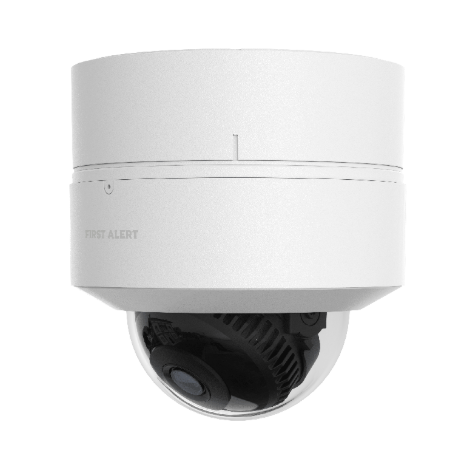
First Alert CX4D Dome Camera

The CX4D Dome Camera combines durability with a discreet look, making it perfect for both indoor and outdoor spaces. Unlike the more visible bullet camera or the more easily adjusted turret, the dome’s protective housing makes it more difficult to adjust after installation. However, the exterior dome helps guard against tampering, particularly when mounted outdoors. With wide coverage and built-in resiliance, it’s an ideal choice for monitoring lobbies, storefronts, hallways, and other high-traffic areas where both performance and aesthetics matter.

These are the most professional cameras yet from Resideo that work with its Total Connect 2.0 remote platform. With edge and cloud storage, you have flexible options for monitoring and saving AI-based video alerts. The cameras can differentiate between people, vehicles, animals and packages to provide notifications tailored to your needs.

Tags: , , , , , , , , , , ,

Comments


Posted By

As we told you in February, Resideo is sunsetting first-gen Total Connect 2.0 cameras. After July 31, 2025, they’ll no longer work in TC2 and will be removed from all accounts. Any recorded clips will also be deleted. Be sure to download and save any important footage outside of TC2 now.

The sunsetting of first-gen Total Connect 2.0 cameras is now just days away. If you still have any of the original TC2 cameras on your account, you should be preparing to replace those cameras with new ones. Otherwise, you will lose video coverage in those areas.

Even more important is downloading any critical video clips uploaded from first-generation cameras. Once the sunset occurs, both the cameras and their recorded footage will be removed from Total Connect 2.0 and will likely be unrecoverable.

It's easy to save these video clips from Total Connect 2.0.

  1. Log into TC2 as normal.
  2. Tap Activity from the menu options at the bottom of the screen, or from the left navigation pane, if you're logged in on the website.

  3. From the Activity screen, find the clip you want to save.
  4. Tap the three dots to the right of the clip title and then choose Download.
  5. In iOS you can access your downloaded clip from Photos. In Android devices, the options may vary depending on device manufacturer, but generally you can access the clip from Files (All or Downloads) and from Gallery:


  6. Recommended VX Series Replacements for EOL Cameras
    Product Name Recommended Replacement
    IPCAM-WI VX5 Indoor Camera
    IPCAM-WI2 VX5 Indoor Camera
    IPCAM-WL VX5 Indoor Camera
    IPCAM-WO VX3 Outdoor Camera
    IPCAM-PT/IPCAM-PT2/PT2A One or More VX5 Indoor Cameras
    ACU Replace ACU and Camera with appropriate Indoor or Outdoor VX5 Camera
    AP/WAP-PLUS/WREX No Replacement Available

The first Total Connect 2.0 cameras did their job well after launching in late 2011 or early 2012, but video tech has come a long way since then. Today's AI motion detection is way better than the old method of analyzing pixel-changes. The newer cameras, such as those in the table above, use AI to actually tell the difference between a person and an animal, for example. With all the available improvements, it makes sense to phase out the original cameras.

Tags: , , , , , , , , , , , , ,

Comments


Posted By

Update 6:46 PM 05/12/25: Per AlarmNet and Resideo, both Total Connect 2.0 and alarm communications are fully restored. This update isn't time stamped, so it's unclear exactly when services were restored. Alarm dealers may continue to see some issues in programming legacy devices and video-only accounts. PRO Series and VISTAH3 device programming is completely restored.

Original Post:

AlarmNet has alerted all dealers to an issue with their communicators that began at 8:15 AM today. They are investigating the issue and working diligently toward a solution. Preliminary investigation shows that this interruption is not the result of malicious activity or a security breach.

What You May See:

As a result of this issue, you may have seen a communicator failure message on your system. This could show up as a "Check 103" message, "Reporter Failure", and possibly others. You may also have noticed issues logging into Total Connect 2.0, or delays or failures in completing commands using TC2.

According to AlarmNet, they are seeing some system recovery with improvements in latency, etc. However, the AlarmNet network is still not at 100%, so if you notice an issue logging into Total Connect 2.0, or an issue with sluggish or failed command execution, this is why.

In the past, we've seen queued signals and notifications being delivered once communication is restored. This can present as a notification coming through that seems out of place. For example, you may receive a notification that your system was disarmed when you know that you armed it. This is just a disarm notification from a previous instance that was delayed in being delivered. The best thing to do is log into Total Connect 2.0 and verify your system status. You can check the panel's event log to confirm exactly what has taken place on your system.

What You Can Do:

If you receive a trouble message on your system you silence it by acknowledging it. This process can vary depending on what system you're using. On a VISTA system, press any key on the keypad to silence the trouble beeping. Enter a disarm sequence by pressing your four-digit code plus one (1) or OFF. Do this twice.

If the communication issue has been resolved, the second disarm command will clear the trouble message from your keypad. If not, the message will remain until the condition has been resolved and you enter a disarm command again.

On the various touchscreen panels or keypads, you should be able to follow prompts on the display to silence and clear the trouble message. On the PRO Series panels, tap the red alert indicator at the bottom right of the display. This will silence the trouble beep and bring up the alert screen. Any active trouble conditions will be displayed. Press "Clear" at the upper right and enter a valid user code.

As with a VISTA system, if the trouble condition has been resolved, this will clear the display. If not, the message will remain under "Active Issues" until the trouble condition is resolved. In this case, until whatever is causing the communication problems has been taken care of. Once the condition has been resolved, press "Clear" again and enter your user code to clear the message.

Stay tuned, as we receive updates we'll update this blog post with any available information.

Tags: , , , , , , , , , , , ,

Comments


Posted By

The First Alert VISTAH3 is Resideo's premiere hybrid panel. It offers built-in wired zones and a built-in PROSIX receiver. With an added module, it can support legacy RF from various manufacturers. However, a touchscreen keypad must be added for local programming, and WIFI isn't included.

The VISTAH3 supports up to 96 zones total, with up to four (4) partitions. There are eight (8) built in hardwired zones, expandable up to a total of 64 hardwired zones. The panel has an RJ45 connector built-in for hardwired Ethernet. If a hardwired network connection isn't possible, the panel can support WIFI with the addition of a module.

The VISTAH3 supports the following agency listings (in no particular order):

  • UL 985 - Household Fire
  • UL 1023 - Household Burg
  • UL 2610 - Commercial Burg
  • UL 1637 - Home Healthcare Signaling Equipment
  • UL 2017 - Safety General Purpose Signaling Devices
  • ULC S545 - Residential Fire Warning System Control Units (Canada)
  • ULC S304 - Standard for Control Units, Accessories and Receiving Equipment for Intrusion Alarm Systems (Canada)
  • ANSI/SIA CP-01 - False Alarm Reduction Standard

Once the VISTAH3 is registered with AlarmNet it can be used with Total Connect 2.0. This allows the end-user to monitor their system remotely, check system status, arm and disarm from nearly any location, control home automation devices that are associated with the account and view video, if included in the monitoring plan.

Like the Honeywell Home PROA7 and PROA7PLUS and the Resideo PROA7C and PROA7PLUSC the First Alert VISTAH3 can be programmed remotely through AlarmNet360 or locally through a touchscreen keypad. Unlike the PRO Series panels though, the VISTAH3 doesn't come with a touchscreen interface from the factory.

To add a touchscreen to the VISTAH3, you must also add WIFI capability. This can be done by adding either the PROWIFI (WIFI only) or the PROWIFIZW (WIFI and Z-Wave Plus). Once the panel has access to WIFI the Honeywell Home PROWLTOUCH, Resideo PROWLTOUCHC, or the First Alert VISTAHTCHWLC can be added.

Up to eight (8) touchscreen keypads are supported per VISTAH3 panel. You can read all about the number and types of supported keypads in this helpful FAQ. In the table below, we have a list of all the VISTAH3 associated products with links to each.

In addition to the individual components listed in the table, we provide a list of curated kits below. These kits make it easy for DIY customers to get all necessary items to program their system upon arrival. Click any link in the table for additional information on individual products, including specifications and documentation on the dedicated product pages.

First Alert VISTAH3 and Associated Products:

Product Image Description
First Alert VISTAH3 Hybrid alarm panel with eight (8) hardwired zones and PROSIX wireless capability built in.
Honeywell Home PROWIFI WIFI-only Module
Honeywell Home PROWIFIZW WIFI + Z-Wave Plus Module
First Alert VISTAHTCHWLC WIFI Touchscreen Keypad
Honeywell Home PROWLTOUCH WIFI Touchscreen Keypad
Honeywell Home PROLTE-A AT&T LTE
Cellular Module
Honeywell Home PROLTE-V2 Verizon LTE
Cellular Module
Resideo PROWLTOUCHC WIFI Touchscreen Keypad
First Alert VISTAHTKVRWL Legacy Wireless Takeover Module
First Alert VISTAHEXPHW Hardwired Expander
First Alert
VISTAHISO

iBus Isolator Module
(Isolates burg from fire
devices on the iBus.
Only required in commercial
fire applications.)
First Alert VISTAHRELAY iBus Relay Module
First Alert VISTAHTKVR-B iBus to ECP Expansion Converter
First Alert VISTAHTKVR-V iBus to V-PLEX Expansion Converter
First Alert VISTAHPKP iBus portrait-style
wired push-button keypad
First Alert VISTAHLKP iBus landscape-style
wired push-button keypad

First Alert VISTAH3 Kits Available from Alarm Grid:

  • First Alert VISTAH3PK:
    • 1 - First Alert VISTAH3 Hybrid Panel
    • 1 - Honeywell Home PROWIFI (WIFI-only) Module
    • 1 - First Alert VISTAHTCHWLC WIFI Keypad
  • First Alert VISTAH3PK-V:
    • 1 - First Alert VISTAH3 Hybrid Panel
    • 1 - Honeywell Home PROWIFI (WIFI-only) Module
    • 1 - Honeywell Home PROLTE-V2 Verizon LTE Module
    • 1 - First Alert VISTAHTCHWLC WIFI Keypad
  • First Alert VISTAH3PK-A:
    • 1 - First Alert VISTAH3 Hybrid Panel
    • 1 - Honeywell Home PROWIFI (WIFI-only) Module
    • 1 - Honeywell Home PROLTE-A AT&T LTE Module
    • 1 - First Alert VISTAHTCHWLC WIFI Keypad
  • First Alert VISTAH3PK-TCH:
    • 1 - First Alert VISTAH3 Hybrid Panel
    • 1 - Honeywell Home PROWIFIZW (WIFI & Z-Wave Plus) Module
    • 1 - First Alert VISTAHTCHWLC WIFI Keypad
  • First Alert VISTAH3PK-TCH-V:
    • 1 - First Alert VISTAH3 Hybrid Panel
    • 1 - Honeywell Home PROWIFIZW (WIFI & Z-Wave Plus) Module
    • 1 - First Alert VISTAHTCHWLC WIFI Keypad
    • 1 - Honeywell Home PROLTE-V2 Verizon LTE Module
  • First Alert VISTAH3PK-TCH-A:
    • 1 - First Alert VISTAH3 Hybrid Panel
    • 1 - Honeywell Home PROWIFIZW (WIFI & Z-Wave Plus) Module
    • 1 - First Alert VISTAHTCHWLC WIFI Keypad
    • 1 - Honeywell Home PROLTE-A AT&T LTE Module
  • VISTAH3IND1***:

***Note: The last kit listed above (VISTAH3IND1) does not contain the required equipment for programming the VISTAH3. To program, you will need to add a WIFI-capable module and a touchscreen keypad from the list of individual products in the preceding table.

Tags: , , , , , , , , , , , , , , , , , , , , , , , , , , ,

Comments


Posted By

Time for the CellBounce to, well, bounce. This device, which served as a temporary bridge for AT&T customers clinging to their 3G communicators, is now being discontinued. For those who rely on CellBounce to convert 3G signals for use on the LTE network, it's time to consider the next steps.


Mark your calendars: as of May 1, 2025, AT&T will officially cease support for CellBounce devices on its network. This means if you're currently relying on a CellBounce to bridge the gap between your old AT&T 3G/4G communicator and the AT&T LTE network, it's time to upgrade.

Failure to upgrade to a new LTE communicator, or a new system before the deadline will likely result in a complete loss of communication, compromising alarm signals. This includes critical life-safety signals like fire and carbon monoxide alerts.

You may be wondering which communicator to choose. Below, we'll give you some suggestions for how best to move past the Resideo CellBounce and that old 3G/4G communicator:

Alarm Panel LTE Communicator Recommended
Replacement
Panel
New Panel
LTE Communicator
L3000 LTE-L3A (AT&T)
LTE-L3V (Verizon)
PROA7PLUSC PROLTE-A (AT&T)
PROLTE-V2 (Verizon)
Lynx Touch
(L7000
L5210
L5000
Panel Firmware
9.00.209+
required)
LTE-L57A (AT&T)
LTE-L57V (Verizon)
PROA7PLUSC PROLTE-A (AT&T)
PROLTE-V2 (Verizon)
VISTA-20P
VISTA-15P
VISTA-10P
LTEM-XA (AT&T)
LTEM-XV (Verizon)
LTEM-PA (IP & AT&T)
LTEM-PV (IP & Verizon)
LTEM-PXA (IP* & AT&T)
LTEM-PXV (IP & Verizon)
LTEM-PIA
(IP & AT&T UL Residential Fire Rated)
LTEM-PIV
(IP & Verizon UL Residential Fire Rated)
VISTAH3 PROLTE-A (AT&T)
PROLTE-V2 (Verizon)
VISTA-21iP LTEM-XA (AT&T)
LTEM-XV (Verizon)
LTEM-PA (IP & AT&T)
LTEM-PV (IP & Verizon)
LTEM-PXA (IP & AT&T)
LTEM-PXV (IP & Verizon)
LTEM-PIA
(IP & AT&T UL Residential Fire Rated)
LTEM-PIV
(IP & Verizon UL Residential Fire Rated)
Must Disable Internal Comm.
VISTAH3

VISTA-21IPLTE
PROLTE-A (AT&T)
PROLTE-V2 (Verizon)

LTE-21V (Verizon)
No AT&T Option Available
for the VISTA-21IPLTE


*The LTEM-PXA and LTEM-PXV are unique in that they can support either a wired Ethernet connection or WIFI. To use WIFI, either the PROWIFI (WIFI Only) or the PROWIFIZW (WIFI and Z-Wave) module must be added.

We realize upgrading to a new panel may be a big undertaking for a DIYer. We've got content on upgrading from a VISTA-20P to a VISTAH3 and on upgrading from several older panels to the PROA7PLUS:

If you fail to replace the Resideo CellBounce before the deadline, here's what you may experience:

  • Communication Failures: "Comm fail," or communication failure, means your alarm system's regular check-in with AlarmNet didn't happen and they sent a message to the monitoring station. These supervision check-ins usually occur daily or monthly. If a comm fail happens, the monitoring station will normally contact the alarm dealer, who will then contact you, though exact procedures may vary. For Alarm Grid customers with cellular communicators, these check-ins are typically set for every day. It is possible that your system is set as "unsupervised". If that is the case, your system might be incapable of communicating and neither you nor the monitoring station would know.
  • Trouble message on display. This issue can vary widely, depending on your panel type and supervision settings. When a cellular communicator is in use, there is a "cell fault time" setting within communicator programming. By default, this is usually set to 60 minutes. With this setting, if the communicator loses contact with the cellular network for 60 consecutive minutes, a trouble message is displayed by the panel. This means you'll likely see that there is a problem before your alarm dealer. This may be displayed as a bF or Check 103 depending on the panel and keypad used. If a CellBounce is the issue, the most effective way to clear this message permanently is to disable the cellular communicator in panel programming. This will effectively disable cellular reporting. A better option is to upgrade the communicator or the system.

If you happen to have an IP and GSM communicator, it is usually possible, depending on your communicator version, to disable only the cellular path for the communicator. This will leave the IP communicator working. This might be a temporary solution, until you can upgrade to a new LTE communicator, or a new system.

The CellBounce was always intended as a short-term fix for a long-term problem. Let's face it, some people just don't like being told they have to upgrade their stuff. I remember when the old 2G network shut down, I had family members who clung to their old phones right up until the bitter end! But eventually, we all have to move with the times. Funny thing is, those same family members wouldn't give up their smartphones without a fight today.

Tags: , , , , , , , , , , , , , , ,

Comments


Posted By

Although users accustomed to the Lyric's all-in-one style and convenience are unlikely to switch to a hybrid panel, it is still possible. Therefore, in this installment of "Preparing for the Eventual Lyric End-of-Life," we will discuss replacing the Lyric with the new First Alert VISTAH3.

Replacing The Lyric With A Hybrid Panel:

The First Alert VISTAH3 may be a good choice to replace an aging Lyric. Much like the PRO Series panels, the VISTAH3 supports SiX and PROSIX sensors right out of the box. It can also support a variety of wired and wireless devices.

The VISTAH3 is more of a traditional system, like the VISTA-20P. The main control panel is installed in a remote location, away from entry points. Then, either wired or wireless keypads are used to control the system. This is the first panel Resideo has produced that can support wired zones, wireless devices, legacy wireless, ECP zone expansion, and V-PLEX zone expansion. That's every type of expansion the company has ever made.

While the VISTAH3 might seem complex, its programming closely resembles that of the PRO Series panels. When replacing a Lyric system, you may not immediately utilize the new panel's more advanced features. However, it's nice knowing these capabilities are available for future expansion.

Recommended Keypads:

DIY installers of the VISTAH3 should be aware that local programming requires a touchscreen WIFI keypad. This means adding either a PROWIFI (WIFI-only) or a PROWIFIZW (WIFI and Z-Wave Plus) module before connecting a programming keypad.

There are three (3) touchscreen keypads to choose from when using the VISTAH3. The Honeywell Home PROWLTOUCH, the Resideo PROWLTOUCHC, and the First Alert VISTAHTCHWLC. If you'll be purchasing a new touchscreen keypad for use with this panel, we recommend the First Alert model. It is compatible with all versions of the VISTAH3 panel without having to undergo a firmware update.

Before using either the PROWLTOUCH or PROWLTOUCHC with the VISTAH3, a firmware update is required. This update can take up to 30 minutes to download and install. The VISTAH3 panel must be registered and updated first; then, it will automatically push the necessary firmware to the keypad. If you intend to set up and program your system before registration, the First Alert VISTAHTCHWLC is the best keypad for you.

Although touchscreen keypads offer the best functionality and control of both the system and automation devices, it is recommended that you have at least one wired keypad to provide control of the alarm system in the event of a wireless failure.

The First Alert VISTAHLKP and First Alert VISTAHPKP both connect to the panel through the iBus. This new bus technology leverages RS-485 and provides robust flexibility for long wire runs.

RS-485 is not a protocol. Instead, it's a standard that defines the electrical characteristics of drivers and receivers in a serial network. It's been commonly used in manufacturing automation for years due to its relative immunity to electrical noise. It supports long wire runs in noisy environments and multiple devices connected to a single bus.

Support for Legacy Wireless:

The VISTAH3 is compatible with the First Alert VISTAHTKVRWL for legacy wireless zone support. This legacy wireless takeover module works exactly like the PROTAKEOVER module used with the PROA7C and PROA7PLUSC. The biggest difference between the two modules is in their antennas.

The PROTAKEOVER includes a new PRO Series panel backplate with integrated antennas. The original backplate must be replaced for proper module function. Similarly, the VISTAHTKVRWL utilizes two external antennas, installed within the VISTAH3 panel's enclosure, to ensure effective wireless signal reception.

Similar to the PROTAKEOVER, the VISTAHTKVRWL cannot support multiple legacy wireless frequencies simultaneously. That means it cannot support both 5800 Series 345 MHz sensors and 2GIG 345 MHz sensors. If your Lyric panel incorporates both sensor types, a decision will have to be made as to which wireless series to keep and which to replace.

Communicators:

The VISTAH3 features an integrated Ethernet communicator. If a wired Ethernet connection is unavailable, or if you plan to use a WIFI keypad, you'll need to add either the PROWIFI (WIFI-only) or PROWIFIZW (WIFI and Z-Wave Plus) module. For enhanced reliability, consider installing either the PROLTE-A or PROLTE-V2 LTE cellular communicator. However, similar to the PRO Series, the VISTAH3 requires an Ethernet or WIFI connection for firmware updates. Over-the-air updates are not allowed via cellular connection.

Total Connect 2.0:

As with choosing a PRO Series panel as a replacement for the Lyric the First Alert VISTAH3 also comes with the added convenience of supporting Total Connect 2.0 (TC2). Whether you've already been using TC2 with the Lyric, or you want to begin using it with the replacement panel, the VISTAH3 provides you with that opportunity.

TC2 is the remote accessibility platform offered by AlarmNet. AlarmNet is a subsidiary of Resideo. It started life as a means of providing backup communication for alarm systems that relied on telephone lines for a communication path. A savvy burglar could cut the phone lines from outside the building, then make entry, secure in the knowledge that the alarm system was unable to communicate.

AlarmNet changed all that by providing cellular communication capabilities for alarm systems. Those old analog cellular communicators were used only in instances where the primary means of communication, namely the copper phone line, was compromised.

Now, cellular communication is often the primary or the only communication path used. With the addition of IP communication, in the form of an Ethernet or WIFI path alarm users can have the best of both worlds. The speed of IP communication with the reliability of cellular. Total Connect 2.0 leverages these paths to provide remote control, along with real-time remote monitoring and notification capability.

Be sure to check out the rest of this series on Preparing For the Eventual Lyric End-of-Life. In Part 1, we discuss the considerations when continuing to use the Lyric. In Part 2 we discuss replacing the Lyric with another all-in-one panel, in particular with one of the PRO Series systems. In Part 4 we discuss using an Alarm.com compatible system as a replacement.

Preparing for the Eventual Lyric End-of-Life - Part 2

Preparing for the Eventual Lyric End-of-Life - Part 4

Tags: , , , , , , , , , , , , , , , , ,

Comments


Posted By

If you must replace a PROA7 or PROA7PLUS* panel, it is important to perform not only the proper steps but in the proper order. Failure to do so may cause some PROSIX sensors to become unresponsive, forcing a replacement of those sensors. In this blog, we'll outline the proper procedure.

As we've often noted, Resideo's SiX Series and PROSIX sensors are uniquely paired to the alarm panel during initial panel and sensor configuration. Once paired, they cannot be used with any other panel until they are properly unpaired from the original. Without this unpairing, a failed original panel can potentially render a sensor unusable.

AlarmNet360 (AN360) acts as an important safeguard. When a PRO Series panel is registered with AN360, it begins near-constant two-way communication. Any programming change at the panel triggers an upload of the panel's configuration to AN360. This creates a backup of the panel's current programming, including the essential configuration information for all PROSIX sensors.

In the event of a PRO Series panel failure, a replacement panel can be configured with the exact same zone and system programming parameters as the original. The sensor information, including wireless channel data and encryption keys, is transferred to the new panel, ensuring it matches the existing sensor programming. By following the proper replacement process, the existing PROSIX sensors function seamlessly, unaware of the panel change.

However, a significant problem arises when DIY users add new PROSIX sensors to the replacement panel before a proper AN360-based panel replacement is performed. We've observed this issue on several occasions. Customers, awaiting a scheduled panel replacement, decide to add new PROSIX sensors in the interim.

Because the panel replacement requires dealer involvement, and in the case of Alarm Grid customers, a scheduled appointment with an Alarm Grid activator, customers often utilize their wait time by tinkering with their system. This can include adding new PROSIX devices.

When the scheduled replacement occurs, customers often overlook the newly added sensors, failing to mention them to the activator. This oversight, due to the unique way PROSIX sensors function, can create a serious conflict.

PROSIX sensors communicate using 2.4 GHz, similar to some WIFI networks. Like WIFI, PROSIX sensors utilize channels within the 2.4 GHz band. If a PRO Series panel detects interference on its current channel, it can instruct all PROSIX sensors to switch to a less congested one. This ensures the most consistent ongoing communication.

During pairing, encryption keys and the designated communication channel are established. All PROSIX devices on a PROA7 or PROA7PLUS panel operate on the same channel. This channel information is regularly backed up to AN360 and transferred to the replacement panel during the swap.

Consequently, AN360 holds a complete backup of the original panel's configuration. However, the new panel now contains configuration information for the recently added sensors, including new encryption keys and a potentially different 2.4 GHz channel.

During the replacement process, the new panel's configuration is overwritten with the backup from the original panel. The information for the newly added PROSIX sensors is lost. Effectively, the new panel becomes the original panel. Unfortunately, the new sensors were paired with the actual new panel, not the restored version.

Consequently, from this point there is no mechanism to instruct the newly added sensors to release or unpair, allowing them to be paired with the restored panel. There is a narrow 24 hour window from the time of enrollment where most PROSIX sensors can be defaulted. If the window for default is missed, and the replacement through AlarmNet360 is completed, the newly added PROSIX sensors become unusable. For that reason, we recommend anyone replacing a PRO Series panel follow these steps.

Recommended Steps, In Order, For Replacing a PROA7 or PROA7PLUS:

  1. Make sure the replacement panel is the same revision, or higher, as the original panel. Work with your alarm dealer to verify the panel versions. It is possible to replace a PROA7 with a PROA7PLUS. It is NOT possible to replace a PROA7PLUS with a PROA7.
    NOTE: Firmware updates require WIFI. If your location doesn't have WIFI you can use a phone as a hotspot. This will be seen as a WIFI connection by the panel and AN360, and should allow you to perform the update. Obviously, this means the panel will need a PROWIFI or PROWIFIZW.
  2. Make sure both panels are powered down.
  3. Your alarm dealer will begin the replacement process in AN360. They will instruct you when to move to the next step.
  4. With both panels still powered down, remove any modules such as PROLTE-A/PROLTE-V2, PROTAKEOVER, PROWIFI/PROWIFIZW from the original panel and install them into the new panel. If you have a PROTAKEOVER, be sure you move the backplate from the old panel to the new panel as well. It contains the antennas for the PROTAKEOVER.
  5. Power up the NEW panel. You can immediately join the WIFI network when prompted, if applicable, or wait for the cellular module to initialize then press NEXT.
  6. Press REGISTER, when prompted. The panel will register then pull all available programming from AN360. When this process is finished, the panel will display the Home screen.
  7. If any PROWLTOUCH or PROWLTOUCHC WIFI keypads are associated with the panel, each will prompt you to "Pair to Panel". Do this at each keypad.
  8. If the original panel was a Version 01 or 02 and there were PROINDMV Motion Viewers associated with it, these will have to be repaired with the new system. Your alarm dealer will give you specific instructions on what to do. The alarm dealer will need to go to each PROINDMV zone within AN360, select EDIT, then select LEARN. At that point they will tell you to activate the Motion Viewer. You can either remove the cover, or remove and replace the batteries. The PROINDMV will then be repaired.
  9. Thoroughly test each component including zones, keypads, keyfobs, communicators, etc. Use the system test mode.
  10. It is now safe to add new PROSIX devices to the panel.
  11. If you're using BlueTooth Disarming, all cell phones will have to be manually paired with the new panel.
  12. If you used Alexa with the original panel, you'll need to set that up manually with the new panel.
  13. All Z-Wave devices that were paired with the original panel will need to be excluded then included with the new panel.
  14. All Total Connect 2.0 scenes will need to be recreated.

Resideo recently announced they would discontinue the Honeywell Home PROA7PLUS and would continue to produce the Resideo PROA7PLUSC. We now use PROA7PLUS and PROA7PLUSC interchangeably.

Tags: , , , , , , , , , , , , , , , ,

Comments


Posted By

With the introduction of the PRO Series and VISTAH3 panels, and with SiX Sensors discontinued, the official end-of-life of the Lyric panel will likely soon follow, leaving its users to seek viable upgrade paths. Here, we explore your upgrade options once the inevitable announcement is made.

If you have a Honeywell Lyric Alarm System don't worry. Even though production was discontinued in 2021, you can still use your working system. It will also continue to work with Total Connect 2.0. Discontinuation just means that you can no longer purchase a new Lyric panel. Also, it is likely there will be few, if any firmware updates going forward.

Upon discontinuing an alarm system, Resideo provides five (5) years of over-the-phone support to alarm dealers. Then the system enters the 'Limited Support' phase. During limited support, Resideo only offers documentation to dealers; direct, one-on-one support is no longer available. For the Lyric panel, limited support begins on December 31, 2026. After this date, a Lyric that displays anomalous behavior should be replaced.

Continue To Use The Lyric:

While SiX Sensors are still available for purchase from Alarm Grid, that's only because we still have inventory. As these sensors are no longer in production, they will be discontinued upon stock exhaustion. So, if you rely on a Lyric panel to protect your belongings or your loved ones, getting any necessary replacement sensors is recommended while supplies last.

Fortunately, the Lyric Controller also supports most Honeywell 5800 Series wireless sensors and 2GIG uni-directional, unencrypted 345 MHz sensors. So, these devices can be used to replace existing SiX Series devices that malfunction. Unfortunately, none of these devices support encrypted signaling between the sensor and the panel.

The Lyric cannot support the 2GIG eSeries encrypted sensors, nor can it support Honeywell bi-directional devices like the 5800WAVE, 5828, or the 5800RL. Any Honeywell 5800 Series device that requires a House ID to communicate with the system is not supported by the Lyric.

There is also the option of using a wired to wireless converter module. For users accustomed to the ease associated with using wireless sensors, the thought of using wired sensors may seem daunting. But depending on the layout, installing a Honeywell 5800C2W or a 2GIG TAKE-345 wired to wireless converter may be a good solution. Particularly if you need to install several closely grouped sensors.

A wired to wireless converter module functions by converting signals from traditional wired sensors into wireless transmissions. This enables the alarm panel to receive status updates from wired sensors, such as door openings or motion detection. The Honeywell 5800C2W supports up to nine (9) wired inputs, while the 2GIG TAKE-345 accommodates up to eight (8).

Consider a scenario involving a room addition or patio to sun room conversion. In such cases, wiring sensors in the new area to a wired to wireless converter module offers a simple method for integrating these zones into your existing Lyric system. This option simplifies the expansion of your security system without the need for a complete overhaul.

Another major consideration when thinking about replacing a Lyric System is the use of Apple HomeKit. The Lyric was the first, and for a long time the only, professionally installed system to support HomeKit. If you're using HomeKit, or if you plan to begin using it, then sticking with the Lyric may be your best bet.

There are now other panels that support Apple HomeKit, including the PROA7PLUSC from Resideo. The functionality between the Lyric and the PRO Series panels is a little different as outlined in this blog post. You can see how to configure HomeKit on a PROA7PLUS or PROA7PLUSC in this FAQ.

Be sure to check out the rest of our series on Preparing For the Eventual Lyric End-of-Life. In Part 2 of the series, we discuss the considerations when replacing a Lyric with another Resideo all-in-one panel the Resideo PROA7C, Honeywell Home PROA7, or Resideo PROA7PLUSC. In Part 3 we cover replacing the Lyric with a new First Alert VISTAH3 hybrid panel, and in Part 4, we consider moving from Resideo to an Alarm.com capable panel.

Preparing For the Eventual Lyric End-of-Life - Part 2

Tags: , , , , , , , , , , , , , , , , ,

Comments