The HS2TCHP(N) Keypad Needs an Update to Work With IQ Pro
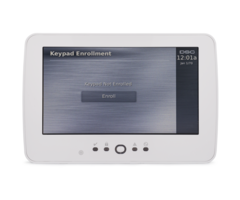
Posted By Julia RossThe DSC HS2TCHP(N) touchscreen keypad can work with a Qolsys IQ Pro, but only after a software update. Keypads running version 1.39 or lower need new interface files first, and you can get them from our HS2TCHP firmware updates page.
The update is a quick job. It takes an SD card, a few minutes, and no new hardware.
Why the HS2TCHP(N) Needs an Update
The HS2TCHP(N) was made for DSC PowerSeries NEO systems. Its touchscreen software, called the user interface or UI, is written for a NEO panel. The IQ Pro needs a different UI. Until the keypad gets the new firmware files, it is not ready to be used with an IQ Pro.
Check the part number on your keypad before you start. If it says HS2TCHPRO and runs version 1.40 or higher, the touchscreen will not work on an IQ Pro. The update is only for the HS2TCHP(N) at version 1.39 or lower.
When Does This Comes Up?
The most likely reason is a panel swap. Say a home has a NEO system with HS2TCHP(N) keypads already mounted on the walls. The owner decides to switch to an IQ Pro. The wiring is already in place, so reusing those keypads saves money and a lot of work. The update is what makes that possible.
There is one catch. Once a keypad has been updated for the IQ Pro, it cannot go back to a NEO control panel. Do not update a keypad that still needs to work on a NEO system. If you are still running a NEO panel, we show you how to add an HS2TCHP to a PowerSeries NEO panel in a separate guide.
How to Update the Keypad
The update uses an SD card. Download the files from the firmware page linked above and unzip them. There are three files, and all three go in the root directory of a blank SD card. Format the card as FAT32 first, and use a card with a capacity of 32 GB or less.
Next, slide the card into the bottom of the keypad. On the touchscreen, tap the Options icon, then Installer Menu. Enter the IQ Pro Installer or Dealer Code (defaults 1111 or 2222 respectively). Tap Keypad Programming, tap Firmware Upgrade, and follow the prompts to finish. When it is done, the keypad shows the "IQPanel" logo in the top right corner instead of the "DSC" logo.
Do not pull the keypad off its backplate while the SD card is inside. That can damage the card slot. For the manufacturer’s full notice, see the HS2TCHP(N) touchscreen keypad update instructions.
Connecting the Keypad to the IQ Pro
An IQ Pro can support up to 16 keypads. They connect to the panel over the Corbus, which is a four-wire connection. Here are the basics:
- Match the colors. Connect the keypad’s red, black, yellow, and green terminals to the corresponding Corbus terminals on the IQ Pro board.
- Use the right wire size. Use 18 - 22 gauge 4-conductor wire. Two twisted pairs are recommended. Do not use shielded wire.
- Watch the distance. Keypads can sit up to 1,000 feet from the panel. They can be home run, wired in series, or T-tapped.
- Power comes last. Keep the panel’s battery and power adapter disconnected until all the wiring is done.
- Enable keypad. Once the keypad is connected, you'll need the IQ Installer App, available for free from the Apple and Google stores, to enable the keypad, assign partitions if necessary, and set any other keypad options.
Each keypad also has a zone input, so you can hook up a wired sensor, like a door contact, right at the keypad. It works with normally closed loops, single end of line resistors, and double end of line resistors. To turn the input on or off, go to Installation, then Devices, then Security Sensors. Pick the enrolled keypad, tap Edit, and choose Keypad Input. Then select Enable or Disable. For all the details, check the IQ Pro install guide.
Need Keypads or Monitoring?
If you're updating your panel and you're interested in a new monitoring plan to go with it, check out our no-contract monitoring options. We don't charge activation fees, and you can cancel at any time. Need another keypad for your project? Browse our PowerG keypads and the IQ Remote PowerG touchscreen keypad.
Need Help?
Stuck on the update or the wiring? Our support team is happy to help. Phone and email support are open from 9:00 AM - 8:00 PM Eastern. Call us at 888-818-7728 or email support@alarmgrid.com. Live chat on our website is also available until 6:00 PM Eastern.